
-
Products and Technology
By Category
-
Groups
Activity Groups
Industry Groups
Influence and Feedback Groups
Interest Groups
Location Groups
Customer Only Groups
- Developers
- Partners
- Events
- Help Center
- Topic Pages
-
Explore SAP
Products
- Autonomous Enterprise
- Artificial intelligence
- Data and analytics
- Autonomous Suite
- Technology platform
- Transformation management
- Midsize business solutions
- Financial management
- Spend management
- Supply chain management
- Human capital management
- Customer experience
- Enterprise resource planning
- Business network
- Sustainability management
- SAP Store
- Try SAP
- View all industries
- Partners
- Services
Learning and Support
-
- Products and Technology
- Groups
- Developers
- Partners
- Events
- Help Center
- Topic Pages
-
Explore SAP
- Explore SAP
-
Products
- Products
- Autonomous Enterprise
- Artificial intelligence
- Data and analytics
- Autonomous Suite
- Technology platform
- Transformation management
- Midsize business solutions
- Financial management
- Spend management
- Supply chain management
- Human capital management
- Customer experience
- Enterprise resource planning
- Business network
- Sustainability management
- SAP Store
- Try SAP
- View all industries
- Partners
- Services
- Learning and Support
- About

- SAP Community
- Products and Technology
- Technology
- Technology Q&A
- PaperSize hell
- Subscribe to RSS Feed
- Mark Question as New
- Mark Question as Read
- Bookmark
- Subscribe
- Printer Friendly Page
- Report Inappropriate Content
PaperSize hell

- Subscribe to RSS Feed
- Mark Question as New
- Mark Question as Read
- Bookmark
- Subscribe
- Printer Friendly Page
- Report Inappropriate Content
on 2018 Apr 20 1:54 PM
- SAP Managed Tags
- SAP Crystal Reports, version for Visual Studio
First if I try to save a Page Setup (using CR 2016 SP5) for a Dymo label printer, CR doesn't keep the papersize. After changing to the correct values I save the report:

then I close the report and I reopen it:

and the 11354 has gone away. Any ideas?
Also when using Don's test program, the correct papersize is also missing:

As you see the PaperSize is already wrong after opening the report:

PS. I'm testing RAS using CR VS.Net SP22.
Another question: would it be possible to save the 11354-papersize back to the original reportfile using RAS (SaveAs-method)?
Regards,
Patrick
Need more details?
Request clarification before answering.
Accepted Solutions (1)
Accepted Solutions (1)

 former_member11
- Mark as New
- Bookmark
- Subscribe
- Subscribe to RSS Feed
- Permalink
- Report Inappropriate Content
Hi Patrick,
Thank you for the report, I can't test print it, no data.
I see the problem on your system, you are setting the paper size using your local Printer but then on this page you are selecting the Redirected (2) printer. As I said, install the printer locally and do not use the redirected driver. It's a MS Remote Desktop issue that we can't fix.
It all works fine on my PC where I have the Dymo 450 installed. Even though you are selecting the 11353 paper size it still uses the 5.x X 3.x size User defined size.
Also, the way MS adds printers is it auto assigns ENUM's to paper sizes. On my PC the Dymo 450 ENUM's start @ 200. the 11353 is this on my PC:
ENUM: 245 Name: 11353 Multi-Purpose
I believe what is happening is CR is looking in the registry for the ENUM's, Easy Print ( Redirected(2)) does not enter registry values for the printer so CR can't find one and just defaults to the Default printer values. I think CR may simply not have any logic built in to deal with this scenario.
So DO Not use Redirected Printers, as we have always said CR has hardware and software dependencies so it requires the printer to be installed locally. Which may be the issue I pointed out earlier where Citrix and Remote Desktop on a Windows 2016 Server will always use the Servers default printer.
Here is another possible way to fix this, see this blog, noted in the sample test app also:
// DISPLAY = no printer.
// See this blog on how to set no printer http://scn.sap.com/community/crystal-reports-for-visual-studio/blog/2010/09/15/how-to-check-no-print...
// requires cloning a report with no printer not checked and then using those properties in the real report
// same is true is you have No Printer checked on and you want to print to portrait it needs a dummy report set to be able to do that
Create a dummy report using the User Defined paper size and save the report in CR Designer, SDK will not allow you to set No Printer, I think. I tested it before but I don't recall why or if it is possible...
Things to do:
1. Install the printer on the Remote Server
2. Try a dummy report and set No Printer in the reports, see test app and blog on how to
3. Contact Microsoft on how to get Redirected Printer ENUM's into the PC you are remoting from into it's registry values.
Don
You must be a registered user to add a comment. If you've already registered, sign in. Otherwise, register and sign in.
Answers (12)
Answers (12)
- Mark as New
- Bookmark
- Subscribe
- Subscribe to RSS Feed
- Permalink
- Report Inappropriate Content
Good to hear that you've reproduced my problem.
Did you already get an answer from DEV?
Patrick
You must be a registered user to add a comment. If you've already registered, sign in. Otherwise, register and sign in.
- Mark as New
- Bookmark
- Subscribe
- Subscribe to RSS Feed
- Permalink
- Report Inappropriate Content
Hi Don,
I just sent the report to you.
To answer your question: the problem happens when I want to change from one specific paper size to another, both supported by the Dymo printer. The problem is not the printing itself to the Dymo printer, it is just changing the paper size and save it back to the report file.
I'm not creating a report with a wrong paper size. I just want to have the option to change the paper size using a little utility app (like yours).
BTW. the three "Multi-Purpose"-paper sizes (see above) are NOT User Defined paper sizes, they are predefined by Dymo - so you should have them too.
Patrick
You must be a registered user to add a comment. If you've already registered, sign in. Otherwise, register and sign in.
former_member11- Mark as New
- Bookmark
- Subscribe
- Subscribe to RSS Feed
- Permalink
- Report Inappropriate Content
Hi Patrick,
IT had the 450 so I got it installed and did some testing and I noticed when you create a report and used the User Defined paper size in CRD selecting any other paper size in the app would be ignored.
So the problem you are having is not that it doesn't work with the User Defined paper size when you designed the report the problem is you now want to change it from User Defined to a specific paper size the printer supports?
Is this correct?
Another test I did was set the paper size in the report to 3.5 x 1.125. I then changed the Printer to my Zebra printer and saved it, it still had the 3.5 x 1.125 paper size. But then I took that report and set it back to the Dymo printer and now it has changed the paper size to 3.5 x 1.094
Now the original paper size is lost since the Dymo printer does not have that paper size defined in it's saved ENUM's CR tried to find the closest it could and used it. Nothing we can do about that, we only keep Report version history , not printer history.
Not sure why it missed by so much when you did it....
Now the real issue, why did you create the report with the wrong paper size?
"..... After changing to the correct values I save the report:"
As I've said multiple times when creating the report using Custom Paper sizes you need it defined in the printer, especially when using label printers.
Now the problem.... how do you set all of the reports to a specific label size when a User Defined paper size was used when the report was created but did not exist in the default printer.... I created a report using the Dymo printer with a User defined paper size and then try to set it to the 11355 ENUM and save the report using SaveAs, when open the new report I don't get the modified paper sizes like you do....
Can you send me the original report? I believe you have my e-mail address... I want to see what I get when I do it.
You must be a registered user to add a comment. If you've already registered, sign in. Otherwise, register and sign in.
- Mark as New
- Bookmark
- Subscribe
- Subscribe to RSS Feed
- Permalink
- Report Inappropriate Content
Hi Don,
I just tried the latest version of your printer app from here: 2163438 - How do I make Crystal Reports for Visual Studio print my reports
But it doesn't work neither.
Original Report:

Opening the report with your app and after selecting the correct printer and size 195 (left side):

After clicking "Set Printer":

After saving the report and reopening it in CRD, the paper size isn't correct:
Patrick
You must be a registered user to add a comment. If you've already registered, sign in. Otherwise, register and sign in.
former_member11- Mark as New
- Bookmark
- Subscribe
- Subscribe to RSS Feed
- Permalink
- Report Inappropriate Content
Hi Patrick,
It works for me using the UI and paper sizes in the printer, Use the Set Printer routine in my app.
For user defined paper sizes I believe you also need to set a paper tray for it to take the setting. You may have to alter my code.
We actually use the Dymo 450 here for labeling assets so I'll see if I can borrow it from IT for a few tests.
It won't let me install the driver without a printer connected.
Don
You must be a registered user to add a comment. If you've already registered, sign in. Otherwise, register and sign in.
former_member11- Mark as New
- Bookmark
- Subscribe
- Subscribe to RSS Feed
- Permalink
- Report Inappropriate Content
mmmn, I don't have that printer but using my printer test app and using the Set Printer button does save the new printer and paper size.
Select a new printer or paper size.
Hit the Set Printer button
Hit the Save As button...
Don
You must be a registered user to add a comment. If you've already registered, sign in. Otherwise, register and sign in.
- Mark as New
- Bookmark
- Subscribe
- Subscribe to RSS Feed
- Permalink
- Report Inappropriate Content
Back to my original problem.
Let's say I'm working only with local printers (no Easy Print) and CRDesigner finds all printer info's and paper sizes. How can I change the paper size and save it back to the report (rpt) with CRVS, so when I reopen CRD 2016, that the Page Setup shows the changed paper size?
I have installed a local Dymo 450 which has some paper sizes predefined:

In the report I have saved with CRD f.ex. the 1st one:
_rptMain.PrintOptions.PaperSize (CrystalDecisions.CrystalReports.Engine.PrintOptions) contains 193

testOpts.PaperSize (CrystalDecisions.ReportAppServer.ReportDefModel.PrintOptions) contains 193
testOpts.SavedPaperName "11353 Multi-Purpose"
Now, how can I change and save back to the rpt f.ex. 195?
_rptMain.PrintOptions.PaperSize = CType(195, CrystalDecisions.Shared.PaperSize)

or

testOpts = _rptClientDoc.PrintOutputController.GetPrintOptions()
testOpts.PaperSize = CType(195, CrystalDecisions.ReportAppServer.ReportDefModel.CrPaperSizeEnum)
_rptClientDoc.PrintOutputController.ModifyPrintOptions(testOpts)

_rptMain.SaveAs("someRpt")
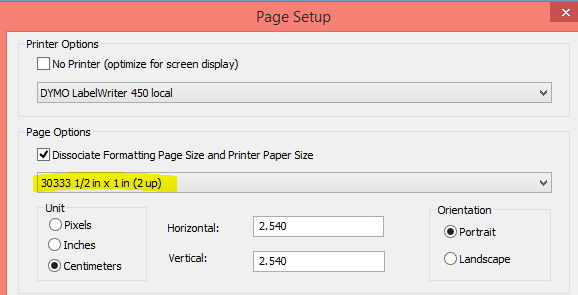
won't work - back in CRD the Page Setup shows "User Defined Size" or sometimes another format like "30333 1/2 in"...
Am I missing something?
I also looked in your test program, but I can't find this logic....
Patrick
You must be a registered user to add a comment. If you've already registered, sign in. Otherwise, register and sign in.
former_member11- Mark as New
- Bookmark
- Subscribe
- Subscribe to RSS Feed
- Permalink
- Report Inappropriate Content
Hi Patrick,
Ah, thanks for adding the platform info.
Redirect has always been a problem for the Framework and CRD. It's the nature of Easy Print ( what MS calls it ). It sends a virtual printer driver to the work stations, but the problem is CR Designer has no access to it, other than from the registry. There is no physical printer driver to get the info from. DEVMODE(W) is what CRD uses, since it doesn't exist only option is to use the properties of the users Default printer on the local PC which if no printer found we then can only use USP10 to format the report and it is not capable of creating a custom paper size.
So when you design the report with the Dymo Printer CR copies those settings into the report, now when No Printer is used it will use what is saved in the RPT file and not try to find "the best" fit when printing is done.
So it all makes sense now that the driver is installed locally, CR Designer has ALWAYS required the printer to be installed locally, it access DEVMODE - DM mode to get the customer properties. CR for VS uses the Framework to get the printer properties and uses it to do the printing, if the framework has issues with Easy Print again it's not something we can ask them to change.
As for asking MS to fix their Easy Print driver it's not something we can do. It's their product and the Users use it as is, We have no power to suggest they change it , it has to come from the end users.
Thanks again
Don
You must be a registered user to add a comment. If you've already registered, sign in. Otherwise, register and sign in.
- Mark as New
- Bookmark
- Subscribe
- Subscribe to RSS Feed
- Permalink
- Report Inappropriate Content
Update: indeed the problem is Easy Print. I'm not using 2016 Server but a Hyper V on Windows 8.1 - and the Virtual Machine Connection is used in an Enhanced Session to access the virtual machine, which is similar to Remote Desktop.
I installed now a Dymo printer locally in the virtual machine (also Windows 8.1). Here when I open the CR Designer 2016, uncheck "No Printer", select the local Dymo and the "11354 Multi-Purpose"-paper size, the paper size remains there after reopening the report - good.
So before, the redirected printer was always retained, but the paper size was lost (due to Easy Print?). Is there also some default paper size for a printer, or how does it come that the CR designer finds the "30334"-papersize (see above)?
Concerning printer installations on Terminal Servers: what do you recommend your customers? Always install a printer locally on the server session, never redirect them or....? What does Microsoft tell you concerning that problem?
Patrick
You must be a registered user to add a comment. If you've already registered, sign in. Otherwise, register and sign in.
former_member11- Mark as New
- Bookmark
- Subscribe
- Subscribe to RSS Feed
- Permalink
- Report Inappropriate Content
Hi Patrick,
Ah that is a function of the printer itself, nothing we can do about the custom paper sizes, only option is to use what the printer sends back to us.
Oh yes I remember now we did discuss Dymo printers and Seagull....
I see the problem now, I missed it the first time... PrinterName - DYMO LabelWriter 450 (redirect 2)
You are using Remote Desktop or Citrix on a windows 2016 Server.
"(redirect 2)" is what Microsoft called "Easy Print", it doesn't work very well. And for some reason they changed it's work flow on 2016 Servers. I had a large OEM who worked with MS on a 5 minute delay when using their Easy Print drivers, I never did hear back if they fixed it or not...
I recently had a case with this exact issue, KBA
( search using Google, link will not work for you )
I never tested using CR Designer but I can see it having the same problem, it always uses the default printer on the 2016 Server, there is nothing we can do about this. It's a registry key setting for the server that MS changed and now calls it legacy.... ( I forget the exact Reg key name ). But the results are when RDC'ing or Ctrix'ing into a Remote Server it will always select the default printer on that Server and ignore the Users default printer.
Call Microsoft, nothing we can do about that..
I'll get the CR Designer Nexus to update the KBA to include CRD as well, or chat with him about it, if he's seen anyone else have this problem...
Don
You must be a registered user to add a comment. If you've already registered, sign in. Otherwise, register and sign in.
- Mark as New
- Bookmark
- Subscribe
- Subscribe to RSS Feed
- Permalink
- Report Inappropriate Content
Hi Don,
For Dymo printers is seems that's not possible to create a custom paper size:

you can only select a paper size.
As I also wrote in a former post (Trouble with Dymo Label printers (PaperSize)), that your Seagull driver doesn't support Dymo printers.
So is it a game of chance working with CR on Dymo printers? Any feedback from DEV?
The sample test I made above was with CR Designer 2016 alone, so no CRVS2010. Nevertheless a bug in CR 2016? The test is on the same PC no interaction with CRVS! So CR 2016 can't find a papersize while opening a report, where CR saved this same size just before.... strange?
BTW. you didn't answer this question concerning CRVS "Another question: would it be possible to save the 11354-papersize back to the original reportfile using RAS (SaveAs-method)?"
Regards,
Patrick
You must be a registered user to add a comment. If you've already registered, sign in. Otherwise, register and sign in.
former_member11- Mark as New
- Bookmark
- Subscribe
- Subscribe to RSS Feed
- Permalink
- Report Inappropriate Content
Hi Patrick,
Create the custom paper size on the printer not in CR Designer.
Then select the paper size from the Printer then you will get the correct values.

Crystal will only select a paper size if it can find something close in the list of paper sizes in the Printer, it will not create a custom paper size in the printer for you.
As I said in one of the other posts, create the custom paper size on the every printer you have. Then when it's printing from the app it will find the same custom paper size and use it without having to do anything in code.
Don
You must be a registered user to add a comment. If you've already registered, sign in. Otherwise, register and sign in.
 Bluesky
- I tricked Datasphere into running my custom scaler functions in Technology Blog Posts by Members
- Pssst! Want to learn a Datasphere secret? in Technology Blog Posts by Members
- I finally found a use for AI in Datasphere in Technology Blog Posts by Members
- SAP BTP - IS - ( IA | CPI ) - The Commander's Blueprint: Rebuilding B2B EDI Governance with SAP BTP. in Technology Blog Posts by Members
- R.I.P. RICEF(W) and Happy Halloween in Technology Blog Posts by Members
| User | Count |
|---|---|
| 8 | |
| 5 | |
| 4 | |
| 4 | |
| 3 | |
| 3 | |
| 2 | |
| 2 | |
| 2 | |
| 2 |


You must be a registered user to add a comment. If you've already registered, sign in. Otherwise, register and sign in.