
-
Products and Technology
By Category
-
Groups
Activity Groups
Industry Groups
Influence and Feedback Groups
Interest Groups
Location Groups
Customer Only Groups
- Developers
- Partners
- Events
- Help Center
- Topic Pages
-
Explore SAP
Products
- Autonomous Enterprise
- Artificial intelligence
- Data and analytics
- Autonomous Suite
- Technology platform
- Transformation management
- Midsize business solutions
- Financial management
- Spend management
- Supply chain management
- Human capital management
- Customer experience
- Enterprise resource planning
- Business network
- Sustainability management
- SAP Store
- Try SAP
- View all industries
- Partners
- Services
Learning and Support
-
- Products and Technology
- Groups
- Developers
- Partners
- Events
- Help Center
- Topic Pages
-
Explore SAP
- Explore SAP
-
Products
- Products
- Autonomous Enterprise
- Artificial intelligence
- Data and analytics
- Autonomous Suite
- Technology platform
- Transformation management
- Midsize business solutions
- Financial management
- Spend management
- Supply chain management
- Human capital management
- Customer experience
- Enterprise resource planning
- Business network
- Sustainability management
- SAP Store
- Try SAP
- View all industries
- Partners
- Services
- Learning and Support
- About

- SAP Community
- Products and Technology
- Technology
- Technology Q&A
- PaperSize hell
- Subscribe to RSS Feed
- Mark Question as New
- Mark Question as Read
- Bookmark
- Subscribe
- Printer Friendly Page
- Report Inappropriate Content
PaperSize hell

- Subscribe to RSS Feed
- Mark Question as New
- Mark Question as Read
- Bookmark
- Subscribe
- Printer Friendly Page
- Report Inappropriate Content
on 2018 Apr 20 1:54 PM
- SAP Managed Tags
- SAP Crystal Reports, version for Visual Studio
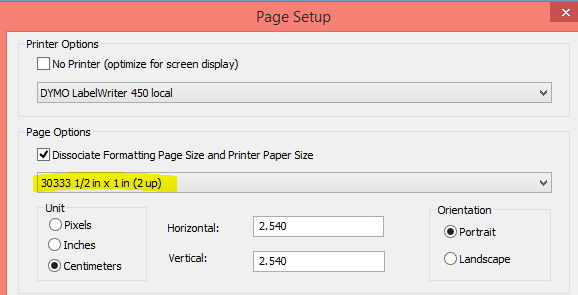
First if I try to save a Page Setup (using CR 2016 SP5) for a Dymo label printer, CR doesn't keep the papersize. After changing to the correct values I save the report:

then I close the report and I reopen it:

and the 11354 has gone away. Any ideas?
Also when using Don's test program, the correct papersize is also missing:

As you see the PaperSize is already wrong after opening the report:

PS. I'm testing RAS using CR VS.Net SP22.
Another question: would it be possible to save the 11354-papersize back to the original reportfile using RAS (SaveAs-method)?
Regards,
Patrick
Need more details?
Request clarification before answering.
- Mark as New
- Bookmark
- Subscribe
- Subscribe to RSS Feed
- Permalink
- Report Inappropriate Content
Hi Don,
I just tried the latest version of your printer app from here: 2163438 - How do I make Crystal Reports for Visual Studio print my reports
But it doesn't work neither.
Original Report:

Opening the report with your app and after selecting the correct printer and size 195 (left side):

After clicking "Set Printer":

After saving the report and reopening it in CRD, the paper size isn't correct:
Patrick
You must be a registered user to add a comment. If you've already registered, sign in. Otherwise, register and sign in.
 Bluesky
- I tricked Datasphere into running my custom scaler functions in Technology Blog Posts by Members
- Pssst! Want to learn a Datasphere secret? in Technology Blog Posts by Members
- I finally found a use for AI in Datasphere in Technology Blog Posts by Members
- SAP BTP - IS - ( IA | CPI ) - The Commander's Blueprint: Rebuilding B2B EDI Governance with SAP BTP. in Technology Blog Posts by Members
- R.I.P. RICEF(W) and Happy Halloween in Technology Blog Posts by Members
| User | Count |
|---|---|
| 8 | |
| 5 | |
| 4 | |
| 4 | |
| 3 | |
| 3 | |
| 2 | |
| 2 | |
| 2 | |
| 2 |


You must be a registered user to add a comment. If you've already registered, sign in. Otherwise, register and sign in.