
-
Products and Technology
By Category
-
Groups
Activity Groups
Industry Groups
Influence and Feedback Groups
Interest Groups
Location Groups
Customer Only Groups
- Developers
- Partners
- Events
- Help Center
- Topic Pages
-
Explore SAP
Products
- Autonomous Enterprise
- Artificial intelligence
- Data and analytics
- Autonomous Suite
- AI platform
- Transformation management
- Midsize business solutions
- Financial management
- Spend management
- Supply chain management
- Human capital management
- Customer experience
- Enterprise resource planning
- Business network
- Sustainability management
- SAP Store
- Try SAP
- View all industries
- Partners
- Services
Learning and Support
-
- Products and Technology
- Groups
- Developers
- Partners
- Events
- Help Center
- Topic Pages
-
Explore SAP
- Explore SAP
-
Products
- Products
- Autonomous Enterprise
- Artificial intelligence
- Data and analytics
- Autonomous Suite
- AI platform
- Transformation management
- Midsize business solutions
- Financial management
- Spend management
- Supply chain management
- Human capital management
- Customer experience
- Enterprise resource planning
- Business network
- Sustainability management
- SAP Store
- Try SAP
- View all industries
- Partners
- Services
- Learning and Support
- About

- SAP Community
- Products and Technology
- Human Capital Management
- HCM Q&A
- Verify Course Completion
Verify Course Completion
- Subscribe to RSS Feed
- Mark Question as New
- Mark Question as Read
- Bookmark
- Subscribe
- Printer Friendly Page
- Report Inappropriate Content

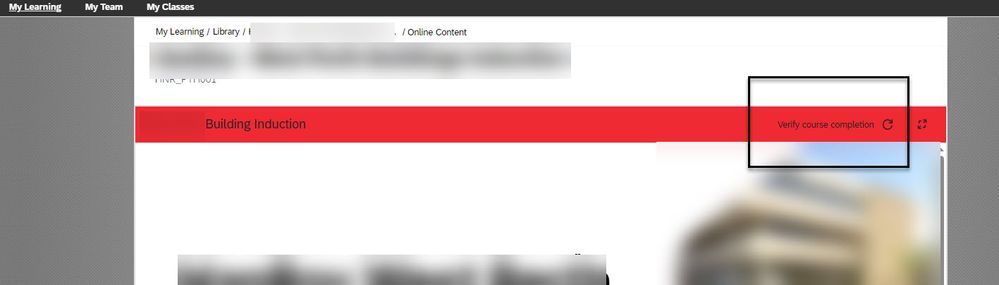
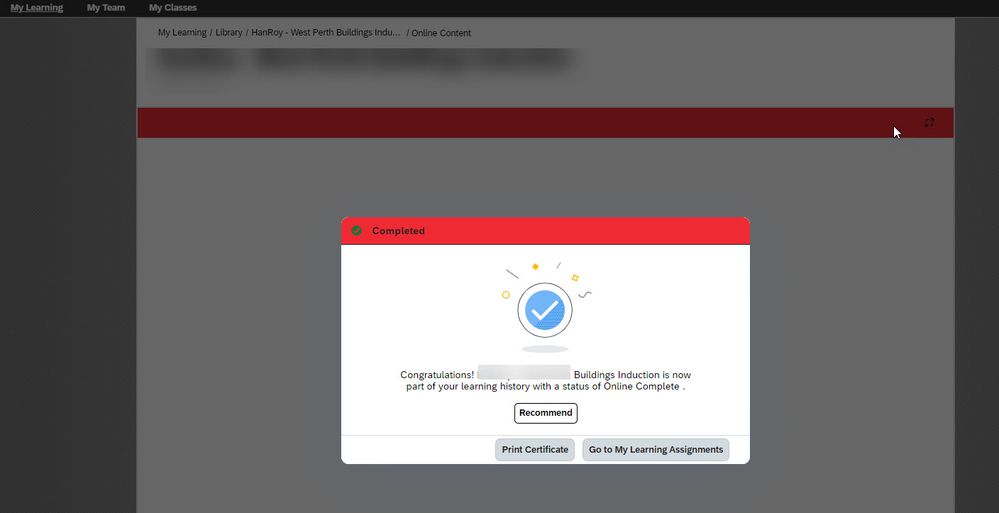
We have an online learning item with scorm content attached that launches using the inline player. When the course launches there is a line of text at the top of the play with the text "verify course completion" and then a small "recycle" log next to it. If the user clicks on this the course will mark as complete even though the user has not completed any/all of the content in the course..
Can this be disabled? I have the online content configured to
- Add to History on Completion of All Content,
- Users can Review Completed Content from History,
- Content is available for launch (available for users)
- Add to history on pass
- The Content Object is set to use inline player
 Bluesky
Need more details?
Request clarification before answering.
Accepted Solutions (0)
Answers (3)
Answers (3)

- Mark as New
- Bookmark
- Subscribe
- Subscribe to RSS Feed
- Permalink
- Report Inappropriate Content
Sorry, I don't have an answer, but I would also be very happy to learn how I can disable this feature. It is really irritating for our users... Thanks, Uwe
You must be a registered user to add a comment. If you've already registered, sign in. Otherwise, register and sign in.

- Mark as New
- Bookmark
- Subscribe
- Subscribe to RSS Feed
- Permalink
- Report Inappropriate Content

- Mark as New
- Bookmark
- Subscribe
- Subscribe to RSS Feed
- Permalink
- Report Inappropriate Content
- Mark as New
- Bookmark
- Subscribe
- Subscribe to RSS Feed
- Permalink
- Report Inappropriate Content
We decided to change the label from "Verify Course Completion" to "Reload content" as the function is basically a refresh.
The label is: label.VerifyCourseCompletion
- Mark as New
- Bookmark
- Subscribe
- Subscribe to RSS Feed
- Permalink
- Report Inappropriate Content
This depends on how your SCORM content was published. It sounds like it sends a "complete course on launch" message to the lms. You can test the content @ cloud.scorm.com which will give you more details on what triggered the completion.
You must be a registered user to add a comment. If you've already registered, sign in. Otherwise, register and sign in.

- Mark as New
- Bookmark
- Subscribe
- Subscribe to RSS Feed
- Permalink
- Report Inappropriate Content

- Mark as New
- Bookmark
- Subscribe
- Subscribe to RSS Feed
- Permalink
- Report Inappropriate Content
Hi Trevor
I also don't have an answer but I would also be happy to know what the solution is for this case.
Did you figure something out in the meantime?
best regards
Gina
You must be a registered user to add a comment. If you've already registered, sign in. Otherwise, register and sign in.
- How to Reset Expired SAP Automation Pilot Service Account Credentials in SAP SPM Implementations in Human Capital Management Blog Posts by SAP
- Managing Multiple Brands in SAP SuccessFactors Recruiting Marketing (RMK) in Human Capital Management Blog Posts by Members
- 2H 2026: Ramp hires faster and automate onboarding with the Onboarding Assistant in Human Capital Management Blog Posts by SAP
- Configuration to download Onboarding Documents Via Onboarding Dashboard in Human Capital Management Blog Posts by Members
- ONB 2.0: Recruiter-Based Task Assignment in Human Capital Management Blog Posts by Members
| User | Count |
|---|---|
| 3 | |
| 3 | |
| 3 | |
| 1 | |
| 1 | |
| 1 | |
| 1 | |
| 1 | |
| 1 | |
| 1 |


You must be a registered user to add a comment. If you've already registered, sign in. Otherwise, register and sign in.