
-
Products and Technology
By Category
-
Groups
Activity Groups
Industry Groups
Influence and Feedback Groups
Interest Groups
Location Groups
Customer Only Groups
- Developers
- Partners
- Events
- Help Center
- Topic Pages
-
Explore SAP
Products
- Autonomous Enterprise
- Artificial intelligence
- Data and analytics
- Autonomous Suite
- Technology platform
- Transformation management
- Midsize business solutions
- Financial management
- Spend management
- Supply chain management
- Human capital management
- Customer experience
- Enterprise resource planning
- Business network
- Sustainability management
- SAP Store
- Try SAP
- View all industries
- Partners
- Services
Learning and Support
-
- Products and Technology
- Groups
- Developers
- Partners
- Events
- Help Center
- Topic Pages
-
Explore SAP
- Explore SAP
-
Products
- Products
- Autonomous Enterprise
- Artificial intelligence
- Data and analytics
- Autonomous Suite
- Technology platform
- Transformation management
- Midsize business solutions
- Financial management
- Spend management
- Supply chain management
- Human capital management
- Customer experience
- Enterprise resource planning
- Business network
- Sustainability management
- SAP Store
- Try SAP
- View all industries
- Partners
- Services
- Learning and Support
- About
- SAP Community
- Products and Technology
- Technology
- Technology Q&A
- Memory Allocation Failed, column store error, sear...
- SAP Managed Tags
- SAP Lumira, server edition
- SAP HANA, platform edition
Hi,
For Hana 2.0 SPS02 rev 23 256 GB license. Lumria Server 1.31 Add-on BI platform 4.2 SPS 05.
I am getting what seems like very High Memory usage on my Hana Server. Can someone please tell me how to debug and optimize ? I did a HDB stop/start as well as machine reboot. My large join queries in Lumira are failing due to HDB i believe.

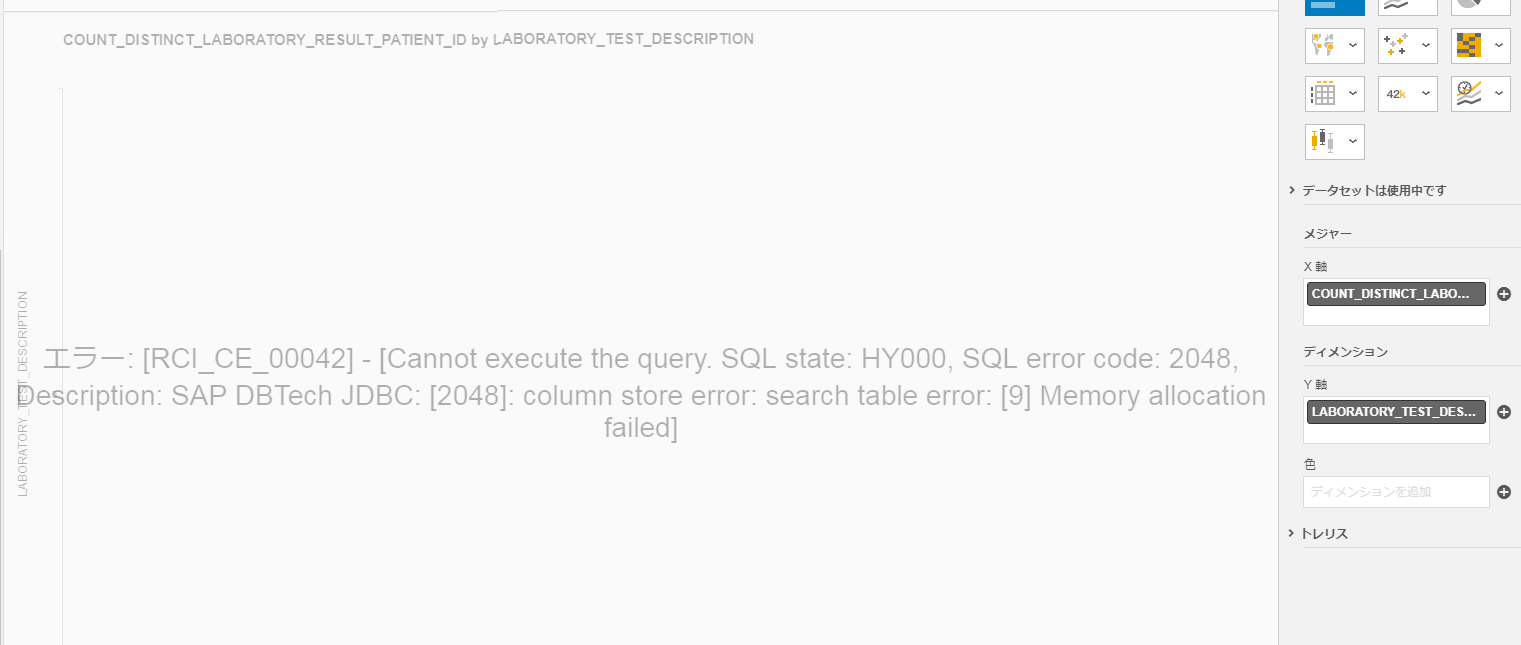
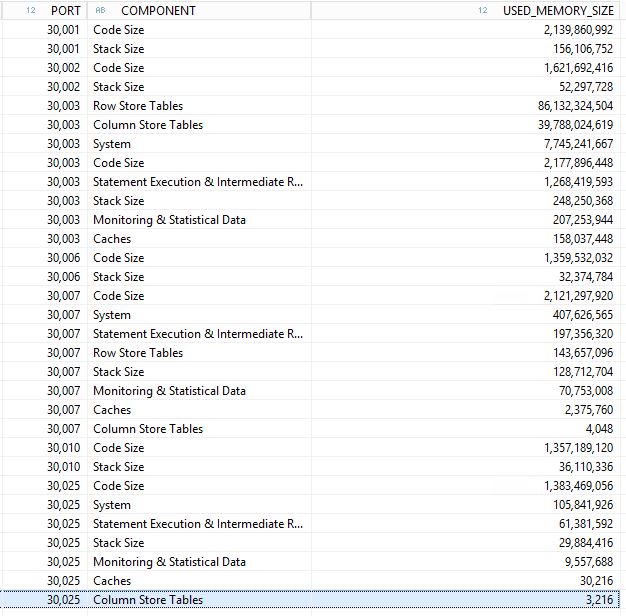
Thanks for your insight,
Matt
 Bluesky
Need more details?
Request clarification before answering.
Accepted Solutions (0)
Answers (3)
Answers (3)

- Mark as New
- Bookmark
- Subscribe
- Subscribe to RSS Feed
- Permalink
- Report Inappropriate Content
Check the size of the MAXIMUM_SIZE_OF_ROW_STORE parameter. Make sure you have not exceed either the physical RAM, allocated RAM, or the size of the parameter. Keep in mind that columnar databases are an old type of legacy database that was replaced with relational databases more than 40 years ago because of these memory issues. Instead of finding data by unique identifiers, they search through all the data using columns on every execution. The size of the data in memory can easily exceed the physical RAM, allocated RAM, or the size of the parameter. IBM has this same issue with DASHDB/DB2 WAREHOUSE. It seems that the lessons of the past have been forgoten are being repeated in the present. To prevent the issue simply plan the size of the RAM and parameters to be larger than the largest possible execution or larger than your data times the number of concurrent users. Since SAP Hana S4 is an in-memory database that uses column store, it can exceed the size of the data. Also, you may want to check if the database can exceed the 32-bit memory limit of 2GB, the old limit from 40 years ago. Most of the legacy technologies have the legacy memory limitations. For example, a tabular database has a 2 billion minus 3 record limit. Some of the old columnar databases had a 2GB hard limit for the size of the query itself, or the return of the data from the query. Since this error is reproducible on every column store database, it's likely that HANA has the same limitation. (ERROR CODE 2048 = the old 32-bit 2GB memory limit of columnar databases). (See database history on Edgar F. Codd and ACID compliant databases systems) https://help.sap.com/viewer/7c78579ce9b14a669c1f3295b0d8ca16/Cloud/en-US/20a760537519101497e3cfe07b3...
You must be a registered user to add a comment. If you've already registered, sign in. Otherwise, register and sign in.
- Mark as New
- Bookmark
- Subscribe
- Subscribe to RSS Feed
- Permalink
- Report Inappropriate Content
Are you getting some out of memory dumps? Without these it's impossible to know whats going on. More details needed.
You must be a registered user to add a comment. If you've already registered, sign in. Otherwise, register and sign in.
- Mark as New
- Bookmark
- Subscribe
- Subscribe to RSS Feed
- Permalink
- Report Inappropriate Content

 candy_zhan
- Mark as New
- Bookmark
- Subscribe
- Subscribe to RSS Feed
- Permalink
- Report Inappropriate Content
Hi Matt,
There is a guide answer might provide you with some ideas.
https://ga.support.sap.com/dtp/viewer/#/tree/2/actions/303
Also note 1999997 helps, which covers most of OOM situation.
To detailed analyze this issue, you can create an incident to HAN-DB, as planViz and traces are needed for deep analysis.
Best regards,
Candy
You must be a registered user to add a comment. If you've already registered, sign in. Otherwise, register and sign in.
- Mark as New
- Bookmark
- Subscribe
- Subscribe to RSS Feed
- Permalink
- Report Inappropriate Content
- Why is this query so slow in HANA DB? in Technology Q&A
- Enhancing SAP MDG Workflow Inbox with a Custom Change Request Type (CR Type) Column in Technology Blog Posts by Members
- Beyond READ_TEXT: Decoding SAPscript Long Texts (STXL) with SQLScript in CDS/AMDP in Technology Blog Posts by Members
- SAP UX Q3/2026 Update – Part 7: SAP Analytics Cloud in Technology Blog Posts by SAP
- AI & SAP: What Happens When You Give an LLM Access to an S/4HANA System? in Technology Blog Posts by Members
| User | Count |
|---|---|
| 5 | |
| 4 | |
| 4 | |
| 3 | |
| 2 | |
| 2 | |
| 2 | |
| 2 | |
| 2 | |
| 2 |


You must be a registered user to add a comment. If you've already registered, sign in. Otherwise, register and sign in.