
-
Products and Technology
By Category
-
Groups
Activity Groups
Industry Groups
Influence and Feedback Groups
Interest Groups
Location Groups
Customer Only Groups
- Developers
- Partners
- Events
- Help Center
- Topic Pages
-
Explore SAP
Products
Learning and Support
-
- Products and Technology
- Groups
- Developers
- Partners
- Events
- Help Center
- Topic Pages
-
Explore SAP
- Explore SAP
-
Products
- Products
- SAP Business Suite
- Artificial Intelligence
- Business applications
- Data and analytics
- Technology Platform
- Financial Management
- Spend Management
- Supply Chain Management
- Human Capital Management
- Customer Experience
- SAP Business Network
- View products A-Z
- View industries
- Try SAP
- Partners
- Services
- Learning and Support
- About

- SAP Community
- Products and Technology
- Technology
- Technology Blog Posts by SAP
- Annotating annotations in SAP Cloud Application Pr...
Technology Blog Posts by SAP
Turn on suggestions
Auto-suggest helps you quickly narrow down your search results by suggesting possible matches as you type.
Showing results for
Success! Subscription added.

 maryana_naboka
Product and Topic Expert
Options
- Subscribe to RSS Feed
- Mark as New
- Mark as Read
- Bookmark
- Subscribe
- Printer Friendly Page
- Report Inappropriate Content
2020 Nov 06
3:24 PM
20,651
I’ve heard from several developers that specifying annotations is the most challenging part when developing applications based on the SAP Fiori elements framework. This is especially true if you have no tools support, as many of us felt trying to add annotations in .cds files of CAP (SAP Cloud Application Programming) projects. We recently introduced code completion for OData annotations in CAP, so even the trickiest things, such as applying annotations to an existing annotation or its part can be achieved with a few clicks.
In this blog post, I will show you how it works with a couple of examples.
Example 1: Annotating UI.DataField records to control table responsiveness
In this example, I have a table of safety incidents represented by the annotation “UI.LineItem”.
On small screens, such as a typical smartphone, the first three columns keep their places by default, and all the other columns move to the second line. But, sometimes you want to show the important information in the right part of the table on large screens and still keep them distinctly visible on the small screens too. In this case, the columns in the middle should slide down to the second line: note the Priority column in the right screenshot below.
To implement this, I applied the annotation “UI.Importance” to UI.DataField records in my LineItem. So, I annotate the data fields for incident title, category and status with High importance, to keep them always distinctly visible. The only non-high value now moves to the second line, giving its space to the VIPs.
Even if you forget the correct syntax for this annotation/value or do not have this example in front of you, use the code completion (CTRL+Space) next to the Value and select a suggestion from the list – it could be even faster than copying!
In this video, you can see it yourself:
Note: Alternatively, I could have annotated the priority_code record with the low importance rather than the 3 records with high, but with the real-life tables having much more than 4 columns it makes more sense to mark those that are more important and ignore the remaining ones.
Example 2: Annotating UI.LineItem to highlight table rows based on criticality
In this example, I would like to highlight the rows in my table based on the incident priority. Thus, priority would still be easily visible, even when the value appears in the second row.
According to the SAP UI5 documentation, I need to apply the annotation “UI.Criticality” to the whole Ui.LineItem annotation.
This is really tricky in cds syntax, even for experienced users: the LineItem annotation should be wrapped in curly brackets { } with $value and then annotated with UI.Criticality in ![ ] syntax. Finally, the value pointing to the entity element containing criticality information should be added:
Thankfully, with code completion all this is achieved with just a few clicks: use CTRL+Space right before the collection brackets [] of the LineItem and choose UI.Criticality - all the wrapping and formatting will be done automatically. Now use the code completion again to select the value and you are done:
https://www.youtube.com/watch?v=yew8Eo9OChY&feature=youtu.be
Try it out and provide feedback
You can try this out yourself in Visual Studio Code with SAP Cloud Platform core data services plug-in for Visual Studio Code (v 3.0.0 or higher) any time, as it is already enhanced with the @sap/ux-cds-odata-language-server-extension.
If you use SAP Business Application Studio, you can find it in the SAP Cloud Business Application dev space.
Once you try it, share your experience with OData annotation support in the comments: what works well, what requires improvement and what else you like to know about LSP features for OData annotations (code completion, diagnostics, etc).
More information on OData annotation support in CAP CDS
In this blog post, I will show you how it works with a couple of examples.
Example 1: Annotating UI.DataField records to control table responsiveness
In this example, I have a table of safety incidents represented by the annotation “UI.LineItem”.
annotate service.SafetyIncidents with @UI.LineItem : [

{

    $Type : 'UI.DataField',

    Value : title,

},

{

    $Type : 'UI.DataField',

    Value : priority_code,

},

{

    $Type : 'UI.DataField',

    Value : category_code,

},

{

    $Type : 'UI.DataField',

    Value : incidentStatus_code,

},

];
On small screens, such as a typical smartphone, the first three columns keep their places by default, and all the other columns move to the second line. But, sometimes you want to show the important information in the right part of the table on large screens and still keep them distinctly visible on the small screens too. In this case, the columns in the middle should slide down to the second line: note the Priority column in the right screenshot below.

To implement this, I applied the annotation “UI.Importance” to UI.DataField records in my LineItem. So, I annotate the data fields for incident title, category and status with High importance, to keep them always distinctly visible. The only non-high value now moves to the second line, giving its space to the VIPs.
annotate service.SafetyIncidents with @UI.LineItem : [

{

    $Type : 'UI.DataField',

    Value : title,

    ![@UI.Importance] : #High,

},

{

    $Type : 'UI.DataField',

    Value : priority_code,

},

{

    $Type : 'UI.DataField',

    Value : category_code,

    ![@UI.Importance] : #High,

},

{

    $Type : 'UI.DataField',

    Value : incidentStatus_code,

    ![@UI.Importance] : #High,

},

];
Even if you forget the correct syntax for this annotation/value or do not have this example in front of you, use the code completion (CTRL+Space) next to the Value and select a suggestion from the list – it could be even faster than copying!
In this video, you can see it yourself:
Note: Alternatively, I could have annotated the priority_code record with the low importance rather than the 3 records with high, but with the real-life tables having much more than 4 columns it makes more sense to mark those that are more important and ignore the remaining ones.
Example 2: Annotating UI.LineItem to highlight table rows based on criticality
In this example, I would like to highlight the rows in my table based on the incident priority. Thus, priority would still be easily visible, even when the value appears in the second row.
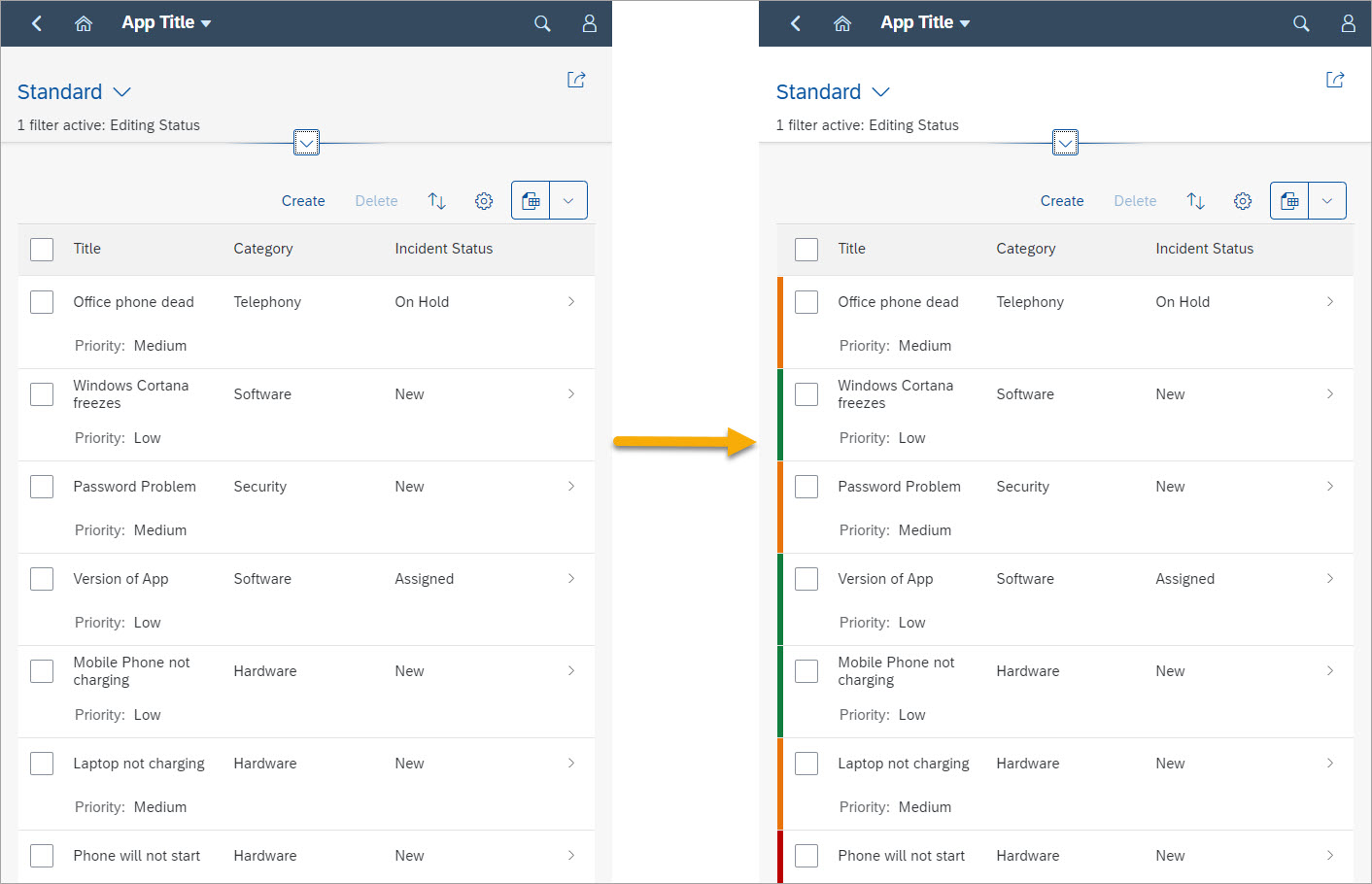
According to the SAP UI5 documentation, I need to apply the annotation “UI.Criticality” to the whole Ui.LineItem annotation.
This is really tricky in cds syntax, even for experienced users: the LineItem annotation should be wrapped in curly brackets { } with $value and then annotated with UI.Criticality in ![ ] syntax. Finally, the value pointing to the entity element containing criticality information should be added:
annotate service.SafetyIncidents with @UI.LineItem : {

    ![@UI.Criticality] : priority.criticality,

    $value:  [

        {

            $Type             : 'UI.DataField',

            Value             : title,

            ![@UI.Importance] : #High,

        },

        {

            $Type : 'UI.DataField',

            Value : priority_code,

        },

        {

            $Type             : 'UI.DataField',

            Value             : category_code,

            ![@UI.Importance] : #High,

        },

        {

            $Type             : 'UI.DataField',

            Value             : incidentStatus_code,

            ![@UI.Importance] : #High,

        },

        ]

};
Thankfully, with code completion all this is achieved with just a few clicks: use CTRL+Space right before the collection brackets [] of the LineItem and choose UI.Criticality - all the wrapping and formatting will be done automatically. Now use the code completion again to select the value and you are done:
https://www.youtube.com/watch?v=yew8Eo9OChY&feature=youtu.be
Try it out and provide feedback
You can try this out yourself in Visual Studio Code with SAP Cloud Platform core data services plug-in for Visual Studio Code (v 3.0.0 or higher) any time, as it is already enhanced with the @sap/ux-cds-odata-language-server-extension.
If you use SAP Business Application Studio, you can find it in the SAP Cloud Business Application dev space.
Once you try it, share your experience with OData annotation support in the comments: what works well, what requires improvement and what else you like to know about LSP features for OData annotations (code completion, diagnostics, etc).
More information on OData annotation support in CAP CDS
- SAP CAP documentation https://cap.clhttps://cap.cloud.sap/docs/advanced/fiorioud.sap/docs/guides/fiori
- SAP CAP release notes https://cap.cloud.sap/docs/releases/sep20#editing-odata-annotations
- My previous blog post introducing annotation LSP for CAP: https://blogs.sap.com/2020/10/14/maintaining-annotations-in-cap-cds-projects-becomes-easier-with-new...
Labels
32 Comments
You must be a registered user to add a comment. If you've already registered, sign in. Otherwise, register and sign in.
 Bluesky
Related Content
- Fullstack CAP Application with HANA Cloud (Decoupled Architecture) [Part-3] in Technology Blog Posts by Members
- Fullstack CAP Application with HANA Cloud (Decoupled Architecture) [Part-2] in Technology Blog Posts by Members
- AI Q&A Agent for FRE Transport & Bundle Adoption: From Wikis to Conversational Knowledge in Technology Blog Posts by SAP
- From RAP to Mobile: Reusing OData V4 Services with SAP Mobile Services and MDK in Technology Blog Posts by SAP
- Pessimistic Concurrency Control (Locking) using Unmanaged Scenario in RAP in Technology Blog Posts by Members
Top liked authors
| User | Count |
|---|---|
| 36 | |
| 27 | |
| 26 | |
| 26 | |
| 26 | |
| 24 | |
| 23 | |
| 22 | |
| 21 | |
| 20 |


