
-
Products and Technology
By Category
-
Groups
Activity Groups
Industry Groups
Influence and Feedback Groups
Interest Groups
Location Groups
Customer Only Groups
- Developers
- Partners
- Events
- Help Center
- Topic Pages
-
Explore SAP
Products
- Autonomous Enterprise
- Artificial intelligence
- Data and analytics
- Autonomous Suite
- Technology platform
- Transformation management
- Midsize business solutions
- Financial management
- Spend management
- Supply chain management
- Human capital management
- Customer experience
- Enterprise resource planning
- Business network
- Sustainability management
- SAP Store
- Try SAP
- View all industries
- Partners
- Services
Learning and Support
-
- Products and Technology
- Groups
- Developers
- Partners
- Events
- Help Center
- Topic Pages
-
Explore SAP
- Explore SAP
-
Products
- Products
- Autonomous Enterprise
- Artificial intelligence
- Data and analytics
- Autonomous Suite
- Technology platform
- Transformation management
- Midsize business solutions
- Financial management
- Spend management
- Supply chain management
- Human capital management
- Customer experience
- Enterprise resource planning
- Business network
- Sustainability management
- SAP Store
- Try SAP
- View all industries
- Partners
- Services
- Learning and Support
- About

- SAP Community
- Products and Technology
- Technology
- Technology Q&A
- [SAP:CPI]: Issue with Content Modifier while captu...
Hi Experts,
I want to store an XPath in the property using a content modifier for the attached Payload.
I tried the below, but the response looked weird as below.


So, I have changed the Data Type to java.lang.Object . Now, I am able to capture the data in the property.
Not sure, If I am overlooking or missing something.


Any leads/solutions will be really helpful.
Regards,
Pavan
 Bluesky
Need more details?
Request clarification before answering.

- Mark as New
- Bookmark
- Subscribe
- Subscribe to RSS Feed
- Permalink
- Report Inappropriate Content
Dear Pavan,
I think you can use either of these below Data Types with xpath : "/CustomPayload/TransformedData" and "/CustomPayload/SourceData" and it will give you exact same results. But each Data Type will create differnt kinds of Saxon impl class (Node, NodeList and NodeInfo) objects.
- java.lang.Object
- org.w3c.dom.Node
- org.w3c.dom.NodeList
After the first contentmodifier whenever you want you can just move those objects from properties to body and you are done. Then you can use them for mapping.

Test -

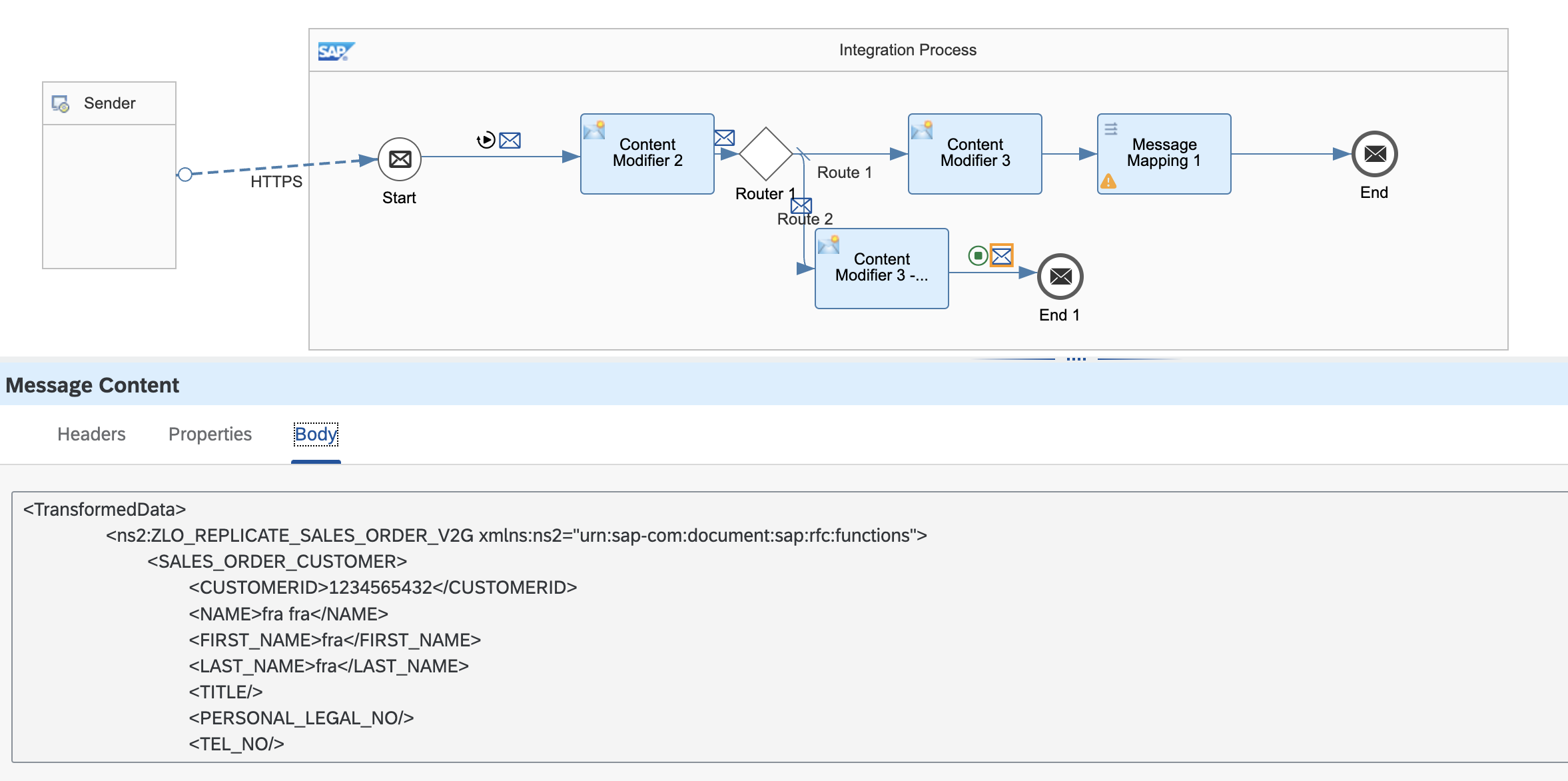
If you want to use them in groovy then you need to use appropriate class to access them (as they are objects of impl classes of NodeList, Node and NodeInfo). Here i am giving an example of if you have defined data type as "org.w3c.dom.NodeList"
import com.sap.gateway.ip.core.customdev.util.Message;
import java.util.HashMap;
import javax.xml.transform.OutputKeys
import javax.xml.transform.Transformer
import javax.xml.transform.TransformerException
import javax.xml.transform.TransformerFactory
import javax.xml.transform.dom.DOMSource
import javax.xml.transform.stream.StreamResult;
import net.sf.saxon.dom.DOMNodeList;
def Message processData(Message message) {
    def properties = message.getProperties();
    value = properties.get("first");
    message.setProperty("firstString", nodeListToString(value))
    return message;
}
private static String nodeListToString(DOMNodeList nodes) throws TransformerException {
    DOMSource source = new DOMSource();
    StringWriter writer = new StringWriter();
    StreamResult result = new StreamResult(writer);
    Transformer transformer = TransformerFactory.newInstance().newTransformer();
    transformer.setOutputProperty(OutputKeys.OMIT_XML_DECLARATION, "yes");
    for (int i = 0; i < nodes.getLength(); ++i) {
        source.setNode(nodes.item(i));
        transformer.transform(source, result);
    }
    return writer.toString();
}
Results -

Thanks,
Asu
You must be a registered user to add a comment. If you've already registered, sign in. Otherwise, register and sign in.
- SAP Just Became AI-Agent Ready — Here's a Step-by-Step MCP Walkthrough in Technology Blog Posts by Members
- CPI HTTP/AMQP Adapter to SAP Event Mesh: HTTP 400 "Missing grant type" during OAuth Token Handshake in Technology Q&A
- Connecting SAP Integration Suite with SAP Signavio Using the Ingestion API. in Technology Blog Posts by Members
- Generative AI-Powered Document Processing in SAP Integration Suite in Technology Blog Posts by Members
- Migrating Interface Split & Multiple Operation Using the Migration Tool in SAP Integration Suite in Technology Blog Posts by SAP
| User | Count |
|---|---|
| 5 | |
| 4 | |
| 4 | |
| 3 | |
| 2 | |
| 2 | |
| 2 | |
| 2 | |
| 2 | |
| 2 |


You must be a registered user to add a comment. If you've already registered, sign in. Otherwise, register and sign in.