
-
Products and Technology
By Category
-
Groups
Activity Groups
Industry Groups
Influence and Feedback Groups
Interest Groups
Location Groups
Customer Only Groups
- Developers
- Partners
- Events
- Help Center
- Topic Pages
-
Explore SAP
Products
- Autonomous Enterprise
- Artificial intelligence
- Data and analytics
- Autonomous Suite
- Technology platform
- Transformation management
- Midsize business solutions
- Financial management
- Spend management
- Supply chain management
- Human capital management
- Customer experience
- Enterprise resource planning
- Business network
- Sustainability management
- SAP Store
- Try SAP
- View all industries
- Partners
- Services
Learning and Support
-
- Products and Technology
- Groups
- Developers
- Partners
- Events
- Help Center
- Topic Pages
-
Explore SAP
- Explore SAP
-
Products
- Products
- Autonomous Enterprise
- Artificial intelligence
- Data and analytics
- Autonomous Suite
- Technology platform
- Transformation management
- Midsize business solutions
- Financial management
- Spend management
- Supply chain management
- Human capital management
- Customer experience
- Enterprise resource planning
- Business network
- Sustainability management
- SAP Store
- Try SAP
- View all industries
- Partners
- Services
- Learning and Support
- About

- SAP Community
- Products and Technology
- Technology
- Technology Q&A
- Creating PostgreSQL OData in BAS.
Creating PostgreSQL OData in BAS.
- Subscribe to RSS Feed
- Mark Question as New
- Mark Question as Read
- Bookmark
- Subscribe
- Printer Friendly Page
- Report Inappropriate Content


 Bluesky
Need more details?
Request clarification before answering.
Accepted Solutions (0)
Answers (4)
Answers (4)

 Hai-lin_Wei
- Mark as New
- Bookmark
- Subscribe
- Subscribe to RSS Feed
- Permalink
- Report Inappropriate Content
Hello Dirisinala,
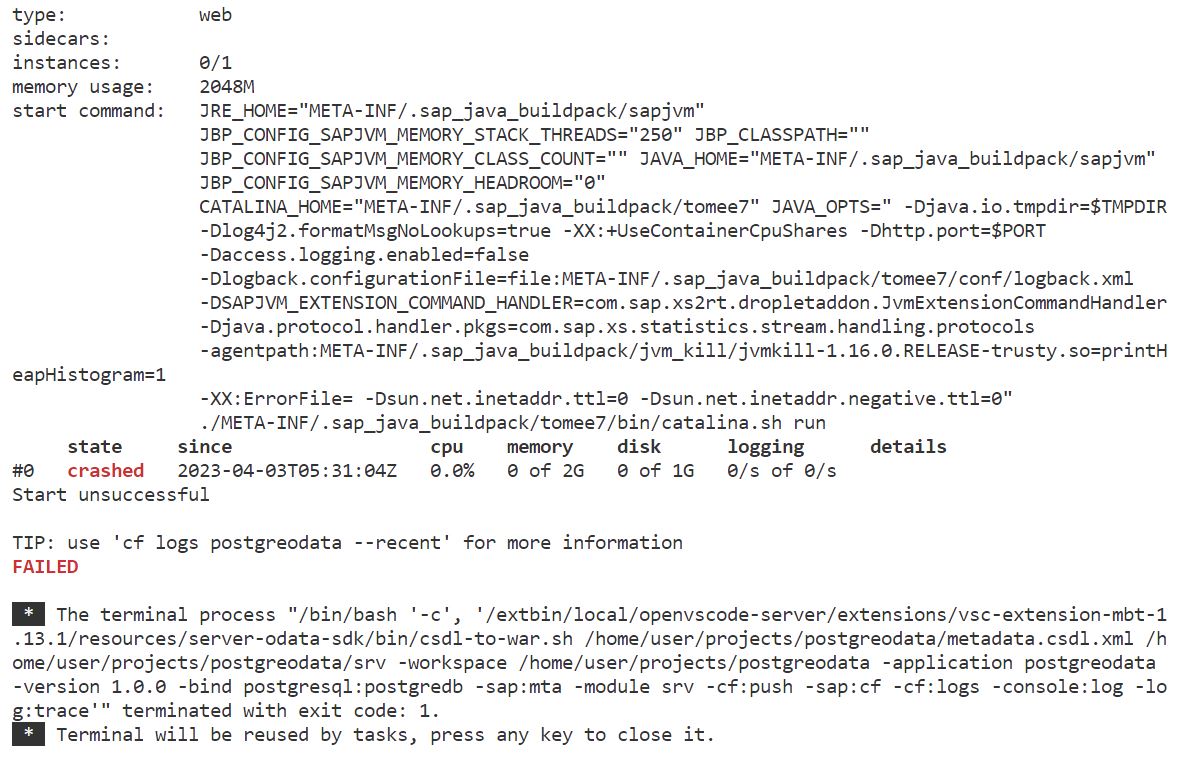
Here we can input a PostgreSQL instance name which is existing in Cloud Foundry, if it hasn't been created yet. Please try to create one in CF.
Please note:
1. if can't find 'PostgreSQL, hyperscaler option' in Service Marketplace of subaccount, Then global account administrator should assign 'PostgreSQL, hyperscaler option | postgresql-db' service firstly in BTP Control Center(https://controlcenter.ondemand.com/index.html), then configure entitlement in BTP cockpit page.
2. service 'PostgreSQL' in Service Marketplace is deprecated now. (avoid using it.)
3. you can find "-bind", "pgsql:<your pgsql instance name>", in the created tasks.json. see more details, please refer https://help.sap.com/doc/f53c64b93e5140918d676b927a3cd65b/Cloud/en-US/docs-en/guides/getting-started...
4. run csdl-to-war task in BAS will deploy the metadata as odata service finally.
Thanks
Hai-lin.wei
You must be a registered user to add a comment. If you've already registered, sign in. Otherwise, register and sign in.
- Mark as New
- Bookmark
- Subscribe
- Subscribe to RSS Feed
- Permalink
- Report Inappropriate Content
 Hai-lin_Wei
- Mark as New
- Bookmark
- Subscribe
- Subscribe to RSS Feed
- Permalink
- Report Inappropriate Content
Hi venkata_dirisinala,
An OData service can be deployed successfully with my trial account at API Endpoint: https://api.cf.us10-001.hana.ondemand.com (postgresql instance is used.)
"Executing task: /extbin/local/openvscode-server/extensions/vsc-extension-mbt-1.13.1/resources/server-odata-sdk/bin/csdl-to-war.sh /home/user/projects/MBT/example.SimpleSchema.csdl.xml /home/user/projects/MBT -workspace /home/user/projects -application testTrial -version 1.0.0 -bind postgresql:postgreSql-instance -cf:push -sap:cf -cf:logs -console:log -log:trace"


You must be a registered user to add a comment. If you've already registered, sign in. Otherwise, register and sign in.
Hai-lin_Wei
- Mark as New
- Bookmark
- Subscribe
- Subscribe to RSS Feed
- Permalink
- Report Inappropriate Content
Hello Dirisinala,
please upgrade the MBT extension to the latest 1.13.4 version. the download-logs task can be found in that version.
And please feel free to mail at [email protected] for further question. Thanks a lot!

You must be a registered user to add a comment. If you've already registered, sign in. Otherwise, register and sign in.
- Mark as New
- Bookmark
- Subscribe
- Subscribe to RSS Feed
- Permalink
- Report Inappropriate Content
Hai-lin_Wei
- Mark as New
- Bookmark
- Subscribe
- Subscribe to RSS Feed
- Permalink
- Report Inappropriate Content
Hi
can you please use Terminal -> Run Task -> "download - logs" to download CF logs.
you may need "cf enable-ssh <appName>" to enable ssh if not enabled yet. the "download - logs" will check if ssh enabled or not.
You must be a registered user to add a comment. If you've already registered, sign in. Otherwise, register and sign in.
- Mark as New
- Bookmark
- Subscribe
- Subscribe to RSS Feed
- Permalink
- Report Inappropriate Content
- Consuming Draft-Enabled RAP OData V4 Applications Using SAP Gateway in Technology Blog Posts by Members
- Build Your AI Agent prototype for free using SAP CAP, LangChain and Ollama cloud in Technology Blog Posts by Members
- BAS Project creation issue using on premise system : Authentication issue in Technology Q&A
- SAP S/4HANA Public Cloud: How to Create a Billing Document Without Reference Using API? in Technology Q&A
- Testing SAP RAP OData Service Using SAP Gateway Client in Technology Blog Posts by Members
| User | Count |
|---|---|
| 5 | |
| 4 | |
| 4 | |
| 3 | |
| 2 | |
| 2 | |
| 2 | |
| 2 | |
| 2 | |
| 2 |


You must be a registered user to add a comment. If you've already registered, sign in. Otherwise, register and sign in.