When you connect and authenticate, the connection and login details are stored locally, as we noted from staring at the output from our initial invocation of btp.
Configuration: /home/user/.cache/.btp/config.json
This is the default location that btp uses.
App Studio lifecycle
This post and the posts in the rest of this SAP Tech Bytes mini-series are based on running the btp CLI in the SAP Business Application Studio (App Studio). Certain directories in your App Studio dev space's work area are cleaned up when a dev space is stopped and restarted.
One of those directories is the /home/user/.cache/ directory.
If we look at this in detail (with ls -la | grep .cache), it's fairly clear that it's ephemeral - here it's a symbolic link to a directory in /tmp/:
In general, in most Unix-like environments, nothing in /tmp/ is guaranteed to be there after a restart. Given that this is where btp stores configuration, what happens when our App Studio dev space is stopped and then restarted? Well, let's find out.
First, let's make sure that we are still logged in, by invoking btp with no further parameters. If we're logged in, we should see something like this (i.e. btp shows us the details of our connection and identity):
Current target:
Global account (subdomain: 82715b8dtrial-ga)
└─ Subaccount (ID: b8a33bf9-b155-4736-aadf-582dae8fd65a)
Tips:
For information about the targeting mechanism, use 'btp --help target'.
To display general help, use 'btp --help'.
OK
Next, go back to the App Studio "Dev Space Manager", and stop the dev space you created for this btp CLI adventure (in SAP Tech Bytes: btp CLI - installation). Once it's stopped, restart it and re-enter it.
Now, in a new terminal, first have a look in the .cache/ directory (we can refer to this relative name as we'll be in our home directory /home/user/ by default in a newly created terminal anyway):
ls --all --dereference --recursive .cache/
the options given to ls here make sure we see hidden files (--all) (remember that .btp begins with a dot and is therefore hidden by default), that symbolic links are followed (--dereference) and that the list descends recursively (--recursive); normally I'd write this as ls -aLR .cache/.
You won't see the .btp/ directory or anything in it, because it's not there any more (any content that is there will have been recreated when the dev space was restarted).
Try btp again. This is the result:
Welcome to the SAP BTP command line interface (client v2.8.0)
CLI server URL: not set
User: not set
Configuration: /home/user/.cache/.btp/config.json
You are currently not logged in.
Tips:
To log in to a global account of SAP BTP, use 'btp login'. For help on login, use 'btp --help login'.
To display general help, use 'btp --help'.
OK
Uh-oh! But not surprising, given that the configuration is gone. Actually, there is some configuration now there, as btp will create a config.json file on invocation. Use the ls command again to see, and you should see (amongst the other content that was there) this:
(although it is flat, unformatted - it wasn't prettified like that).
So now we understand why btp shows nothing, and that we're not logged in any more.
Managing our configuration
We need to have the configuration stored in a different place, and used from there, so it persists. Personally, I'm a fan of the X Desktop Group (XDG) Base Directory Specification, which defines environment variables that apps can heed. XDG_CONFIG_HOME is one of those, and "defines the base directory relative to which user-specific configuration files should be stored.". Moreover, it goes on to say: "If $XDG_CONFIG_HOME is either not set or empty, a default equal to $HOME/.config should be used.". That works as a nice default for me.
The btp CLI allows you to specify the location of the configuration file either using the --config option, which you'll need to specify on each invocation of btp, or using the environment variable SAPCP_CLIENTCONFIG.
Let's tell the btp CLI that we want our configuration in this location (relative to our home directory):
.config/btp/config.json
Environment variables are best set when a shell session starts, so let's add the appropriate assignment to SAPCP_CLIENTCONFIG in the same file as we added the bin/ directory to our path in the previous post. This is the .bashrc file in our home directory.
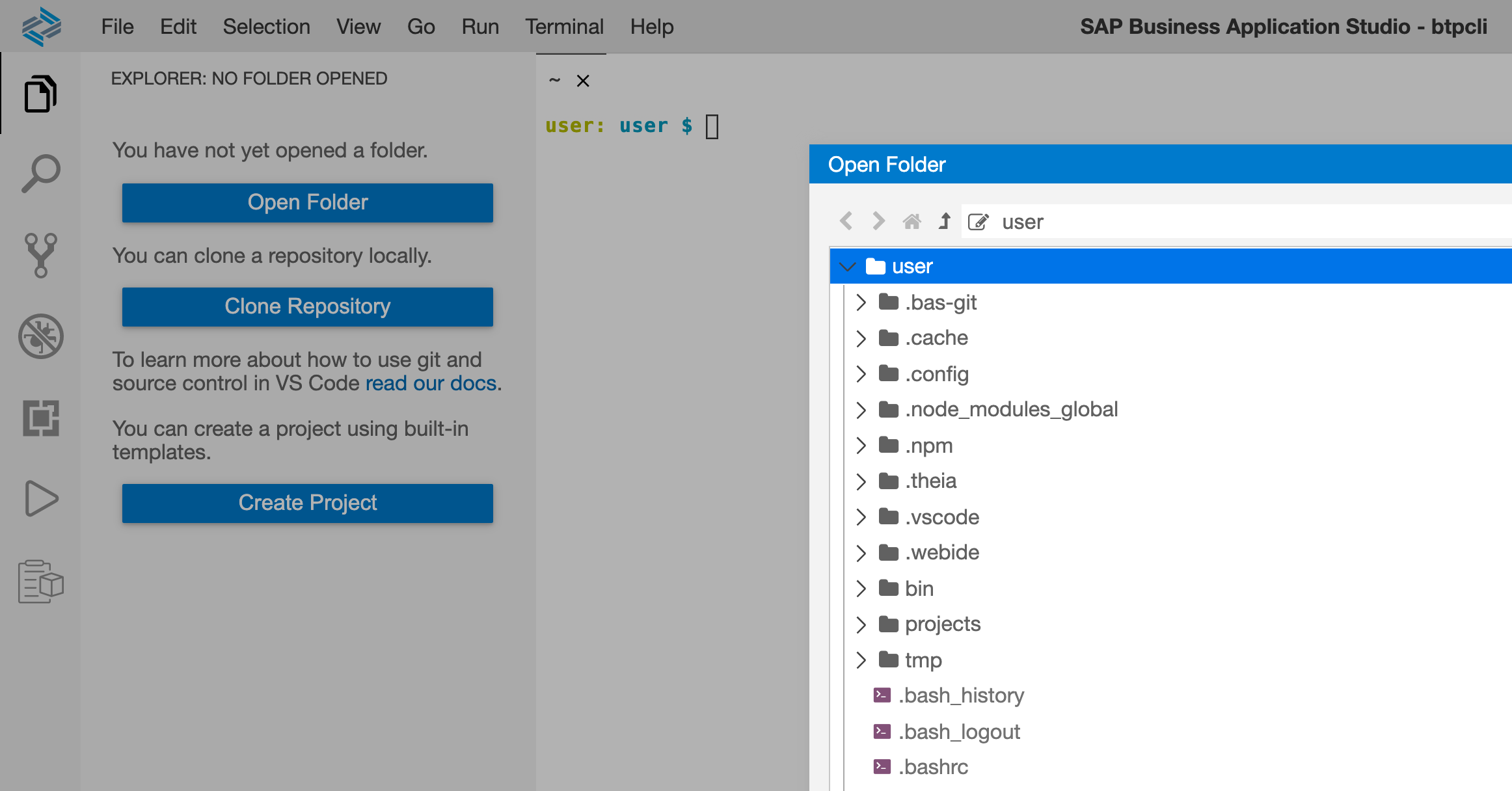
You can edit this file using App Studio of course. First, open your home directory as a folder in the explorer, using the "Open Folder" button like this:
Then find and open the .bashrc file from the Explorer, and at the bottom, add content so it looks like this:
Close any existing terminal session and start a new one (Terminal -> New Terminal); this will cause the .bashrc file to be processed, and you can then check that the SAPCP_CLIENTCONFIG environment variable is indeed now set:
echo$SAPCP_CLIENTCONFIG
It should show you this:
/home/user/.config/btp/config.json
Now it's time to log back in with the btp CLI. Follow the same login procedure as described in the previous post SAP Tech Bytes: btp CLI - logging in. Use the btp target command to specify your trial subaccount too.
Invoking btp on its own now should show familiar information:
Current target:
Global account (subdomain: 82715b8dtrial-ga)
└─ Subaccount (ID: b8a33bf9-b155-4736-aadf-582dae8fd65a)
Tips:
For information about the targeting mechanism, use 'btp --help target'.
To display general help, use 'btp --help'.
OK
But note the location of the configuration - it is honouring where we told the btp CLI to keep it, via SAPCP_CLIENTCONFIG. Great!
Final checks
Go through the process of restarting your dev space once more. When starting a new terminal after that, and invoking btp, you should see that your configuration has survived, and you're still logged in. Great!



 Bluesky


You must be a registered user to add a comment. If you've already registered, sign in. Otherwise, register and sign in.