


1. Introduction
Machine learning models, such as classification and regression models, capture the relationships and patterns between features in a training dataset and can be applied to similar data in the future for prediction. Model training can be time-consuming, so it is desirable to store or persist a model for future use without retraining it.
In Python Machine Learning Client for SAP HANA (hana-ml), we provide a model storage class for model persistence across classification, regression, clustering, and time-series models. In this blog post, you will learn:
- ModelStorage class and its methods in hana_ml.
- How to apply model storage and its methods in a use case.
2. ModelStorage Class
ModelStorage class allows users to save, load, list, and delete models. Internally, a model is stored in two parts:
- Metadata: contains the model identification (name, version, algorithm class) and its Python model object attributes required for re-instantiation. It is saved in a table named HANAML_MODEL_STORAGE by default.
- Back-end model: consists of the model returned by SAP HANA Predictive Analysis Library (PAL), and a model can be saved into different SAP HANA tables depending on the requirements of the algorithm.
Some important methods and descriptions are listed below:
- save_model (model, if_exists='upgrade') :The model is stored in SAP HANA tables in a schema specified by the user. A model is identified by its name and version. The parameter ‘if_exists’ provides three ways of handling model saving if a model with the same name and version already exists:
- replace: the previous model will be overwritten.
- upgrade: the current model will be saved with an incremented version number.
- fail: an error message is thrown to indicate that the model with same name and version already exists.
- load_model (name, version=None) :Load a model according to the model name. If the version is not provided, the latest version is loaded.
- delete_model (name, version) :Delete a model according to its name and version.
- list_models(name=None, version=None) :List all the existing models stored in SAP HANA.
- clean_up() :Delete all the models and the metadata table in SAP HANA.
Algorithms that have predict and transform functions are supported by Model Storage. Part of the supported algorithm list is as follows:
- Classification: UnifiedClassification, MLPClassifier, RDTClassifier, HybridGradientBoostingClassifier, SVC, DecisionTreeClassifier, CRF, LogisticRegression, KNNClassifier, NaiveBayes…
- Regression: UnifiedRegression, LinearRegression, PolynomialRegression, GLM, ExponentialRegression…
- Clustering: UnifiedClustering, DBSCAN, SOM…
- Time Series: ARIMA, OnlineARIMA, VectorARIMA, AutoARIMA, LSTM…
- Preprocessing: Imputer, KBinsDiscretizer…
3. Use Case
All source code uses the Python Machine Learning Client for SAP HANA (hana-ml).
The first step is to establish a connection to SAP HANA. Once the connection context is created, hana_ml can push the required time-series processing to SAP HANA for in-database execution. A minimal example is shown below:
import hana_ml
from hana_ml import dataframe
conn = dataframe.ConnectionContext(address='AAA.BBB.CCC.DDD', port=XXX, user='username', password='password')
Replace ‘AAA.BBB.CCC.DDD’, ‘XXX’, ‘username’, and ‘password’ with your SAP HANA instance details.
A simple self-made dataset is used to demonstrate model storage for classification. The data is stored in SAP HANA tables called DATA_TBL_FIT and DATA_TBL_PREDICT. Let's have a look at the dataset.
df_fit = conn.table('DATA_TBL_FIT')
df_predict = conn.table('DATA_TBL_PREDICT')
print(df_fit.collect())
print(df_predict.collect())
The result is shown below:
ID   OUTLOOK  TEMP  HUMIDITY WINDY        CLASS
0    0     Sunny    75      70.0   Yes         Play
1    1     Sunny    77      90.0   Yes  Do not Play
2    2     Sunny    85      79.0    No  Do not Play
...
11  11      Rain    75      80.0    No         Play
12  12      Rain    68      80.0    No         Play
13  13      Rain    70      96.0    No         Play

   ID   OUTLOOK   TEMP  HUMIDITY WINDY
0   0  Overcast     75  -10000.0   Yes
1   1      Rain     78      70.0   Yes
2   2     Sunny -10000      78.0   Yes
3   3     Sunny     69      70.0   Yes
4   4      Rain     74      70.0   Yes
5   5      Rain     70      70.0   Yes
6   6       ***     70      70.0   Yes
Train the model with the UnifiedClassification function and various algorithms: 'MLP', 'NaiveBayes', 'LogisticRegression', 'decisiontree', 'HybridGradientBoostingTree', 'RandomDecisionTree', and 'SVM':
from hana_ml.algorithms.pal.unified_classification import UnifiedClassification
from hana_ml.model_storage import ModelStorage
ms = ModelStorage(conn)
classification_algorithms = ['MLP', 'NaiveBayes', 'LogisticRegression', 'decisiontree',
                             'HybridGradientBoostingTree', 'RandomDecisionTree','SVM']
dt_param = dict(algorithm='c45')
mlp_param = dict(hidden_layer_size=(10,), activation='TANH', output_activation='TANH',
                 training_style='batch', max_iter=1000, normalization='z-transform',
                 weight_init='normal', thread_ratio=1)

for name in classification_algorithms:
    if name == 'decisiontree':
        algorithm = UnifiedClassification(func = name, **dt_param)
    elif name ==  'MLP':
        algorithm = UnifiedClassification(func = name, **mlp_param)
    else:
        algorithm = UnifiedClassification(func = name)

    if name == 'LogisticRegression':
        algorithm.fit(data=df_fit, key='ID', class_map0='Play', class_map1='Do not Play')
    else:
        algorithm.fit(data=df_fit, key='ID')

    algorithm.name = name
    algorithm.version = 1
    ms.save_model(model=algorithm, if_exists='replace')
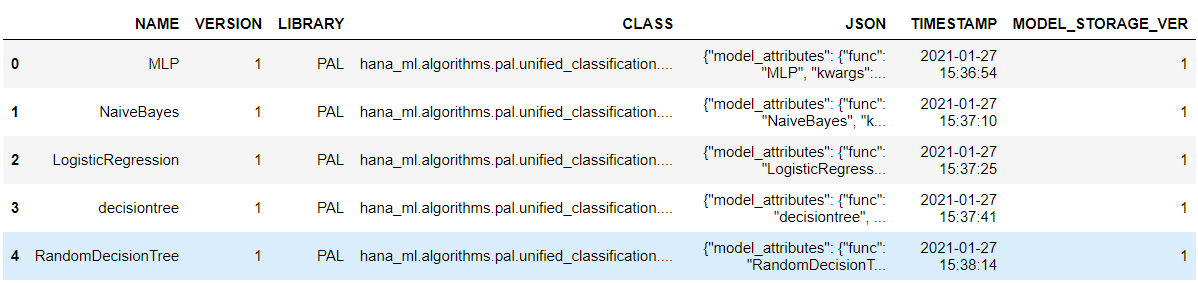
Use the list_models function to list all models, and we can see that all models with their names, versions, and other information are shown in a table:
ms.list_models()The model list is shown below:

Let's select one model, 'SVM', and load it for prediction:
new_model = ms.load_model(name='SVM', version =1)
type(new_model)
Output:
hana_ml.algorithms.pal.unified_classification.UnifiedClassificationThe type of new_model is an object of UnifiedClassification. We can use this object for prediction:
res = new_model.predict(df_predict, key='ID')
print(res.collect())
The result:
   ID        SCORE  CONFIDENCE REASON_CODE
0   0         Play    0.296441        None
1   1         Play    0.505984        None
2   2         Play    0.296441        None
3   3         Play    0.595937        None
4   4         Play    0.635761        None
5   5  Do not Play    0.248283        None
6   6  Do not Play    0.313294        None
For example, if we want to delete the model 'SVM':
ms.delete_model(name='SVM', version=1)
ms.list_models()
Output:
We could also clean up all models at once:
ms.clean_up()3. Summary
In this blog, we described what model storage in hana-ml is and how to use its core methods. Using a simple classification example, we showed how to save trained models, list available versions, reload a selected model for prediction, and remove models when they are no longer needed. These capabilities help streamline machine learning workflows in SAP HANA by making trained models easier to reuse, manage, and maintain.
References
Product Documentation:
Other Related Blog Posts:
 Bluesky


