


SAP Fiori Reference Apps
Last Update: August 2017
In this blog post you'll get an overview about the SAP Fiori Reference apps which are part of the SAP Web IDE. We always update this blog post when there is a new version of the SAP Fiori Reference Apps.
- What are SAP Fiori Reference Apps?
- Where can I get the SAP Fiori Reference Apps?
- What type of apps are included in the SAP Fiori Reference Apps?
- Which apps are included in the SAP Fiori Reference Apps?
- What features are implemented in the SAP Fiori Reference Apps?
- Backend information
- Link collection
What are SAP Fiori Reference Apps?
The SAP Fiori Reference Apps are sample applications that help developers and designers with their development projects.
- Developers
Both new and experienced SAP Fiori developers can see real working code and live examples covering all layers end-to end. They go far beyond typical "Hello World" examples and aim to provide best practices. - Designers
UX Designers can find examples of how SAP Fiori patterns and controls are being implemented in typical use cases and discover the interaction flow of typical SAP Fiori business apps. They can see how the individual controls function in a live scenario.
The SAP Fiori Reference Apps demonstrate the development and UX Design guidelines and best practices applicable to the SAP Fiori development lifecycle. This covers the entire end-to-end process from design and technology to coding principles, from OData modeling to implementation, as well as selected product standards such as performance, and extensibility. The SAP Fiori Reference Apps are based on the Enterprise Procurement Model (EPM).
Where can I get the SAP Fiori Reference Apps?
The SAP Fiori Reference Apps are part of the SAP Web IDE delivery. Please read our documentation here about how to get the apps and how to run them.
- Get the apps
- How to run them
- Run the apps against a real backend
What type of apps are included in the SAP Fiori Reference Apps?
The included apps cover a broad range of different use cases and different UI patterns. There are so-called "Freestyle Applications" which are build from scratch and apps based on SAP Fiori Elements.
Which apps are included in the SAP Fiori Reference Apps?
Shop
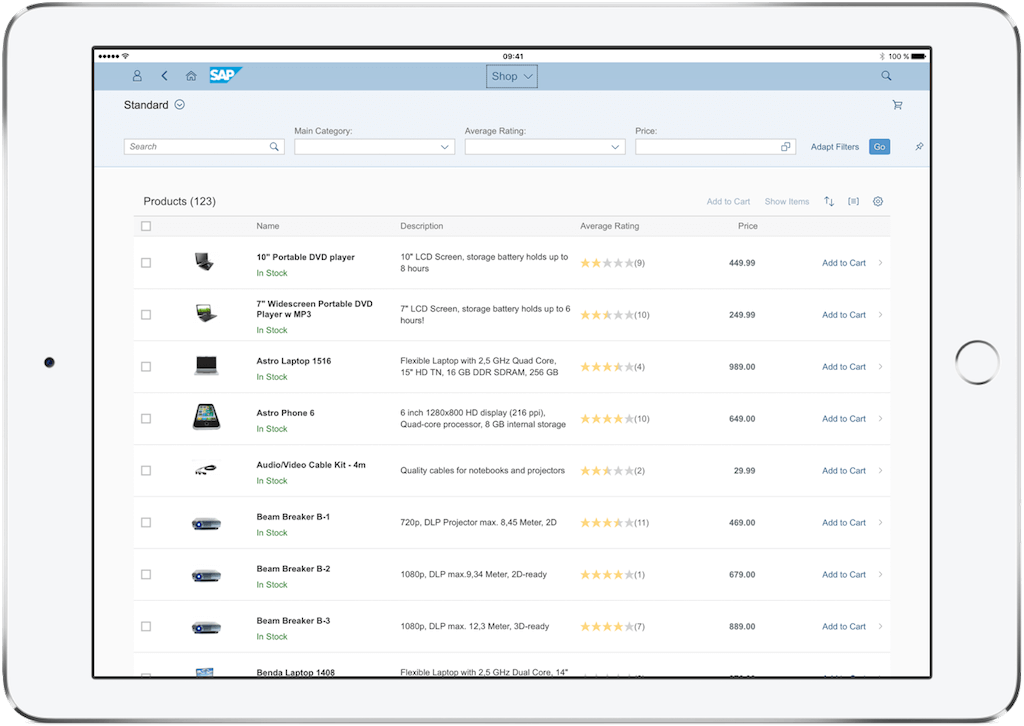
The Shop app is a freestyle application using the worklist pattern. It allows you to browse the product catalog and add products to your shopping cart and check out.
Learn more:
Approve Purchase Orders

The Approve Purchase Orders app is a transactional app implementing the split view layout and is a typical approval app. You can check the list of purchase orders assigned to you and approve or reject them. It is also possible approve or reject multiple purchase orders at once.
Learn more:
Procurement Overview
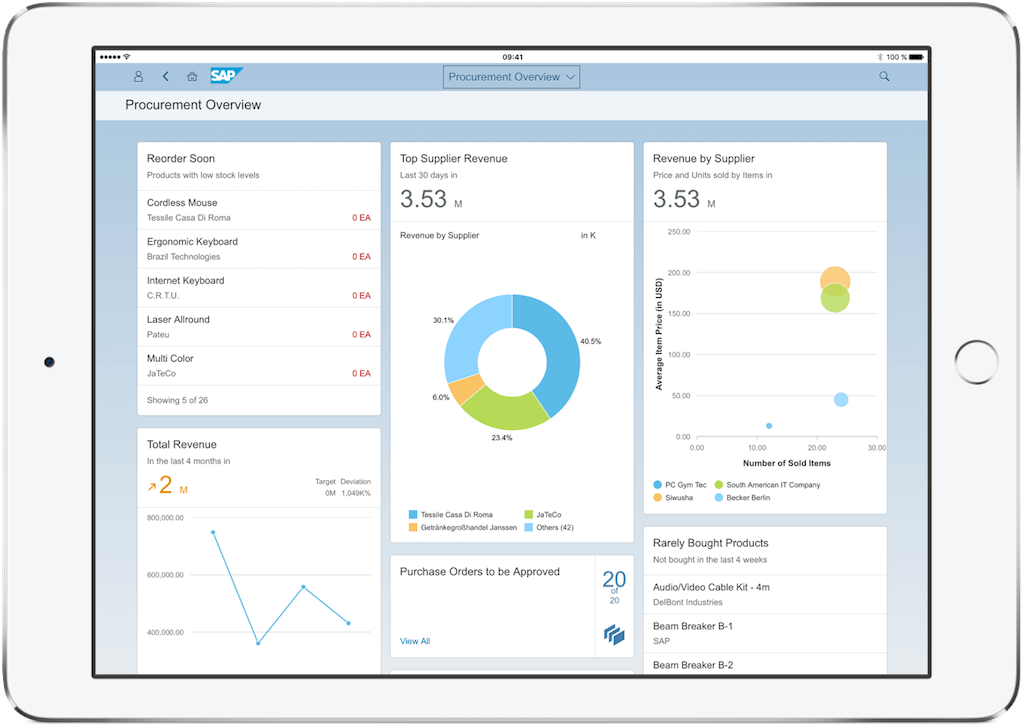
The Procurement Overview app is a SAP Fiori Elements application and it implements the Overview Page pattern. In this app you can get an overview about your best sellers, the revenue by supplier, your total revenue, new sales orders and purchase orders which need to be approved.
Learn more:
Manage Products
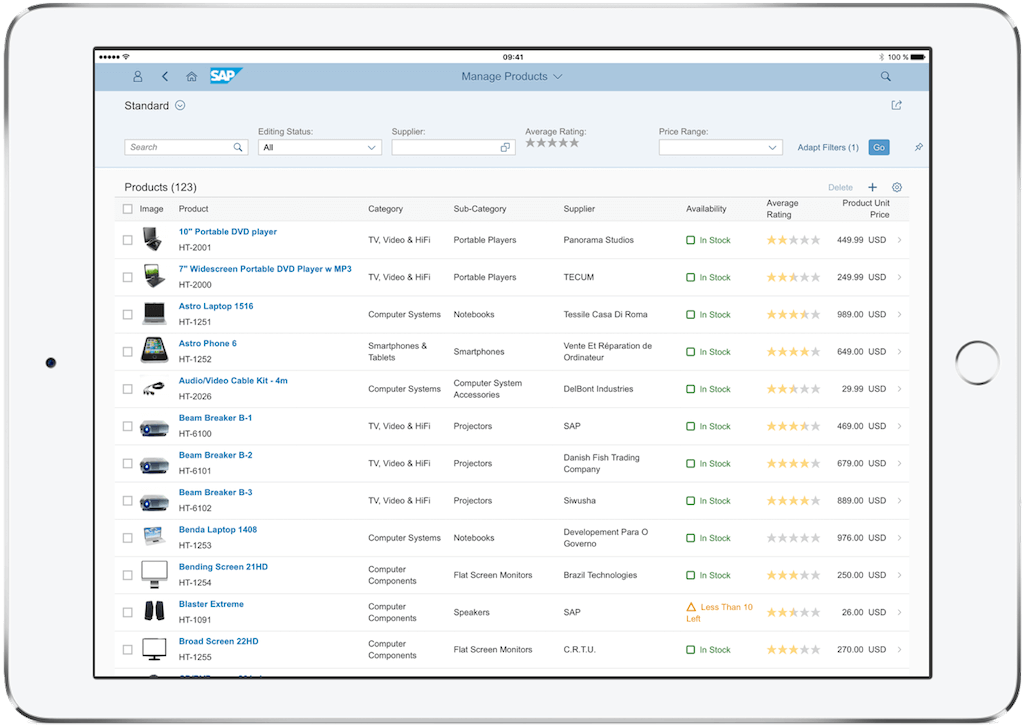
The Manage Products app is a SAP Fiori Elements based application and it implements the List Report and Object Page Pattern. In this app you can create, update, display and delete products.
The app is not fully functional in when running in Mock mode, we suggest to use a real backend.
Learn more:
What features are implemented in the SAP Fiori Reference Apps?
Features Freestyle apps - Patterns and Main Controls
| Feature | Shop | Approve Purchase Orders |
| Full Screen | X (with letterboxing) | |
| Master-Detail | X (with letterboxing) | |
| Smart Filter Bar | Product List
| |
| Object Header | Product Details
| Purchase Order Details
Purchase Order Multiselect
|
| Table | Product List
Product Details - Review List
Shopping Cart
| Purchase Order Details
Purchase Order Multiselect
|
| List | Purchase Order List
| |
| Form | Product Details
| Purchase Order Details
|
Features Freestyle apps - Design Concepts in alphabetical order
| Design Concepts | Shop | Approve Purchase Orders |
| Button | Product List
Product Details
| Purchase Order Details
Purchase Order Multiselect
|
| Carousel | Product Details
| |
| Dialog | Product Details - Rating (custom dialog)
| Confirmation dialog for approve/reject |
| Delete Item | Shopping Cart (delete row in table) | |
| Formatting Data | Product List such as availability (in stock/out-of-stock) | Purchase Order Details such as date |
| Growing List | Product List | |
| Input Field | Shopping Cart
| Confirmation dialog for approve/reject |
| Personalization | Product List
| |
| Mark as Favorite/Set Flag | Product Details | |
| Message Page | for errors, such as if purchase order does not exist for deep link or if list is empty | |
| Message Strip | Product Details
| |
| Message Toast | Product List, message toast is shown for example in the following cases:
| Purchase Order Details and Purchase Order Multiselect
|
| Quick Overview | Product Details
| |
| Search | Product List | Purchase Order List |
| Sort, Group, Filter | Product List | |
| Toolbar | Product List
Product Details
| Purchase Order Details and Purchase Order Multiselect
|
| View Settings Dialog (Sort, Group, Filter) | Product List
|
Features Fiori Elements apps
| Feature | Procurement Overview | Manage Products |
| Overview Page Pattern | Donut Chart Card Bubble Chart Card Line Chart Card Stack Card Bar Chart List Card List Card | |
| List View Pattern | Smart Filterbar Breakout | |
| Object Page Pattern | Editable Header Content Various header facet types: Datafields Data Points Multiline text facet Smart Chart |
Backend information
You can have a look at the backend coding for the applications inside your own system as the backend coding is part of the SAP_BASIS component 751 SP02.
All backend services are implemented via CDS views and exposed via OData v2.
Here are the package names for the apps and their implementation features:
(READ = GET, CHANGE = POST, PUT, MERGE, DELETE)
Shop
S_ODATA_EPMRA_SHOP
Gateway: Mapped Data Source
READ: SADL
CHANGE: Manual Implementation
Annotations: Annotations maintained in SEGW and Model Provider Class
Manage Products
S_ODATA_EPMRA_PROD_MAN
Gateway: Referenced Data Source
READ: SADL
CHANGE: SADL + BOPF
Annotations: Automatic annotation exposure by SADL
Approve Purchase Orders
S_ODATA_EPMRA_PO_APV
Gateway: Referenced Data Source
READ: SADL
CHANGE: Manual invocation of BOPF via implementation in Data Provider Class
Annotations: Annotations maintained in SEGW and Model Provider Class
Procurement Overview
S_ODATA_EPMRA_OVERVIEW
Gateway: Referenced Data Source
READ: SADL
CHANGE: n/a (display only)
Annotations: Automatic annotation exposure by SADL
Re-use backend components are located in package: S_EPMRA_COMMON e.g BOPF implementation for Manage Products and Shop.
 Bluesky


