Technology Blog Posts by Members
cancel
Showing results for 
Search instead for 
Did you mean: 

Hi Folks,

Note: This blog is creating during earlier versions of SAP HANA.

         If you are on SP09,You have an supported option of multiple values parameters.

         Refer  http://help.sap.com/hana/SAP_HANA_Modeling_Guide_for_SAP_HANA_Studio_en.pdf  Page no: 106

In the previous blog SAP HANA: Handling Dynamic Select Column List and Multiple values in input parameter have shown on how to select multiple values for filtration using "Replace" function in procedure.

In that document, we went to procedure approach, since the user needs the dynamic output based on input conditions.

But if the output is static column list, you wouldn't want to use procedure, so in this blog will be explaining on how to achieve the same functionality of handling multiple values filter condition on a graphical calculation view using "Projection".

Problem Description:

Giving the flexibility of choosing the values he wishes to see in the report and then pushing the filtration logic to the lowest level possible.

Case 1: To select single value or multiple values for filter based on the input from the user

Case 2: To select "All" values if he doesn't want to apply any filter

**Note: If using "HTM5 Dashboards" , you can present the dropdown for filter as shown below:

This approach is very useful, if your dropdown has more values in the selection like more than 100 selections.

Now, Let us create an analytic view for our testing as shown below:

Now after adding the required fields to the "Output".

Let us create a "Input Parameter" to hold values of selection for "Region" from the user as shown below:

Now Let us create the filter using "Expression" as shown below:


in("REGION",'$$In_Region$$') or match ("REGION",'*$$In_Region$$*')


Data Preview:

Case 1 : ( Single or Multiple Values) :

(a) Single Value:


Sql Statement:


SELECT "REGION","EMP_NO", "EMPLOYEE_NAME", "EMPLOYEE_TYPE", "GENDER", "AGE", sum("SALARY") AS "SALARY" FROM "_SYS_BIC"."_SYS_BIC"."projects/CV_EMPLOYEE" ('PLACEHOLDER' = ('$$In_Region$$', 'AMER')) GROUP BY "EMP_NO", "EMPLOYEE_NAME", "EMPLOYEE_TYPE", "GENDER", "AGE", "REGION"

In the above screenshot we can see 1 value i.e AMER coming in output.

(b) Multiple Value:

You have to input the value like this example: AMER'',''APAC as shown below:
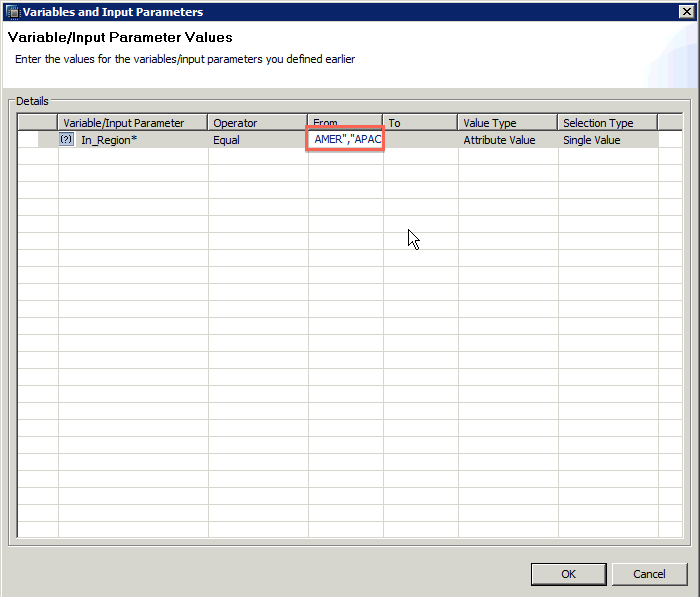
Sql Statement:

SELECT "REGION","EMP_NO", "EMPLOYEE_NAME", "EMPLOYEE_TYPE", "GENDER", "AGE", sum("SALARY") AS "SALARY" FROM "_SYS_BIC"."projects/CV_EMPLOYEE" ('PLACEHOLDER' = ('$$In_Region$$', 'AMER'',''APAC')) GROUP BY "EMP_NO", "EMPLOYEE_NAME", "EMPLOYEE_TYPE", "GENDER", "AGE", "REGION"


In the above screenshot we can see two values i.e AMER & APAC coming in output.

Case 2 : ( All Values -- No Filtering) :


We need to pass * as shown below :

Sql Statement:

SELECT "REGION","EMP_NO", "EMPLOYEE_NAME", "EMPLOYEE_TYPE", "GENDER", "AGE", sum("SALARY") AS "SALARY" FROM "_SYS_BIC"."projects/CV_EMPLOYEE" ('PLACEHOLDER' = ('$$In_Region$$', '*')) GROUP BY "EMP_NO", "EMPLOYEE_NAME", "EMPLOYEE_TYPE", "GENDER", "AGE", "REGION"

In the above screenshot we can see all the 3 regions coming in output.

**Note: This approach is useful when your reporting solution is HTML5 dashboards and you cannot use Variables (multiple values) for filtering.

Hoping that blog is helpful for you , do let me know your feedback on this.

Your's

Krishna Tangudu :smile:


65 Comments
rindia
Active Contributor

Nice one Krishna.

former_member182302
Active Contributor

Thank you Raj :smile:

Former Member

Good document....... Krishna..

former_member182302
Active Contributor

Thanks Murali :smile:

vivekbhoj
Active Contributor

Another Nice blog Krishna

Thanks for sharing

Regards,

Vivek

former_member182302
Active Contributor

Thank you so much Vivek.Sharing back to community was always been a pleasure :smile:

Regards,

Krishna Tangudu

ericdu
Associate
Associate

Hi Krishna,

Thanks for the sharing, your blogs are very helpful.

Based on this example, do you know if it is possible to make the input parameter optional? For example, I like the filtering by regions but I also want to get all the records in case I don't enter the value of the parameter.

Regards,

Eric Du

former_member182302
Active Contributor

Hi Eric,

Thanks for your feedback :smile:

If you see the blog closely, you can see that passing '*' to retrieve all the regions.I think that will help you .

Regards,

Krishna Tangudu

ericdu
Associate
Associate

Thanks Krishna. So that's what the "match" works.

former_member182302
Active Contributor

Yes Eric, And in this blog SAP HANA: Handling Dynamic Select Column List and Multiple values in input parameter

I have used LIKE to do the same.

Regards,

Krishna Tangudu

ericdu
Associate
Associate

Krishna, for non-string types, like INTEGER, do you know how to use multiple value input parameters as the match() and LIKE doesn't work for INTEGER. Thanks.

former_member182302
Active Contributor

Hi Eric,

You can create a calculated column and convert the Integer to String and then use it.

Ex: In the scenario, i have taken for this blog i have "Employee_Type" which is a integer.

I have created a calculated column named "Emp_Type" with formula string("EMPLOYEE_TYPE")

And then kept this expression in the projection filter:

in("Emp_Type",'$$In_Employee_type$$') or match ("Emp_Type",'*$$In_Employee_type$$*')

And it works.

Do let me know in case you still find some issues.

Regards,

Krishna Tangudu

sreehari_vpillai
Active Contributor

Hi Krishna,

Really nice one :smile:

and one doubt(its been already discussed in multiple post, still ). I have one calculation view with mandatory parameters. Say "MATERIAL" and "TO_DATE" and "FROM_DATE".

I need to call this calc view from a procedure passing these parameters .

I am able to run this from SQL CONSOL


SELECT "STOCK_TYPE",


                  sum("SIGNEDSTOCK") AS "SIGNEDSTOCK"


                  FROM "_SYS_BIC"."W_METALS_ONE.Modeling/CV_AVG_STOCK_MAT_PER"


                  (


                  'PLACEHOLDER' = ('$$MATERIAL$$', 'DEMO22'),


                  'PLACEHOLDER' = ('$$TO_DATE$$', '20140219'),


                  'PLACEHOLDER' = ('$$FROM_DATE$$', '20130101'))


                                    where STOCK_TYPE = 'A'


                  GROUP BY "STOCK_TYPE" ;


If I use the same in Procedure, it get activated successfully but, run time errors happening.

Any hope ?

CE Function : CE_CALC_VIEW - running with placeholders

Sreehari

former_member182302
Active Contributor

Hi Sreehari,

Thanks for your feedback.

I Just replied to your thread while you are commenting on this blog :wink:

Regards,

Krishna Tangudu

Former Member

Thanks Krishna!!

Another helpfull post again!!

Former Member

Hi Krishna,

Thanks for the nice blog. It works as described in HANA Studio. However, have you tries consuming(directly) in any front-end tool(apart from HTML).

I tried the scenario consumption in Analysis Office for Excel and get the attached error. Have you come across this scenario?

Regards,

Rahul

Former Member

Hi Rahul,

Did you find any workaround for this? I'm also facing similar issue.

Former Member

Dear Krishna ,

Please explain

in below discussion .


How to propagate Input parameter to base data or table?

sudha_kaswan
Associate
Associate

Hello Krishna,

I followed the above mentioned steps. Below is my query ,

SELECT

  TOP 200 "PRODUCT_CLASS",

  "STATUS",

  "CUSTOMER_DUNS"

FROM "_SYS_BIC"."SK_TEST_PACKAGE/RANGE_TEST" ('PLACEHOLDER' = ('$$In_Region$$', '0001121815","0001121816'))

But it fetches no results. Any thoughts why this is happening.

Former Member

Hi Krishna,

If I have to create a calculated column at projection then, in that case the input parameter cannot be passed till AT/at table level to minimize the data set.

Or in other words you cannot pass the input parameter with multiple values to table level in case of integer data type. Is my understanding true?

ChengJiajia
Product and Topic Expert

Hello Sudha,

I also have the same issue with you. I follow the same step, but no luck to pass multi value for the input parameter. I am on rev 91.

Would be glad if anyone could provide a solution. :???:

Former Member

Echo & Sudha I am encountering the same issue with multiple values have either of you figured out how to get this to work?  The * part works fine for me but not distinct multi-values

Former Member

Hi Krishna,

Very useful blog.  As you mention HTML5, I assume you have been able to pass in multiple values for a single input parameter in your oData service call?  If so, I would be very grateful to see an example url with the syntax for passing multiple values - I can get the multiple values working with data preview, but not with an oData service call.

Just to be clear - I'm not talking about $filter - I want to use input parameters to filter on a column in my model that I do not aggregate and expose in my model and odata server (hence cant use $filter).

Many thanks, much appreciated.

Former Member

Hi Krishna,

I am not able to correctly use APPLY_FILTER functionality and I am using HANA SPS09.

My Use Case as below: Calculation View

Below line of code gives me the result in the Table1 as given below.

var_ff = CE_AGGREGATION(:var_defects, [COUNT("ContextId") AS "Defects"],["EmployeeName"]);

Table:1

DefectsEmployeeName
4admin
6admin1
8admin2
10admin3

I want to send the Input parameter say admin'',''admin1 and get result for only that Employee Names.

My below Calculation View is activating correctly but not giving the result.(AT_DEFECTS is Attribute view)

**************************************************************************************************************************************

BEGIN

  DECLARE SQL_STR VARCHAR(2000);

  var_defects = CE_JOIN_VIEW("_SYS_BIC"."aProdV1/AT_DEFECTS",["EmployeeName","ContextId"]);

  var_ff = CE_AGGREGATION(:var_defects, [COUNT("ContextId") AS "Defects"],["EmployeeName"]);

  /*SQL_STR:='"EmployeeName" IN (''admin'',''admin1'')';/* working one Input value hard coded and gives desired output*/

  SQL_STR:='"EmployeeName" IN (''$$NAME$$'')';/* NAME is INPUT PARAMETER */

  var_out=APPLY_FILTER(:var_ff,:SQL_STR);

END /********* End Procedure Script ************/

*******************************************************************************************************************************************

Please the attached Input.jpg for Input parameter and output.

I want to filter the data by passing input parameter say admin'',''admin1 etc

Please also let me know on escape character used in HANA.(I mean how to pass input parameter)

regards

Raj

former_member182302
Active Contributor

Hi Jon,

We didnt use oData for this project.

Regards,

Krishna Tangudu

Hello Krishna,

I have read your article "Using Multiple Values in Input parameter for filtering in Graphical Calculation View" but I can't make it work in my Ecliplse. Does your instructions still work, or are related to an old version of Eclipse?

I have Eclipse IDE for Java Developers. Version: Luna Service Release 2 (4.4.2).

Best regards.

sudha_kaswan
Associate
Associate

Hi Alex & Echo,

I have figured it out how it will work.

You have to use two single quotes in place of double quotes .

So in above example , we give input value as Amer and Apac, So give the value as following:

Amer'',''Apac

This part ('','') seems like ta comma between two double quotes , but it is two single quotes then a comma and again two single quotes.

Hope this resolve your issue.

Former Member

Thank you Sudha this was very helpful not sure how usable it will be for end users since they would have to type '','' between each value and type the values they want.  Hopefully SAP makes input parameters more like variables soon.

former_member182302
Active Contributor

Hi Alex,Sudha & Echo,

If you are on SP09,You have an supported option of multiple values parameters.

         Refer  http://help.sap.com/hana/SAP_HANA_Modeling_Guide_for_SAP_HANA_Studio_en.pdfPage no: 106

Regards,

Krishna Tangudu

Former Member

Nice document krishna.tangudu 

Regards,

Debasis Nayak

Former Member

Great, very helpful!!

Former Member

Krishna Tangudu very helpful document


Former Member

Hi Raj,

Have you fixed the issue? I got the same issue as you.

it would be great appreciated if any respond, thanks in advance!

Former Member

No lucky from my side :sad: always return nothing

Former Member

Hi Krishna,

A very helpful document indeed. :smile:

Requesting for your kind advice on a extension of this scenario as described below:

I wish to filter the data on say  different criteria of type

Country_list_1     Applicable_employee_grades_1     Amt_limit_1       Currency_1

Country_list_2     Applicable_employee_grades_2     Amt_limit_2       Currency_2

and so on...

where the number of such criteria is variable and I need to filter the data set on all the available criteria at any point of time.

How would I achieve this using graphical modelling and input parameters?

Thanks for your help in advance. :smile:

Regards,

Anindita Bhowmik

Former Member

I am on SP10. Creating an input paramter with multiple entries is working fine EXCEPT when the parameter is left blank. If it's left blank then it should equate to select all (like in ECC). I am using in() function. I tried above syntax but it's not working because it's prior to SP9.

But I'm getting an error when leaving it blank. I get the following error

column store error: search table error:  [6968] Evaluator: syntax error in expression string;expected TK_ID,parsing "if(\nin(\"RYEAR\",  [here]) = 1, \"RYEAR\" = '2010', \"RYEAR\" = '2011' \n)"

Possible Cause(s): Syntax error due to data type mismatch for the input parameter value used in the calculation of a calculated column.

Proposed Solution(s): Provide a value with the matching data type as that of the input parameter either as default value or at runtime during data preview.

Any advice?

former_member182302
Active Contributor

Even the filter columns are dynamic? which reporting tool you would be using?

Regards,

Krishna Tangudu

former_member182302
Active Contributor

Can you share the syntax you used here? did you use like this in() or match()?Also if you do not send any value, you can keep a DEFAULT value for your input parameter as * and use.

Regards,

Krishna Tangudu

Former Member

Hey, I am using in(). I am in SP10.

If I put * as default value I get no results.

If I leave it blank I get an error.

Thanks,

Mickey

former_member182302
Active Contributor

Hi Mickey, You should use in() or match()

Regards,

Krishna Tangudu

Former Member

Need help in how to pass multi input values that will be passed a comma delimited string. I have a variable already defined in the Hana view and it is setup to accept multiple values.

I am using Crystal Enterprise 4.0 to call this input variable from Hana View

The user will be given one input parameter where they will enter Hundreds of input values that are separated by a comma.

I used the below logic

select * from "_SYS_BIC"."supplychain/SALES"('PLACEHOLDER' in ('$$VAR1$$','REPORTVAR'))

VAR1 is the variable I have defined in the Hana AV

REPORTVAR is the input parameter I have define in Crystal Enteprise.This I have defined as multi value parameter so that the user can enter values like

Eg: 12345,58796,23456

I even tried passing it as '12345','58796','23456

The data is not getting filtered either ways.

Any Help

Thanks

Aswin

Former Member

Hi Aswin,

This expression has to be entered in the expression editor of the node where the filtering should happen.

IN("VAR",'$$VAR$$')

Kindly note not to select 'List Of Values' option in the drop down list of filters to generate this expression. Enter this manually in the expression editor.

In the input string ensure the string enters this filter in the form 12345'',''58796'',''23456 where '' is two individual single quotes and is not a double quote.


This is when you are using an input parameter and not an input variable.

Hope this helps. :smile:

Regards,

Anindita Bhowmik

Former Member

Thanks Anindita. Is there any solution on how to use this filtering as input variable.

The view should filter all the entered values in the Hana db level.

Also the input string u suggested that the format to enter should be 2 individual single quotes then the value followed by the 2 individual single quotes...Is there a way where this can be avoided . Instead allow the user to just enter a string that is just comma delimted.

Thanks

Aswin

Former Member

Hi Aswin,

Input parameters are the method to enable filtering at HANA DB level. Input variables are applied after the completion of the processing of the view logic.

However, if you would wish to use input variables,

you need to define the variable from the semantics node in the view. Select single value and allow for the suggested list of values from possible set of comma separated lists stored in a table/view.

The input string can be entered as comma delimited values by the user. This needs to be formatted as per the format suggested using front end logic and then passed to the hana logic to enable it to be parsed.

Regards,

Anindita Bhowmik

Former Member

Hi Anindita

I am now trying to create the multi select input parameter. In an earlier note you had suggested This expression has to be entered in the expression editor of the node where filtering should happen IN("VAR",'$$VAR$$'). I am not able to follow this as I am still new to Hana. Can you please guide me further on where exactly to find this expression editor. When you say node does that mean to the field that is in Hana View.

After this expression is written how to call this parameter from Crystal enterprise.

Thanks

Aswin

Former Member

Hi Aswin,

Consider you have taken a table 'ABC' into a Projection_1. Say, EMP_COUNTRY_CODE is the column in that table on which you wish to apply the input parameter which passes a multi country selection.

In the Expression editor of Projection_1, we would enter,

IN("EMP_COUNTRY_CODE",'$$VAR$$') where 'VAR' is the input parameter and is not a variable.

To test this within the limits of the hana studio without getting into Crystal enterprise, create a dummy table say DUMMY.

INSERT INTO DUMMY VALUES ('MM'''',''''MN'''',''''MO'''',''''MR')

where 'mm','mn','mo','mr' are countries based on which the rows of the table 'ABC' have to be filtered. Put this in a view say 'AT1'. In the input parameter "VAR" reference this list from the view and test it.

For the integration testing between Crystal enterprise and HANA, I m not very sure on how this would happen. You could check this post: How to consume value help for Variables/Input Parameters in BOBJ reports in case it would help.

The method suggested by me is a pure workaround as of Sp09. The simple consumption of a comma separated list 'MM','MN','MO','MR' as suggested by the post: Input Parameters and Variables in SAP HANA Modeling didn't work in my development scenario and hence, this alternative.

You could try what works for you. :smile:

Regards,

Anindita Bhowmik

Former Member

Hi Krishna,

Thanks for the nice blog. I have a problem on filtering the result but I'm not sure if it can be done with input parameters or not. Could you please take a look on my post which I explained in detail my question.


How to filter by grouped datas On Lumira BI Launchpad

Former Member

Hello Krishna,

Thank you for sharing such a nice Blog. I have a similar scenario for you Case 1(b), where you are passing multiple values like AMER'',''APAC. This works fine if I do the data preview of calculation model in HANA. I just created a universe and pulled the objects and provided 2 values using same pattern as above but its not returning data since webi generated script looks like - ('$$IP_REGION$$','AMER\''\'',\''\''APAC').

Could you please suggest how the multiple values should be passed from webi manually (not selecting from LOVs).

Regards,

Jiten

Former Member

Based on HANA version all multi-value input parameters will not work.

Example(Single value): C001

Example(Multi Value):C001'',''C002.

Henceforth we need add and click on + or Plus symbol and provide values separately.

former_member258682
Participant
 

there is nothing on page 106 related to input parameter, can you please check?
Labels in this area