


Step 1
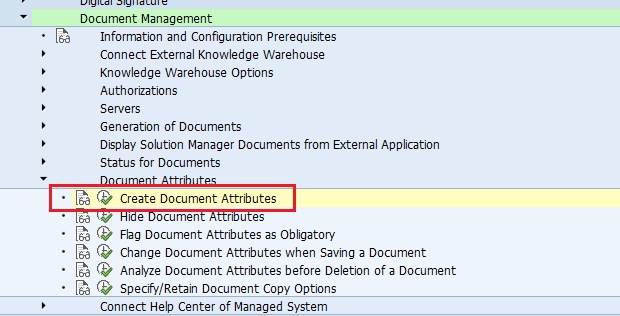
IMG > SAP Solution Manager > Technical Settings > Document Management > Document Attributes > Create Document Attributes
Step 2
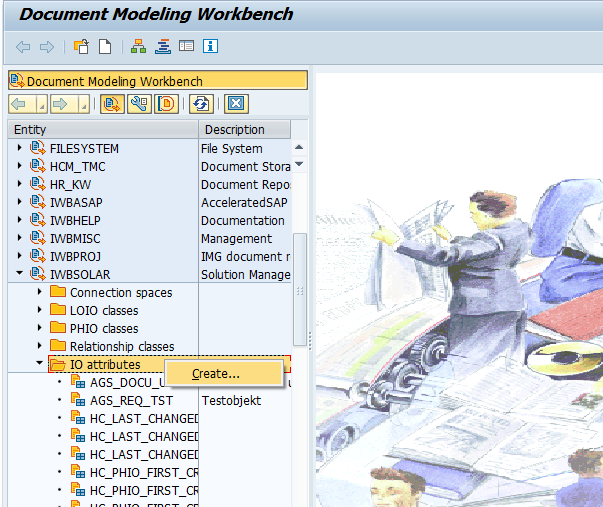
The above step will take you to the Document Modelling Workbench shown as in the below screenshot:

Now go to the entity IWBSOLAR > IO attributes. Right click IO attributes > Create
Give the new attribute you want to create. Here I'm adding ZTEST_PLANEND

Give the new field name(s) and its table. Save and Activate.
Now, add the new IO attribute to the Physical IO class.
Double click SOLARGNSRC_V Multimedia object (source). Add the new attribute(ZTEST_PLANEND) in the 'Instance Attribs' tab.
Save and Activate.

That's it. We are done...
Result:
Go to Transaction SOLAR01 or SOLAR02. Here you can see the custom field(s) that we have added. A new tab 'Other Attributes' will be available now, which contains our custom attribute(s).

Go to Transaction SOLAR_EVAL (Business Blueprint - Documentation - SAP Solution Manager)
In this report also the newly added attribute(s) will be available.
Thanks.
IMG > SAP Solution Manager > Technical Settings > Document Management > Document Attributes > Create Document Attributes
Step 2
The above step will take you to the Document Modelling Workbench shown as in the below screenshot:
Now go to the entity IWBSOLAR > IO attributes. Right click IO attributes > Create
Give the new attribute you want to create. Here I'm adding ZTEST_PLANEND
Give the new field name(s) and its table. Save and Activate.
Now, add the new IO attribute to the Physical IO class.
Double click SOLARGNSRC_V Multimedia object (source). Add the new attribute(ZTEST_PLANEND) in the 'Instance Attribs' tab.
Save and Activate.
That's it. We are done...
Result:
Go to Transaction SOLAR01 or SOLAR02. Here you can see the custom field(s) that we have added. A new tab 'Other Attributes' will be available now, which contains our custom attribute(s).
Go to Transaction SOLAR_EVAL (Business Blueprint - Documentation - SAP Solution Manager)
In this report also the newly added attribute(s) will be available.
Thanks.
 Bluesky


