

- SAP Managed Tags
-
Products and Technology
By Category
-
Groups
Activity Groups
Industry Groups
Influence and Feedback Groups
Interest Groups
Location Groups
Customer Only Groups
- Developers
- Partners
- Events
- Help Center
- Topic Pages
-
Explore SAP
Products
- Autonomous Enterprise
- Artificial intelligence
- Data and analytics
- Autonomous Suite
- Technology platform
- Transformation management
- Midsize business solutions
- Financial management
- Spend management
- Supply chain management
- Human capital management
- Customer experience
- Enterprise resource planning
- Business network
- Sustainability management
- SAP Store
- Try SAP
- View all industries
- Partners
- Services
Learning and Support
-
- Products and Technology
- Groups
- Developers
- Partners
- Events
- Help Center
- Topic Pages
-
Explore SAP
- Explore SAP
-
Products
- Products
- Autonomous Enterprise
- Artificial intelligence
- Data and analytics
- Autonomous Suite
- Technology platform
- Transformation management
- Midsize business solutions
- Financial management
- Spend management
- Supply chain management
- Human capital management
- Customer experience
- Enterprise resource planning
- Business network
- Sustainability management
- SAP Store
- Try SAP
- View all industries
- Partners
- Services
- Learning and Support
- About
- SAP Community
- Archived Community Content
- Archived Groups
- Interest Groups
- SAP Builders
- Knowledge Base
- New way to view payload for process API trigger
Archive
SAP Builders Knowledge Base
Check the knowledge base for essential information to help you get the job done with the SAP Build.
Turn on suggestions
Auto-suggest helps you quickly narrow down your search results by suggesting possible matches as you type.
Showing results for
Success! Subscription added.
Options
- Subscribe to RSS Feed
- Mark as New
- Mark as Read
- Bookmark
- Subscribe
- Printer Friendly Page
- Report Inappropriate Content
The SAP Builders group was sunset as of March 2025, and has therefore been set to read-only.
2024 Mar 05 12:22 PM - edited 2024 Mar 12 1:42 PM

 Dan_Wroblewski
Developer Advocate
Labels
Just noticed the new place to get the required payload for a SAP Build Process Automation – and you CAN CUT AND PASTE from the UI!!
To view the trigger you have to go to the Control Tower > Environments.
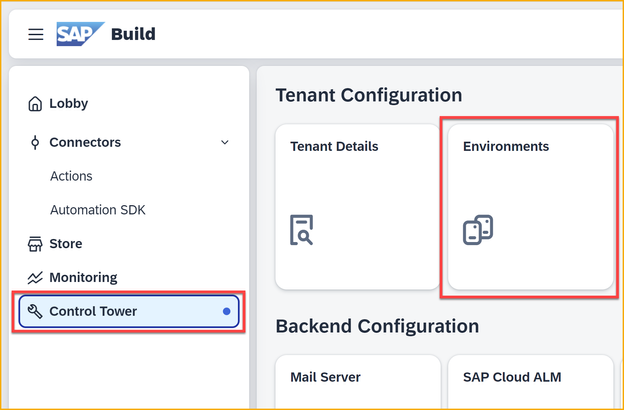
Then you select the environment where you deployed your process and select Unattended Triggers.

Select your trigger (it helps to look at the Project & Version column), and the all the way to the right you'll find the Actions column. Choose View.

You'll see the definition ID, plus the required payload – and you will be able to copy from the window (not with Control-C but with right-click and selecting Copy) 😸
P.S.: The above is relevant for API triggers, not event triggers.
 Bluesky