
-
Products and Technology
By Category
-
Groups
Activity Groups
Industry Groups
Influence and Feedback Groups
Interest Groups
Location Groups
Customer Only Groups
- Developers
- Partners
- Events
- Help Center
- Topic Pages
-
Explore SAP
Products
- Autonomous Enterprise
- Artificial intelligence
- Data and analytics
- Autonomous Suite
- Technology platform
- Transformation management
- Midsize business solutions
- Financial management
- Spend management
- Supply chain management
- Human capital management
- Customer experience
- Enterprise resource planning
- Business network
- Sustainability management
- SAP Store
- Try SAP
- View all industries
- Partners
- Services
Learning and Support
-
- Products and Technology
- Groups
- Developers
- Partners
- Events
- Help Center
- Topic Pages
-
Explore SAP
- Explore SAP
-
Products
- Products
- Autonomous Enterprise
- Artificial intelligence
- Data and analytics
- Autonomous Suite
- Technology platform
- Transformation management
- Midsize business solutions
- Financial management
- Spend management
- Supply chain management
- Human capital management
- Customer experience
- Enterprise resource planning
- Business network
- Sustainability management
- SAP Store
- Try SAP
- View all industries
- Partners
- Services
- Learning and Support
- About

- SAP Community
- Products and Technology
- Additional Blog Posts by Members
- Using SAP Gui for Java on Mac for development

- Subscribe to RSS Feed
- Mark as New
- Mark as Read
- Bookmark
- Subscribe
- Printer Friendly Page
- Report Inappropriate Content
My need for SAP Gui is modest so to say. I primarily do Web Dynpro Java development and hence does not need to use the SAP Gui for much other than fetching RFC and BAPI specs and of course the occasional test drive of the two. Transactions SE37 and BAPI work terrific in SAP Gui for Java. In fact I'll rather use the Java version as it seems a little faster than the WinGUI.
One exception is when I'm developing Web Dynpro ABAP (WD4A). The I of course use the gui a bit more intensive. I have recently discovered that there are some minor glitches in the Java gui regarding the WD4A extension to SE80. These glitches is mostly regarding context menus and the initial layout of property inspectors and tables. This of course can related to the fact I've set Safari as the default browser and Safari isn't supported by the Web Dynpro framework.
Installing SAP Gui for Java on Mac
Seriously, installing the SAP Gui for Java is a breeze. I went to the SWDC and downloaded a installer packed as a jar file. Once downloaded I ran the installer and it created a Mac-ified application which integrates with the Mac OS X just perfectly.
And then the problems started to kick in, not that there is anything wrong with the software, it just appears that I don't know how to configure it. Things work a little different than in the WinGui. Here is hvat you need to do:
After installing Gui for Java, run it and click the New button. It should look something like this:

Click the advanced tab and check the check-box saying user expert.... and write a connection string in the textarea like what I've done below. Remember to substitute what is between the<and > with something from reality.

After this I was able to connect just perfectly.
When running the Java version of Gui, you won't be able to use the new ABAP code editor with code-completion and syntax highlighting. I don't see this as a loss as the ABAP code completion doesn't really complete anything for me, and the syntax highlighting almost none existent when compared to Eclipse in which i used to work. I recognise the fact that a lot of ABAP'ers love and cherish the new features, so if you're a highlighting completion lover, stay clear of Java GUI 🙂
The bapi transaction
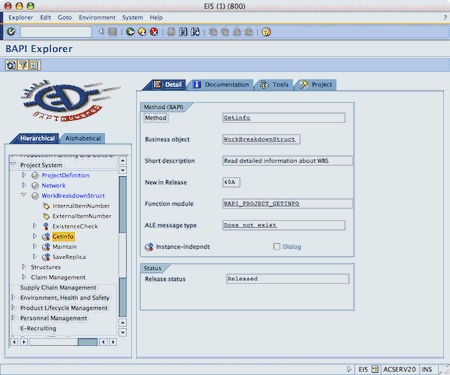
As stated earlier, the BAPI transaction works beautifully. I only use it to read documentation and as a shortcut helper to the function builder where I can perform tests. This is also the intended usage I guess.
The function builder

The function builder also work OK. Btw I never use the function builder for anything else than testing RFCs and BAPIs. When I write RFCs, which I don't do very often, I use the function builder under se80 (yeah it's the same, i know).
Web Dynpro builder

This describes the most common problem with Gui for Java. All properties sections are totally collapsed by default and their state gets reset every time the window is re-painted. Very annoying.
If you were to right click the context node in the views context, you might expect to se a context menu giving you the relevant context manipulation choices. However this is not the case as nothing shows up! This is a complete show stopper as there is no other way to get to these functions.
Conclusion
There is still a way to go for SAP before they have a working client on other platforms than Windows, or at least one that can be used for development. Perhaps SAP should make a native client for Mac as well? And what about the Linux user, I quess they're left out in the cold as well.
 Bluesky
- Making Web Apps IPv6-Ready: The IPv6 Web Resource Checker (webres6) in Technology Blog Posts by SAP
- Joule Studio: Intent-Based Development for Creating and Running AI Agents at Scale in Technology Blog Posts by SAP
- SAP BTP - CI - How I Built an Open-Source Enterprise Custom Kafka Adapter from Scratch - Part I in Technology Blog Posts by Members
- AI-Assisted Development in SAP Cloud Integration: Four Features You Should Know in Technology Q&A
- Develop RAP-Based SAP Fiori Applications in Minutes with SAP Fiori Tools AI Project Accelerator in Technology Blog Posts by SAP


