
-
Products and Technology
By Category
-
Groups
Activity Groups
Industry Groups
Influence and Feedback Groups
Interest Groups
Location Groups
Customer Only Groups
- Developers
- Partners
- Events
- Help Center
- Topic Pages
-
Explore SAP
Products
- Autonomous Enterprise
- Artificial intelligence
- Data and analytics
- Autonomous Suite
- Technology platform
- Transformation management
- Midsize business solutions
- Financial management
- Spend management
- Supply chain management
- Human capital management
- Customer experience
- Enterprise resource planning
- Business network
- Sustainability management
- SAP Store
- Try SAP
- View all industries
- Partners
- Services
Learning and Support
-
- Products and Technology
- Groups
- Developers
- Partners
- Events
- Help Center
- Topic Pages
-
Explore SAP
- Explore SAP
-
Products
- Products
- Autonomous Enterprise
- Artificial intelligence
- Data and analytics
- Autonomous Suite
- Technology platform
- Transformation management
- Midsize business solutions
- Financial management
- Spend management
- Supply chain management
- Human capital management
- Customer experience
- Enterprise resource planning
- Business network
- Sustainability management
- SAP Store
- Try SAP
- View all industries
- Partners
- Services
- Learning and Support
- About
- SAP Community
- Products and Technology
- Technology
- Technology Q&A
- Weird WF Task behavior on Agent Assignment - Pleas...
Weird WF Task behavior on Agent Assignment - Please check attached screen shot
- Subscribe to RSS Feed
- Mark Question as New
- Mark Question as Read
- Bookmark
- Subscribe
- Printer Friendly Page
- Report Inappropriate Content
- SAP Managed Tags
- SAP Business Workflow
Hi Experts,
I am facing weird situation, please have a look in below steps:

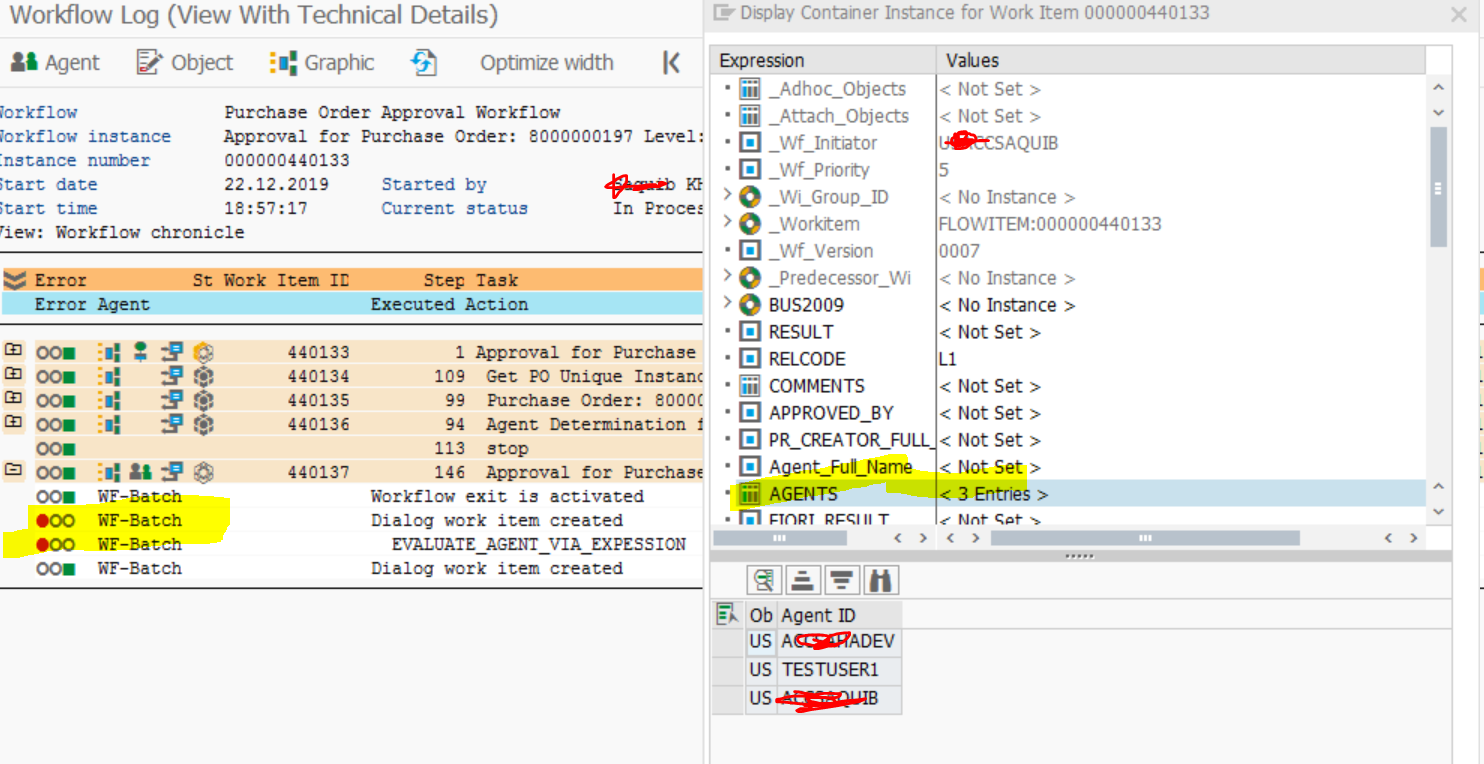
Workitem set to Committed and Confimation column in inbox also set with flag - confirm end of processing either I set it in TASK or not


When I have created new task will all the same bindings with passing same agent table in expression showing error in agent determination while agent determination step is correctly return value...

Not able to know the reason of the error while table AGENT has error -
Thanks,
Saquib
 Bluesky
Need more details?
Request clarification before answering.
Accepted Solutions (1)
Accepted Solutions (1)

- Mark as New
- Bookmark
- Subscribe
- Subscribe to RSS Feed
- Permalink
- Report Inappropriate Content
Hi Saquib,
1. Does Workflow Log View for TS99400067 look exact same in each row & each workflow step, as TS99400118?
2. You ran both tasks in same system, generating same 3 SAP userids as Agents? same 3 agents in TS99400067? Are all 3 SAP userids assigned to you?
3. Do all 3 SAP userids exist and are active in the SAP systemID(SID)/instance you are running in?
4. Workflow Log: Looks like: row 4: says: "Agent Determination failed"? What else does Workflow Log say? I cannot read the right side of Workflow Log (covered by Display Container pop-up).
5. on row 6, click the Agent Icon (icon of 2 people, 1 gray, 1 green), what will it show? same in TS99400067 workflow log?
6. In your "Dear Approver" screenshot, Purchase Order is not populated here. Is PO populated in TS99400067?
7. so I'm wondering of there may be a delay; consider a wait statement if custom
8. BUS2009 is No Instance. Same for step TS99400067?
9. since your SAP userid is also workflow initiator, is your SAP userid being excluded by both tasks TS99400067 & TS99400118, as an available agent to approve?
10. in TS99400067 workflow view, is workflow exit activated?
Happy New Year.
You must be a registered user to add a comment. If you've already registered, sign in. Otherwise, register and sign in.
Answers (1)
Answers (1)
- Mark as New
- Bookmark
- Subscribe
- Subscribe to RSS Feed
- Permalink
- Report Inappropriate Content
Hi,
Please check the agent assignment of the task itself, maybe this is conflicting something.
I also noted the workflow exit part of the technical log, please check the tab Program Exits for this step in the worflow definition.
And finally, try if refreshing the HR buffer solves the problem (SWU_OBUF)
Kind regards, Rob Dielemans
You must be a registered user to add a comment. If you've already registered, sign in. Otherwise, register and sign in.
- SAP Readiness Check - FDQ Collector Job Running for Extended Duration in Technology Q&A
- SAP FSA Business Rules: Practical Examples to Avoid a Business Rule Jungle in Technology Blog Posts by SAP
- Modernizing High-Volume Customer Accounting: A Boundary-to-Ledger Framework for SAP FI-CA/PSCD in Technology Blog Posts by Members
- sap-harness Series (2) — How the ADT mirror works in Technology Blog Posts by Members
- SAP Joule for Consultants Expert Workspace: The Essential Configuration Guide in Technology Blog Posts by SAP
| User | Count |
|---|---|
| 5 | |
| 4 | |
| 4 | |
| 3 | |
| 2 | |
| 2 | |
| 2 | |
| 2 | |
| 2 | |
| 2 |


You must be a registered user to add a comment. If you've already registered, sign in. Otherwise, register and sign in.