
-
Products and Technology
By Category
-
Groups
Activity Groups
Industry Groups
Influence and Feedback Groups
Interest Groups
Location Groups
Customer Only Groups
- Developers
- Partners
- Events
- Help Center
- Topic Pages
-
Explore SAP
Products
- Autonomous Enterprise
- Artificial intelligence
- Data and analytics
- Autonomous Suite
- Technology platform
- Transformation management
- Midsize business solutions
- Financial management
- Spend management
- Supply chain management
- Human capital management
- Customer experience
- Enterprise resource planning
- Business network
- Sustainability management
- SAP Store
- Try SAP
- View all industries
- Partners
- Services
Learning and Support
-
- Products and Technology
- Groups
- Developers
- Partners
- Events
- Help Center
- Topic Pages
-
Explore SAP
- Explore SAP
-
Products
- Products
- Autonomous Enterprise
- Artificial intelligence
- Data and analytics
- Autonomous Suite
- Technology platform
- Transformation management
- Midsize business solutions
- Financial management
- Spend management
- Supply chain management
- Human capital management
- Customer experience
- Enterprise resource planning
- Business network
- Sustainability management
- SAP Store
- Try SAP
- View all industries
- Partners
- Services
- Learning and Support
- About

- SAP Community
- Products and Technology
- Technology
- Technology Q&A
- SMP Agentry setup for Mac
- Subscribe to RSS Feed
- Mark Question as New
- Mark Question as Read
- Bookmark
- Subscribe
- Printer Friendly Page
- Report Inappropriate Content
SMP Agentry setup for Mac

- Subscribe to RSS Feed
- Mark Question as New
- Mark Question as Read
- Bookmark
- Subscribe
- Printer Friendly Page
- Report Inappropriate Content
on 2019 May 20 4:53 PM
- SAP Managed Tags
- Agentry
- SAP Mobile Platform
After having followed [this blog](https://blogs.sap.com/2015/10/13/how-to-create-an-agentry-client-for-ios-using-smp-sdk-sp10-and-xcod...) on setting up Agentry for Mac using the SAP Sample, the app crashes on my emulator after passing the SAP splash screen and trying to boot the actual app. The warning I believe to cause the "signal abort" error is:
ld: warning: ignoring file ../../../iOS/SMPAgentryClient.framework/SMPAgentryClient, missing required architecture x86_64 in file ../../../iOS/SMPAgentryClient.framework/SMPAgentryClient (3 slices)I have tried adjusting the Architectures and Valid Architectures to $(ARCHS_STANDARD_32_BIT) and "i386 armv7 armv7s" respectively, however when I remove `arm64` from the valid architectures I am denied access to the xcode project file and cannot run the project (build completes successfully). I found these architecture types by running the `file` command on the SMPAgentryClient file, as per the below.

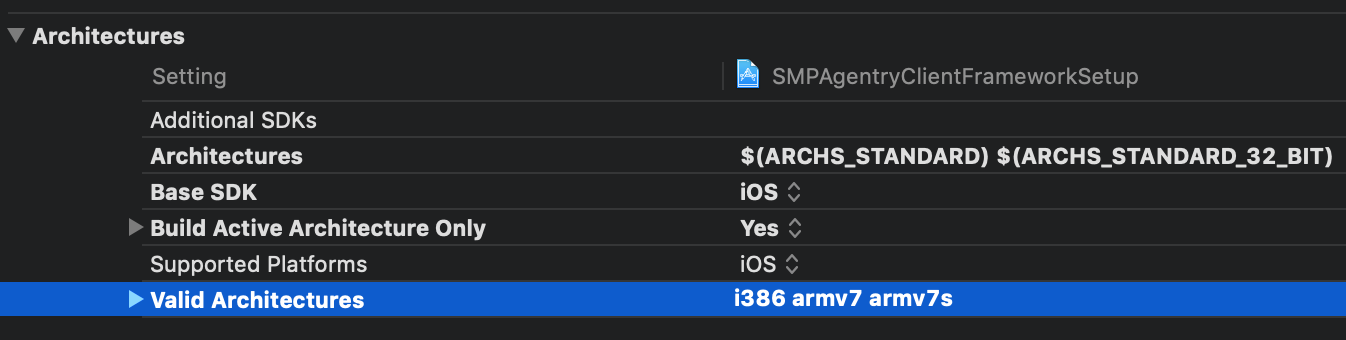
How can I run this sample project without errors and crashes?
Need more details?
Request clarification before answering.
- Mark as New
- Bookmark
- Subscribe
- Subscribe to RSS Feed
- Permalink
- Report Inappropriate Content
Downloading SMP 3.1 seems to make everything run correctly, originally I used SMP 3.0 and that caused all the issues.
You must be a registered user to add a comment. If you've already registered, sign in. Otherwise, register and sign in.
 Bluesky
- Is it possible to integrate SAP Sales Cloud Version 2 via the Groupware Integration when using an on in Technology Q&A
- Integrating GitHub with SAP Integration Suite: A Complete Guide to Version Control and DevOps in Technology Blog Posts by Members
- Automating SAP Security Tasks and SoD Analysis with ZSecTools (Open-Source) in Technology Blog Posts by Members
- Error while deploying Iflow with AMQP adapter( Event mesh scenario) in Technology Q&A
- Integrating Amazon FBA with SAP S4 HANA - Part 3 in Technology Blog Posts by Members
| User | Count |
|---|---|
| 6 | |
| 6 | |
| 5 | |
| 3 | |
| 3 | |
| 2 | |
| 2 | |
| 2 | |
| 1 | |
| 1 |


You must be a registered user to add a comment. If you've already registered, sign in. Otherwise, register and sign in.