
-
Products and Technology
By Category
-
Groups
Activity Groups
Industry Groups
Influence and Feedback Groups
Interest Groups
Location Groups
Customer Only Groups
- Developers
- Partners
- Events
- Help Center
- Topic Pages
-
Explore SAP
Products
- Autonomous Enterprise
- Artificial intelligence
- Data and analytics
- Autonomous Suite
- Technology platform
- Transformation management
- Midsize business solutions
- Financial management
- Spend management
- Supply chain management
- Human capital management
- Customer experience
- Enterprise resource planning
- Business network
- Sustainability management
- SAP Store
- Try SAP
- View all industries
- Partners
- Services
Learning and Support
-
- Products and Technology
- Groups
- Developers
- Partners
- Events
- Help Center
- Topic Pages
-
Explore SAP
- Explore SAP
-
Products
- Products
- Autonomous Enterprise
- Artificial intelligence
- Data and analytics
- Autonomous Suite
- Technology platform
- Transformation management
- Midsize business solutions
- Financial management
- Spend management
- Supply chain management
- Human capital management
- Customer experience
- Enterprise resource planning
- Business network
- Sustainability management
- SAP Store
- Try SAP
- View all industries
- Partners
- Services
- Learning and Support
- About

- SAP Community
- Products and Technology
- Technology
- Technology Q&A
- "No Global Scripts Found" error
"No Global Scripts Found" error
- Subscribe to RSS Feed
- Mark Question as New
- Mark Question as Read
- Bookmark
- Subscribe
- Printer Friendly Page
- Report Inappropriate Content

- SAP Managed Tags
- SAP Screen Personas
Good morning.
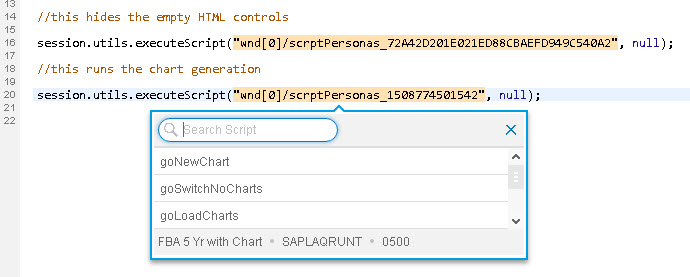
I would like to call a script from within another script on my flavor. I would like to use the session.utils.executeScript method but I periodically get a "No Global Scripts Found" error.
How is a script determined to be "Global"? It's frustrating because it is manifesting somewhat randomly.
Thank you in advance,
Cristin

 Bluesky
Know the answer?
Help others by sharing your knowledge.
AnswerNeed more details?
Request clarification before answering.
Accepted Solutions (0)
Answers (2)
Answers (2)

 cris_hansen
- Mark as New
- Bookmark
- Subscribe
- Subscribe to RSS Feed
- Permalink
- Report Inappropriate Content
Hi Cristin,
An example on how to call global scripts are available in this wiki page.
Kind regards,
Cris
You must be a registered user to add a comment. If you've already registered, sign in. Otherwise, register and sign in.
 Tamas_Hoznek
- Mark as New
- Bookmark
- Subscribe
- Subscribe to RSS Feed
- Permalink
- Report Inappropriate Content
My guess would be that in the second case, the other scripts belong to a different screen than the one you are working on.
Global scripts would be the ones you store as resource in the Admin transaction and refer to them with session.utils.include
You must be a registered user to add a comment. If you've already registered, sign in. Otherwise, register and sign in.
- Mark as New
- Bookmark
- Subscribe
- Subscribe to RSS Feed
- Permalink
- Report Inappropriate Content
Hi Tamas.
I'm not sure I understand. In my first example, where the dropdown exists with values, those scripts exist solely in the flavor itself and are not contained in the resources in the admin transaction.
In the second example, all the scripts were contained as resources in the admin transaction but this proved difficult to manage so I moved them back to being explicitly in the flavor. Sometimes they appear in the dropdown, sometimes they do not. It's very strange....
Cristin
Tamas_Hoznek
- Mark as New
- Bookmark
- Subscribe
- Subscribe to RSS Feed
- Permalink
- Report Inappropriate Content
Scripts are tied to a specific screen. In your screen shots, you can see the program name and the screen number at the bottom of the popup when selecting the script.
In the second case, it appears there are no other scripts belonging to that screen, whereas in the first screen shot, it looks like you see the other scripts you created for the same screen earlier.
Are you saying that the scripts you would expect to appear in the list are all tied to the same exact screen, but they still don't show up?
- Mark as New
- Bookmark
- Subscribe
- Subscribe to RSS Feed
- Permalink
- Report Inappropriate Content
Yes, that is what I am saying.
I understand my above example are confusing because they are two different screens. But each of the screens have scripts and I was illustrating how one was popping them up and the other is not.
I have since logged out and back in and the example screen showing "No Global Scripts Found" is now finding scripts. Nothing has been changed 😞

Tamas_Hoznek
- Mark as New
- Bookmark
- Subscribe
- Subscribe to RSS Feed
- Permalink
- Report Inappropriate Content
- How SAP Cloud ALM Supports Your SAP Cloud ERP Private Upgrade Today – End-to-End in Technology Blog Posts by SAP
- SAP Integration Suite -Transforming SAP PI/PO Java Mappings with Integration Content Migration Agent in Technology Blog Posts by SAP
- ABAP + MCP: Let AI Do Real Development in Your SAP System in Technology Blog Posts by Members
- Simplified SAP Joule for Consultants (J4C) Activation using CIAS Automation in Technology Blog Posts by SAP
- What If We Could Predict a Supplier Quality Failure Before It Happens? in Technology Blog Posts by SAP
| User | Count |
|---|---|
| 5 | |
| 4 | |
| 4 | |
| 3 | |
| 2 | |
| 2 | |
| 2 | |
| 2 | |
| 2 | |
| 2 |


You must be a registered user to add a comment. If you've already registered, sign in. Otherwise, register and sign in.