
-
Products and Technology
By Category
-
Groups
Activity Groups
Industry Groups
Influence and Feedback Groups
Interest Groups
Location Groups
Customer Only Groups
- Developers
- Partners
- Events
- Help Center
- Topic Pages
-
Explore SAP
Products
- Autonomous Enterprise
- Artificial intelligence
- Data and analytics
- Autonomous Suite
- Technology platform
- Transformation management
- Midsize business solutions
- Financial management
- Spend management
- Supply chain management
- Human capital management
- Customer experience
- Enterprise resource planning
- Business network
- Sustainability management
- SAP Store
- Try SAP
- View all industries
- Partners
- Services
Learning and Support
-
- Products and Technology
- Groups
- Developers
- Partners
- Events
- Help Center
- Topic Pages
-
Explore SAP
- Explore SAP
-
Products
- Products
- Autonomous Enterprise
- Artificial intelligence
- Data and analytics
- Autonomous Suite
- Technology platform
- Transformation management
- Midsize business solutions
- Financial management
- Spend management
- Supply chain management
- Human capital management
- Customer experience
- Enterprise resource planning
- Business network
- Sustainability management
- SAP Store
- Try SAP
- View all industries
- Partners
- Services
- Learning and Support
- About
- SAP Community
- Products and Technology
- Technology
- Technology Q&A
- printer paper size is different from default setti...
printer paper size is different from default setting
- Subscribe to RSS Feed
- Mark Question as New
- Mark Question as Read
- Bookmark
- Subscribe
- Printer Friendly Page
- Report Inappropriate Content
- SAP Managed Tags
- SAP Crystal Reports, version for Visual Studio
Hi,
I had set paper size to be 8inx7in, named the form kennam and set to be default paper size on dot matrix printer preference -> advanced -> paper size.

But when I try to print out that report by running the program, It said the paper size is letter not kennam.
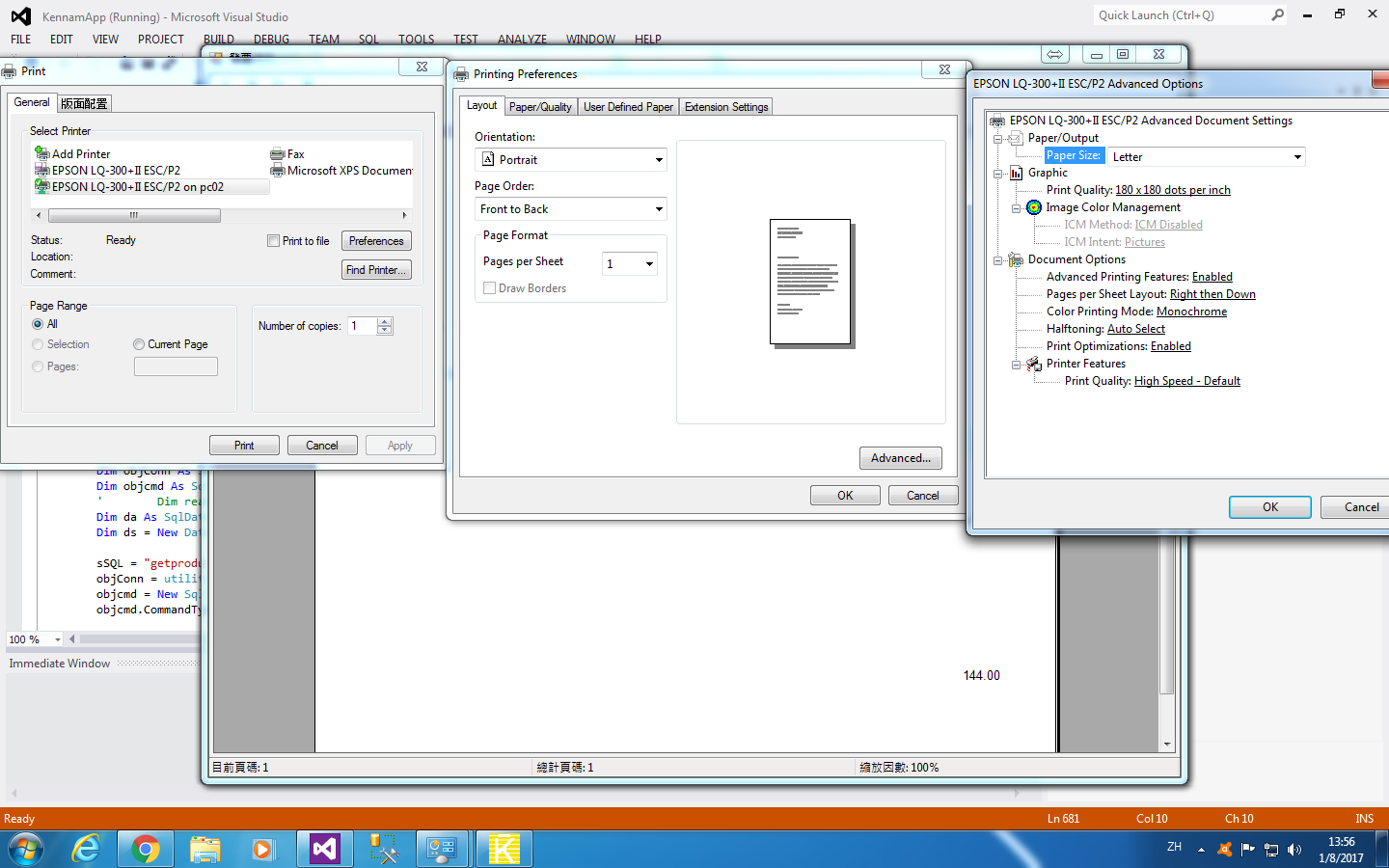
By the way, I set up default paper size to be kennam, why before printing, it set paper size to be letter.
Anyway to fix this issue?
 Bluesky
Need more details?
Request clarification before answering.
Accepted Solutions (1)
Accepted Solutions (1)

 former_member11
- Mark as New
- Bookmark
- Subscribe
- Subscribe to RSS Feed
- Permalink
- Report Inappropriate Content
Didn't you already post this question somewhere?
https://answers.sap.com/questions/266560/index.html
So what is different now?
I did the same thing using my Epson printer. I then open CR Designer and used Page Setup to select that paper size and saved the report.

I can't test in my app right now, I'm installing SP 21 Beta but will when it's done.
Which API are you using, P2P or POC or from the Viewer Print button, which can also be set to either P2P or POC.
Don
You must be a registered user to add a comment. If you've already registered, sign in. Otherwise, register and sign in.

- Mark as New
- Bookmark
- Subscribe
- Subscribe to RSS Feed
- Permalink
- Report Inappropriate Content
Answers (1)
Answers (1)
former_member11- Mark as New
- Bookmark
- Subscribe
- Subscribe to RSS Feed
- Permalink
- Report Inappropriate Content
P2P = PrintToPrint ( default API when using the Viewers Print button ) USes the default printer properties and ignore what is selected in code.
POC = PrintOutputController ( selectable in the properties of the Viewer or in code )
You must be a registered user to add a comment. If you've already registered, sign in. Otherwise, register and sign in.
- Principal Propagation from BTP to S/4HANA Public Cloud: Configuration Notes and Open Questions in Technology Blog Posts by Members
- Logic for taking the batch or other class character values in Technology Q&A
- SAP Just Became AI-Agent Ready — Here's a Step-by-Step MCP Walkthrough in Technology Blog Posts by Members
- Automating Material Data Extracts: A Multi-Format Email Report in ABAP in Technology Blog Posts by Members
- SAP Readiness Check - FDQ Collector Job Running for Extended Duration in Technology Q&A
| User | Count |
|---|---|
| 4 | |
| 4 | |
| 4 | |
| 3 | |
| 2 | |
| 2 | |
| 2 | |
| 2 | |
| 2 | |
| 2 |


You must be a registered user to add a comment. If you've already registered, sign in. Otherwise, register and sign in.