
-
Products and Technology
By Category
-
Groups
Activity Groups
Industry Groups
Influence and Feedback Groups
Interest Groups
Location Groups
Customer Only Groups
- Developers
- Partners
- Events
- Help Center
- Topic Pages
-
Explore SAP
Products
- Autonomous Enterprise
- Artificial intelligence
- Data and analytics
- Autonomous Suite
- Technology platform
- Transformation management
- Midsize business solutions
- Financial management
- Spend management
- Supply chain management
- Human capital management
- Customer experience
- Enterprise resource planning
- Business network
- Sustainability management
- SAP Store
- Try SAP
- View all industries
- Partners
- Services
Learning and Support
-
- Products and Technology
- Groups
- Developers
- Partners
- Events
- Help Center
- Topic Pages
-
Explore SAP
- Explore SAP
-
Products
- Products
- Autonomous Enterprise
- Artificial intelligence
- Data and analytics
- Autonomous Suite
- Technology platform
- Transformation management
- Midsize business solutions
- Financial management
- Spend management
- Supply chain management
- Human capital management
- Customer experience
- Enterprise resource planning
- Business network
- Sustainability management
- SAP Store
- Try SAP
- View all industries
- Partners
- Services
- Learning and Support
- About

- SAP Community
- Products and Technology
- Technology
- Technology Q&A
- New Input Control Button missing in WEBI Report
New Input Control Button missing in WEBI Report
- Subscribe to RSS Feed
- Mark Question as New
- Mark Question as Read
- Bookmark
- Subscribe
- Printer Friendly Page
- Report Inappropriate Content

- SAP Managed Tags
- SAP BusinessObjects - Web Intelligence (WebI)
Hi,
I have giving almost all the permission related to Web Intelligence to a user but the New button for Input Control doesn't show up in Design mode. It is showing up if I log in as administrator. These two buttons are missing for normal users.
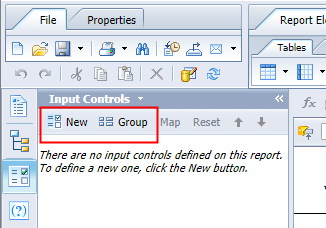
What permission do I need to assign to the user? The user already have all the permissions under Application -> Web Intelligence.
Thanks.
 Bluesky
Need more details?
Request clarification before answering.
Accepted Solutions (0)
Answers (2)
Answers (2)
- Mark as New
- Bookmark
- Subscribe
- Subscribe to RSS Feed
- Permalink
- Report Inappropriate Content
Hi Tom,
The user already has those permissions. I even tried granting the user Full Control to the folder (and the Webi report). But nothing seems to work, other than Administrator.
Thanks,
Henry
You must be a registered user to add a comment. If you've already registered, sign in. Otherwise, register and sign in.

- Mark as New
- Bookmark
- Subscribe
- Subscribe to RSS Feed
- Permalink
- Report Inappropriate Content
Hi Henry,
You will need to grant the following three Web Intelligence application rights to your user:
- Reporting - create and edit input controls Enables a user to create and to edit input controls
- Reporting - create and edit report filters and consume input controls Enables a user to creation and editing of report filters and input controls (Input Controls pane in the Left Pane are not displayed when disabled)
- Reporting - enable formatting Enables a user to edit report formatting Without this access right, the Design and Data mode is not available.
Kind regards,
Tom
You must be a registered user to add a comment. If you've already registered, sign in. Otherwise, register and sign in.
- SAP Master Data Governance on SAP S/4HANA Cloud Public Edition · Release 2608 - Highlights in Technology Blog Posts by SAP
- RSPC process chain transport does not transport connections between process variants in Technology Q&A
- AI-Powered Forecasting with SAC, SAP RPT & Gen AI - Part 6: From Proof of Concept to Production in Technology Blog Posts by Members
- Who Still Has Access to My SAP BTP Subaccount? in Technology Blog Posts by Members
- Automation of Communication Channel Monitoring in SAP PI/PO in Technology Blog Posts by Members
| User | Count |
|---|---|
| 5 | |
| 4 | |
| 4 | |
| 3 | |
| 2 | |
| 2 | |
| 2 | |
| 2 | |
| 2 | |
| 2 |


You must be a registered user to add a comment. If you've already registered, sign in. Otherwise, register and sign in.