
-
Products and Technology
By Category
-
Groups
Activity Groups
Industry Groups
Influence and Feedback Groups
Interest Groups
Location Groups
Customer Only Groups
- Developers
- Partners
- Events
- Help Center
- Topic Pages
-
Explore SAP
Products
- Autonomous Enterprise
- Artificial intelligence
- Data and analytics
- Autonomous Suite
- Technology platform
- Transformation management
- Midsize business solutions
- Financial management
- Spend management
- Supply chain management
- Human capital management
- Customer experience
- Enterprise resource planning
- Business network
- Sustainability management
- SAP Store
- Try SAP
- View all industries
- Partners
- Services
Learning and Support
-
- Products and Technology
- Groups
- Developers
- Partners
- Events
- Help Center
- Topic Pages
-
Explore SAP
- Explore SAP
-
Products
- Products
- Autonomous Enterprise
- Artificial intelligence
- Data and analytics
- Autonomous Suite
- Technology platform
- Transformation management
- Midsize business solutions
- Financial management
- Spend management
- Supply chain management
- Human capital management
- Customer experience
- Enterprise resource planning
- Business network
- Sustainability management
- SAP Store
- Try SAP
- View all industries
- Partners
- Services
- Learning and Support
- About
- SAP Community
- Products and Technology
- Technology
- Technology Q&A
- IRPA API Trigger - Invalid API Key
- Subscribe to RSS Feed
- Mark Question as New
- Mark Question as Read
- Bookmark
- Subscribe
- Printer Friendly Page
- Report Inappropriate Content
IRPA API Trigger - Invalid API Key

- Subscribe to RSS Feed
- Mark Question as New
- Mark Question as Read
- Bookmark
- Subscribe
- Printer Friendly Page
- Report Inappropriate Content
on 2020 Feb 06 11:32 AM
- SAP Managed Tags
- SAP Intelligent Robotic Process Automation
Hi All,
I created an API trigger for my IRPA Deployment. I followed the SAP Help document and tested the post URL using POSTMAN and it started a job and I could see it on the Cloud Factory. I copied the code generated by POSTMAN and tried using it in an AJAX call in my UI5 app so that I can start a job through my UI5 App. I get this error "status: 403, code: "SAP_IPA_12019", severity: "ERROR", message: "The API key is invalid."
What could I be doing wrong here?
Thanks in advance!
Best Regards
TP
Need more details?
Request clarification before answering.
Accepted Solutions (1)
Accepted Solutions (1)

- Mark as New
- Bookmark
- Subscribe
- Subscribe to RSS Feed
- Permalink
- Report Inappropriate Content
Hi Teena,
my colleague Pavel might have a solution for you:
Please put the “irpa-trigger-token” in the body (instead of the header) as follows:
{
"irpaTriggerToken": "xxxxxxxxxxxxxxxxxxxx"
}
I think the problem lies with the Destination Service – it does not transmit the header.
Please let me know if this doesn’t work and we will look for another solution.
Best Regards
Christoph
You must be a registered user to add a comment. If you've already registered, sign in. Otherwise, register and sign in.
- Mark as New
- Bookmark
- Subscribe
- Subscribe to RSS Feed
- Permalink
- Report Inappropriate Content
Answers (4)
Answers (4)

- Mark as New
- Bookmark
- Subscribe
- Subscribe to RSS Feed
- Permalink
- Report Inappropriate Content
Hello christoph.gross,
putting the irpa-trigger-token in the body worked for me as well, when I tested it manually via Postman. However I got another error in my UI5 Application when I try to fetch the token.
I configured the following destination to the token endpoint.

Then I referenced that in my neo-app.json and implemented an ajax call in my code.
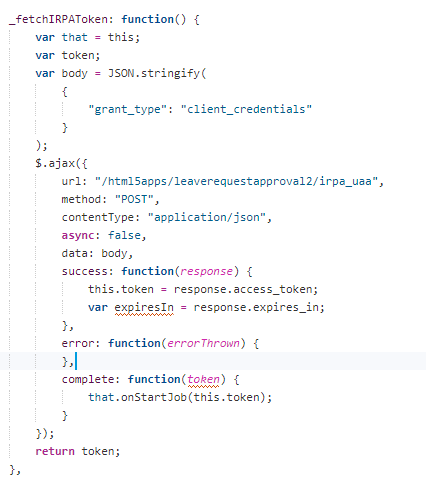
When I run the application I get the following error message:

Do you have any suggestions why it is not working. I assume that the grant_type "client_credentials" is correctly specified?
Thanks in advance and best regards
Christian
You must be a registered user to add a comment. If you've already registered, sign in. Otherwise, register and sign in.
- Mark as New
- Bookmark
- Subscribe
- Subscribe to RSS Feed
- Permalink
- Report Inappropriate Content
Hi TP,
could you try to generate a new irpa trigger token? It seems your current one is invalid.
To do this just edit your trigger and click on the "Generate new token" button
 2020-02-07-14-29-44-sap-intelligent-robotic-proces.png(75.9 kB)
You must be a registered user to add a comment. If you've already registered, sign in. Otherwise, register and sign in.
- Mark as New
- Bookmark
- Subscribe
- Subscribe to RSS Feed
- Permalink
- Report Inappropriate Content
- Mark as New
- Bookmark
- Subscribe
- Subscribe to RSS Feed
- Permalink
- Report Inappropriate Content
Hi Mark Teichmann,
Thanks a lot for your quick response. My answer to all your questions is yes.
Here is my AJAX call:

and Here is how I set the destination:

Network:

I trigger the call from my UI5 App .

Before this attempt of copying the code generated by POSTMAN, I first tried fetching the token in my program and passing it to the POST ajax call. I received the token, but received the same error for the trigger API.

The destination for this call is as below:

My app is running in my actual account and I created the IRPA stuff from my trial account. Don't know if that matters..
Hope you can find a problem in my code and give me the solution :).
Thanks a lot in advance!
Best Regards
TP
You must be a registered user to add a comment. If you've already registered, sign in. Otherwise, register and sign in.

- Mark as New
- Bookmark
- Subscribe
- Subscribe to RSS Feed
- Permalink
- Report Inappropriate Content
Hi TP
first I would double check that the API key really matches the one you used in POSTMAN. Maybe while copying you missed a character or added a SPACE somewhere?
If that is not the reason, is the OAuth authentication working or are you already getting the 403 error here? Do you ave the Header field irpa-trigger-token in your call? Is the Content-type set to application-json? Can you provide your code of the AJAX call to check if something is missing?
You must be a registered user to add a comment. If you've already registered, sign in. Otherwise, register and sign in.
 Bluesky
- SAP Cloud Integration (CI/CPI) - Self-Healing iFlows with n8n and AI in Technology Blog Posts by SAP
- Implementing RAP Action Parameter Value Help Using CDS Abstract Entity in SAP RAP in Technology Blog Posts by Members
- A Practical Approach to Automating External Parameter Changes in SAP Integration Suite in Technology Blog Posts by Members
- Building Custom Joule Capabilities: Message Types in Practice in Technology Blog Posts by SAP
- Disabling CSRF Token Validation in SAP for Testing with Postman and External Applications in Technology Blog Posts by Members
| User | Count |
|---|---|
| 8 | |
| 5 | |
| 5 | |
| 4 | |
| 4 | |
| 3 | |
| 2 | |
| 2 | |
| 2 | |
| 2 |


You must be a registered user to add a comment. If you've already registered, sign in. Otherwise, register and sign in.