
-
Products and Technology
By Category
-
Groups
Activity Groups
Industry Groups
Influence and Feedback Groups
Interest Groups
Location Groups
Customer Only Groups
- Developers
- Partners
- Events
- Help Center
- Topic Pages
-
Explore SAP
Products
- Autonomous Enterprise
- Artificial intelligence
- Data and analytics
- Autonomous Suite
- Technology platform
- Transformation management
- Midsize business solutions
- Financial management
- Spend management
- Supply chain management
- Human capital management
- Customer experience
- Enterprise resource planning
- Business network
- Sustainability management
- SAP Store
- Try SAP
- View all industries
- Partners
- Services
Learning and Support
-
- Products and Technology
- Groups
- Developers
- Partners
- Events
- Help Center
- Topic Pages
-
Explore SAP
- Explore SAP
-
Products
- Products
- Autonomous Enterprise
- Artificial intelligence
- Data and analytics
- Autonomous Suite
- Technology platform
- Transformation management
- Midsize business solutions
- Financial management
- Spend management
- Supply chain management
- Human capital management
- Customer experience
- Enterprise resource planning
- Business network
- Sustainability management
- SAP Store
- Try SAP
- View all industries
- Partners
- Services
- Learning and Support
- About

- SAP Community
- Products and Technology
- Technology
- Technology Q&A
- Fetching Backup Catalog SAP DBTech JDBC invalid ar...
Fetching Backup Catalog SAP DBTech JDBC invalid argument file access error
- Subscribe to RSS Feed
- Mark Question as New
- Mark Question as Read
- Bookmark
- Subscribe
- Printer Friendly Page
- Report Inappropriate Content

- SAP Managed Tags
- SAP HANA
I'm trying to Restore a tenant from a backup of another tenant in an SAP HANA 2.0 SPS3 system using HANA Studio.
But I get the "Fetching Backup Catalog... has encounter a problem" error. It reads: com.sap.ndb.studion.backup.wizard.recovery.StartegyOutputException: com.sap.db.jdbc.exceptions.JDBCDriverException: SAP DBTech JDBC: [8]: invalid argument: file access error: /usr/sap/<sid>/HDB01/<server_name>/trace/strategyOutput.xml:2 (No such file or directory).
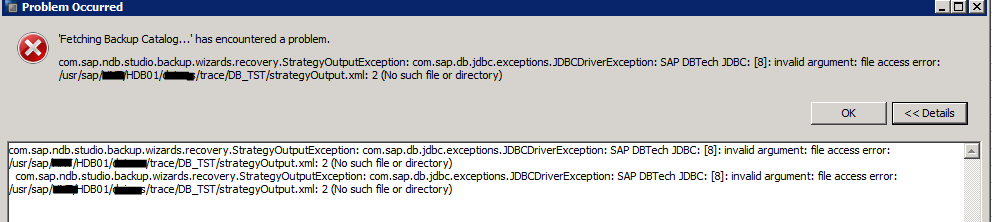
I have found several SAP Notes, including 2762503, setting the catalog_backup_ising_backint parameter to true.

To recreate this error, From the SYSTEMDB@<SID> (SYSTEM) right click and select Backup and Recovery -> Recover Tenant Database... Then Select the target <sid>, then Recover the database to a specific data backup. Then select Backint System Copy and enter the Source System <source SID>@<SID>. It Stops the target database. Searches for and errors with the above error message.
What am I missing? I believe it should find the Backup Catalog and we then pick the backup to be restored back to.
As a second purpose, after I can get the test restore from the same database, I want to be able to search and find the production system backups to be able to restore from in a DRP situation.
Thank you for your help
Ken
 Bluesky
Need more details?
Request clarification before answering.
Accepted Solutions (0)
Answers (2)
Answers (2)

- Mark as New
- Bookmark
- Subscribe
- Subscribe to RSS Feed
- Permalink
- Report Inappropriate Content
Hi Ken,
You went through correct note 2762503.
Did you set catalog_backup_using_backint = true ( in source system) after the issue? If so, trigger a new backup at source and try to recover it at target (as the old source backups don't have catalog backedup).
catalog_backup_using_backint allows the catalog to be backed up i.e, required to read the particular backup. Ensure that in source system , the value for catalog_backup_using_backint is 'true 'and the catalogs are backedup at the path global.ini/[persistence]/basepath_catalogbackup
If the issue continues, please provide the values of Source system for below parameters
- global.ini/[persistence]/basepath_catalogbackup
- global.ini/[persistence]/basepath_logbackup
You must be a registered user to add a comment. If you've already registered, sign in. Otherwise, register and sign in.

- Mark as New
- Bookmark
- Subscribe
- Subscribe to RSS Feed
- Permalink
- Report Inappropriate Content
Hello ken.halvorsen01
I am exactly with the same problem... did you solve it?
Thanks
You must be a registered user to add a comment. If you've already registered, sign in. Otherwise, register and sign in.
- Modernizing High-Volume Customer Accounting: A Boundary-to-Ledger Framework for SAP FI-CA/PSCD in Technology Blog Posts by Members
- OData MCP Proxy - How to add a UI view to your own MCP server in Technology Blog Posts by Members
- RAP Factory: AI-Assisted Engineering of SAP RAP Applications in Technology Blog Posts by Members
- Natural Language Queries for SAP CAP via MCP: The LLM Translates, CDS Executes in Technology Blog Posts by SAP
- Disabling CSRF Token Validation in SAP for Testing with Postman and External Applications in Technology Blog Posts by Members
| User | Count |
|---|---|
| 5 | |
| 4 | |
| 4 | |
| 3 | |
| 2 | |
| 2 | |
| 2 | |
| 2 | |
| 2 | |
| 2 |


You must be a registered user to add a comment. If you've already registered, sign in. Otherwise, register and sign in.