
-
Products and Technology
By Category
-
Groups
Activity Groups
Industry Groups
Influence and Feedback Groups
Interest Groups
Location Groups
Customer Only Groups
- Developers
- Partners
- Events
- Help Center
- Topic Pages
-
Explore SAP
Products
- Autonomous Enterprise
- Artificial intelligence
- Data and analytics
- Autonomous Suite
- Technology platform
- Transformation management
- Midsize business solutions
- Financial management
- Spend management
- Supply chain management
- Human capital management
- Customer experience
- Enterprise resource planning
- Business network
- Sustainability management
- SAP Store
- Try SAP
- View all industries
- Partners
- Services
Learning and Support
-
- Products and Technology
- Groups
- Developers
- Partners
- Events
- Help Center
- Topic Pages
-
Explore SAP
- Explore SAP
-
Products
- Products
- Autonomous Enterprise
- Artificial intelligence
- Data and analytics
- Autonomous Suite
- Technology platform
- Transformation management
- Midsize business solutions
- Financial management
- Spend management
- Supply chain management
- Human capital management
- Customer experience
- Enterprise resource planning
- Business network
- Sustainability management
- SAP Store
- Try SAP
- View all industries
- Partners
- Services
- Learning and Support
- About

- SAP Community
- Products and Technology
- Technology
- Technology Q&A
- Error updating SAPUI5 version using UI5 Tooling
Error updating SAPUI5 version using UI5 Tooling
- Subscribe to RSS Feed
- Mark Question as New
- Mark Question as Read
- Bookmark
- Subscribe
- Printer Friendly Page
- Report Inappropriate Content

- SAP Managed Tags
- SAPUI5
I have a pretty standard ui5.yaml setup as follows..
specVersion: "2.3"
metadata:
  name: itcpc.cms
type: application
framework:
  name: SAPUI5
  version: "1.84.26"
  libraries:
    - name: sap.ui.core
    - name: sap.m
    - name: sap.tnt
    - name: themelib_sap_fiori_3
server:
  customMiddleware:
    - name: odataProxy
      beforeMiddleware: serveResources
I've attempted to update the SAPUI5 version like so..
$ yarn ui5 use sapui5@latest
This correctly updates my ui5.yaml file.
But when I run ui5 serve, I get the following error on the sap.tnt dependency.
info normalizer:translators:ui5Framework Using SAPUI5 version: 1.118.0

⚠️  Process Failed With Error

Error Message:
Invalid ui5.yaml configuration for project @openui5/sap.tnt

Unsupported "specVersion"

C:\Users\10119451\.ui5\framework\packages\@openui5\sap.tnt\1.118.0\ui5.yaml:2

1: ---
2: specVersion: "3.0"
   ^
Your UI5 CLI installation might be outdated.
Supported specification versions: "2.3", "2.2", "2.1", "2.0", "1.1", "1.0", "0.1"
For details see: https://sap.github.io/ui5-tooling/pages/Configuration/#specification-versions

For details, execute the same command again with an additional '--verbose' parameter
error Command failed with exit code 1.
info Visit https://yarnpkg.com/en/docs/cli/run for documentation about this command.
What steps do I need to take to resolve?
 Bluesky
Need more details?
Request clarification before answering.
Accepted Solutions (0)
Answers (3)
Answers (3)

- Mark as New
- Bookmark
- Subscribe
- Subscribe to RSS Feed
- Permalink
- Report Inappropriate Content

You must be a registered user to add a comment. If you've already registered, sign in. Otherwise, register and sign in.

- Mark as New
- Bookmark
- Subscribe
- Subscribe to RSS Feed
- Permalink
- Report Inappropriate Content
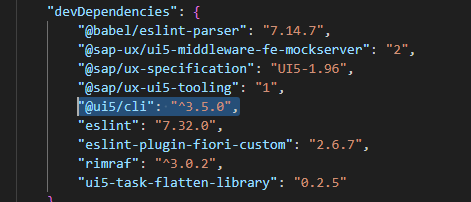
Another (recommended) way is to install UI5 CLI globally like so. Then you do not need installing it in your project but having it globally (for all projects/repos).
npm i -g @ui5/cli
You must be a registered user to add a comment. If you've already registered, sign in. Otherwise, register and sign in.

- Mark as New
- Bookmark
- Subscribe
- Subscribe to RSS Feed
- Permalink
- Report Inappropriate Content
Try to update UI5 CLI using command
npm i @ui5/cliYou must be a registered user to add a comment. If you've already registered, sign in. Otherwise, register and sign in.
- Mark as New
- Bookmark
- Subscribe
- Subscribe to RSS Feed
- Permalink
- Report Inappropriate Content
This updated the cli from 2.10.4 to 2.14.19
Tried a yarn install to link dependencies.
Very similar error but this time the version the specification version have increase from 2.3 to 2.6.
$ ui5 serve
info normalizer:translators:ui5Framework Using SAPUI5 version: 1.118.0

⚠️  Process Failed With Error

Error Message:
Invalid ui5.yaml configuration for project @openui5/sap.tnt

Unsupported "specVersion"

C:\Users\10119451\.ui5\framework\packages\@openui5\sap.tnt\1.118.0\ui5.yaml:2

1: ---
2: specVersion: "3.0"
   ^
Your UI5 CLI installation might be outdated.
Supported specification versions: "2.6", "2.5", "2.4", "2.3", "2.2", "2.1", "2.0", "1.1", "1.0", "0.1"
For details see: https://sap.github.io/ui5-tooling/pages/Configuration/#specification-versions

For details, execute the same command again with an additional '--verbose' parameter
error Command failed with exit code 1.
info Visit https://yarnpkg.com/en/docs/cli/run for documentation about this command.
- Mark as New
- Bookmark
- Subscribe
- Subscribe to RSS Feed
- Permalink
- Report Inappropriate Content
I've also tried going down the road of amending the specVersion in all my dependencies..
E.g..
specVersion: "2.6"
type: library
metadata:
  name: sap.tnt
  copyright: |-
   OpenUI5
    * (c) Copyright 2009-${currentYear} SAP SE or an SAP affiliate company.
    * Licensed under the Apache License, Version 2.0 - see LICENSE.txt.
resources:
  configuration:
    propertiesFileSourceEncoding: ISO-8859-1
- Mark as New
- Bookmark
- Subscribe
- Subscribe to RSS Feed
- Permalink
- Report Inappropriate Content
- Mark as New
- Bookmark
- Subscribe
- Subscribe to RSS Feed
- Permalink
- Report Inappropriate Content
- SAP Harness Series 3: The Rules That Kept 33 Days of AI-Agent Development Honest in Technology Blog Posts by Members
- API-led integration: what to look for in an enterprise integration platform in Technology Blog Posts by SAP
- SAP UI Integration Cards: Choosing the Right Development Path for Supplier Portals in Technology Blog Posts by SAP
- AI-Powered Forecasting with SAC, SAP RPT & Gen AI - Part 6: From Proof of Concept to Production in Technology Blog Posts by Members
- SAP's API Policy on AI Agents: What It Prohibits, Allows, and Leaves Open in Technology Blog Posts by Members
| User | Count |
|---|---|
| 5 | |
| 4 | |
| 4 | |
| 3 | |
| 2 | |
| 2 | |
| 2 | |
| 2 | |
| 2 | |
| 2 |


You must be a registered user to add a comment. If you've already registered, sign in. Otherwise, register and sign in.