
-
Products and Technology
By Category
-
Groups
Activity Groups
Industry Groups
Influence and Feedback Groups
Interest Groups
Location Groups
Customer Only Groups
- Developers
- Partners
- Events
- Help Center
- Topic Pages
-
Explore SAP
Products
- Autonomous Enterprise
- Artificial intelligence
- Data and analytics
- Autonomous Suite
- AI platform
- Transformation management
- Midsize business solutions
- Financial management
- Spend management
- Supply chain management
- Human capital management
- Customer experience
- Enterprise resource planning
- Business network
- Sustainability management
- SAP Store
- Try SAP
- View all industries
- Partners
- Services
Learning and Support
-
- Products and Technology
- Groups
- Developers
- Partners
- Events
- Help Center
- Topic Pages
-
Explore SAP
- Explore SAP
-
Products
- Products
- Autonomous Enterprise
- Artificial intelligence
- Data and analytics
- Autonomous Suite
- AI platform
- Transformation management
- Midsize business solutions
- Financial management
- Spend management
- Supply chain management
- Human capital management
- Customer experience
- Enterprise resource planning
- Business network
- Sustainability management
- SAP Store
- Try SAP
- View all industries
- Partners
- Services
- Learning and Support
- About

- SAP Community
- Products and Technology
- Technology
- Technology Q&A
- [BIG PROBLEM] SAP Host Agent cannot connect to SYS...
[BIG PROBLEM] SAP Host Agent cannot connect to SYSTEMDB
- Subscribe to RSS Feed
- Mark Question as New
- Mark Question as Read
- Bookmark
- Subscribe
- Printer Friendly Page
- Report Inappropriate Content

- SAP Managed Tags
- SAP HANA
Dear Experts,
I am totally nuts about the following problem:
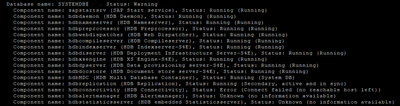
# /usr/sap/hostctrl/exe/saphostctrl -function ListDatabases
The passwords of <SID>adm, SYSTEM in SYSTEMDB and SAPDBCTRL are 100% correct, tried them all out.
SAP Note
2023587 - Maintaining SAP HANA user store using SetDatabaseProperty for SAP Host Agent
is NOT helping
SAP Note
2621457 - hdbconnectivity failure after upgrade to 2.0
is NOT helping
Please kindly advise how to get this solved.
 Bluesky
Need more details?
Request clarification before answering.
Accepted Solutions (0)
Answers (4)
Answers (4)
- Mark as New
- Bookmark
- Subscribe
- Subscribe to RSS Feed
- Permalink
- Report Inappropriate Content
Any update please ? Any ideas please ?
This is hindering us tremendously, as several automation scripts are failing due to this problem !!
We need to get this sorted out... Thanks a lot!
You must be a registered user to add a comment. If you've already registered, sign in. Otherwise, register and sign in.

- Mark as New
- Bookmark
- Subscribe
- Subscribe to RSS Feed
- Permalink
- Report Inappropriate Content
- Mark as New
- Bookmark
- Subscribe
- Subscribe to RSS Feed
- Permalink
- Report Inappropriate Content
- Mark as New
- Bookmark
- Subscribe
- Subscribe to RSS Feed
- Permalink
- Report Inappropriate Content
No, long reply that says 2 weeks ago. I am pasting it here as well:
I'm still interested to see the symptom. I understand, as you have provided, output of ListDatabases for saphostctrl have got some errors towards the end. At beginning, it's detecting HANA components alright. So I want to understand what it stops you doing.
If you cehck Agent Admin on your Solution Manager system, is Host agent Green there: http(s)://<SolMan_FQDN>:5<Java_App_Instance_number><00_for_HTTP/01_for_HTTPS>/smd/AgentAdmin --> SAP Host Agent --> HANA FQDN under Agent name
How about Diagnostics agent: http(s)://<SolMan_FQDN>:5<Java_App_Instance_number><00_for_HTTP/01_for_HTTPS>/smd/AgentAdmin --> Agents --> HANA FQDN under Connected Agents - Full Host Name
Do you have outside discover setup by host agent or diagnostics agent? You can find that in your LMDB (on SolMan) --> Hosts --> HANA short hostname against Host Name --> Display --> besides Host Name, it will show "Supplied by Outside Discovery (SAP Host Agent)" if outside discovery by host agent is configured.
Moreover, if you have systems registering to SLD and from there going to LMDB, then you need to look at that as well.
- Mark as New
- Bookmark
- Subscribe
- Subscribe to RSS Feed
- Permalink
- Report Inappropriate Content
1
You must be a registered user to add a comment. If you've already registered, sign in. Otherwise, register and sign in.
- Mark as New
- Bookmark
- Subscribe
- Subscribe to RSS Feed
- Permalink
- Report Inappropriate Content
I found an interesting article, not directly related to Host agent but HANA, which states:
Such error can appear if you have ";" character in your HANA database user password. The only workaround at the moment is to change the password.
Please check and see if that helps.
Best regards,
Kashyap Shah
You must be a registered user to add a comment. If you've already registered, sign in. Otherwise, register and sign in.
- Mark as New
- Bookmark
- Subscribe
- Subscribe to RSS Feed
- Permalink
- Report Inappropriate Content
- Mark as New
- Bookmark
- Subscribe
- Subscribe to RSS Feed
- Permalink
- Report Inappropriate Content
I'm still interested to see the symptom. I understand, as you have provided, output of ListDatabases for saphostctrl have got some errors towards the end. At beginning, it's detecting HANA components alright. So I want to understand what it stops you doing.
If you cehck Agent Admin on your Solution Manager system, is Host agent Green there: http(s)://<SolMan_FQDN>:5<Java_App_Instance_number><00_for_HTTP/01_for_HTTPS>/smd/AgentAdmin --> SAP Host Agent --> HANA FQDN under Agent name
How about Diagnostics agent: http(s)://<SolMan_FQDN>:5<Java_App_Instance_number><00_for_HTTP/01_for_HTTPS>/smd/AgentAdmin --> Agents --> HANA FQDN under Connected Agents - Full Host Name
Do you have outside discover setup by host agent or diagnostics agent? You can find that in your LMDB (on SolMan) --> Hosts --> HANA short hostname against Host Name --> Display --> besides Host Name, it will show "Supplied by Outside Discovery (SAP Host Agent)" if outside discovery by host agent is configured.
Moreover, if you have systems registering to SLD and from there going to LMDB, then you need to look at that as well.
Thanks.
- Mark as New
- Bookmark
- Subscribe
- Subscribe to RSS Feed
- Permalink
- Report Inappropriate Content
Hello and thanks a lot for your reply!
This is the output from the command /usr/sap/hostctrl/exe/saphostctrl -function ListDatabases
I have intentionally left out the upper few lines, as I have to keep hostnames and SIDs private.
I have no idea if the connection you are mentioning is HTTPS. I did not setup any HTTPS. Furthermore,
this is host-internal.
I am VERY puzzled by the statement no hosts left... Like if there is a list of hosts, but there isn't, it's
just this host. When I try to connect with hdbsql on the command line, it works flawlessly.
I have also updated to the latest SAP Host Agent, still the same problem!
You must be a registered user to add a comment. If you've already registered, sign in. Otherwise, register and sign in.
- Closing the Workforce Plan-to-Execution Gap with SAP Business AI Platform in Technology Blog Posts by SAP
- Part 1: From OData to MCP: Building an MCP Server with SAP Integration Suite in Technology Blog Posts by SAP
- From process mining to action: What's new in the Process Consulting Agent October release in Technology Blog Posts by SAP
- ABAP development tools MCP server: Major update available! in Technology Blog Posts by SAP
- Several e-mail addresses, one SAP user: CERTRULE instead of the gateway mapping table for BTP apps in Technology Blog Posts by Members
| User | Count |
|---|---|
| 7 | |
| 7 | |
| 5 | |
| 4 | |
| 4 | |
| 4 | |
| 4 | |
| 3 | |
| 3 | |
| 2 |


You must be a registered user to add a comment. If you've already registered, sign in. Otherwise, register and sign in.