
-
Products and Technology
By Category
-
Groups
Activity Groups
Industry Groups
Influence and Feedback Groups
Interest Groups
Location Groups
Customer Only Groups
- Developers
- Partners
- Events
- Help Center
- Topic Pages
-
Explore SAP
Products
Learning and Support
-
- Products and Technology
- Groups
- Developers
- Partners
- Events
- Help Center
- Topic Pages
-
Explore SAP
- Explore SAP
-
Products
- Products
- SAP Business Suite
- Artificial Intelligence
- Business applications
- Data and analytics
- Technology Platform
- Financial Management
- Spend Management
- Supply Chain Management
- Human Capital Management
- Customer Experience
- SAP Business Network
- View products A-Z
- View industries
- Try SAP
- Partners
- Services
- Learning and Support
- About

- SAP Community
- Products and Technology
- Technology
- Technology Blog Posts by SAP
- SAP Cloud Integration - Multi Mapping in Message M...
Technology Blog Posts by SAP
Turn on suggestions
Auto-suggest helps you quickly narrow down your search results by suggesting possible matches as you type.
Showing results for
Success! Subscription added.

 DeepakGDeshpand
Associate
Options
- Subscribe to RSS Feed
- Mark as New
- Mark as Read
- Bookmark
- Subscribe
- Printer Friendly Page
- Report Inappropriate Content
2018 Apr 26
5:25 AM
25,502
- SAP Managed Tags
- SAP Integration Suite
- Cloud Integration
Introduction
SAP Cloud Integration version 2.40 improves message mapping with multi mapping feature. Multi mapping enables you to use more than one message in the source or target of your mapping.
Let us understand multi mapping further with a simple integration flow.

Clicking on the resource link (MultiMappingDemo.mmap in this case) opens the message mapping editor

It already has one message in the source and target message structures.
Click on the pen icon to Edit message for source and/or target

This opens up the source and target messages editor. If you have already worked with it, you might observe the below changes

- Add icon '+' has been introduced, to add more messages
- Occurrence table column has been introduced, to change the occurrence of message
- Action column has been introduced with
- Icon to Replace the message
- Icon to Delete the message
Occurrence
You can use the occurrence column to change the occurrence of the message. By default, the occurrence '1..1' shall be selected. If you select the occurrence '0..1' or '1..n', the multi mapping for this message shall be enabled. For example, set the message occurrence to "0..1" click on OK header action. Go back to message mapping editor.

You will now observe the root element of the message is enclosed with ns0:Messages and ns0:Message1 elements as shown in the below screenshots. This indicates multi mapping.

The similar structure could also be observed in the target side as well.
Multiple Messages
Multi mapping is also enabled when you select more than one messages as the source or target in your mapping. Consider the same example of source and target message editor. Click on '+' icon at Source Message and select a schema file.


Once the schema is added, you observe the same in source messages list shown below

Now, click OK. It will take you to the message mapping editor.
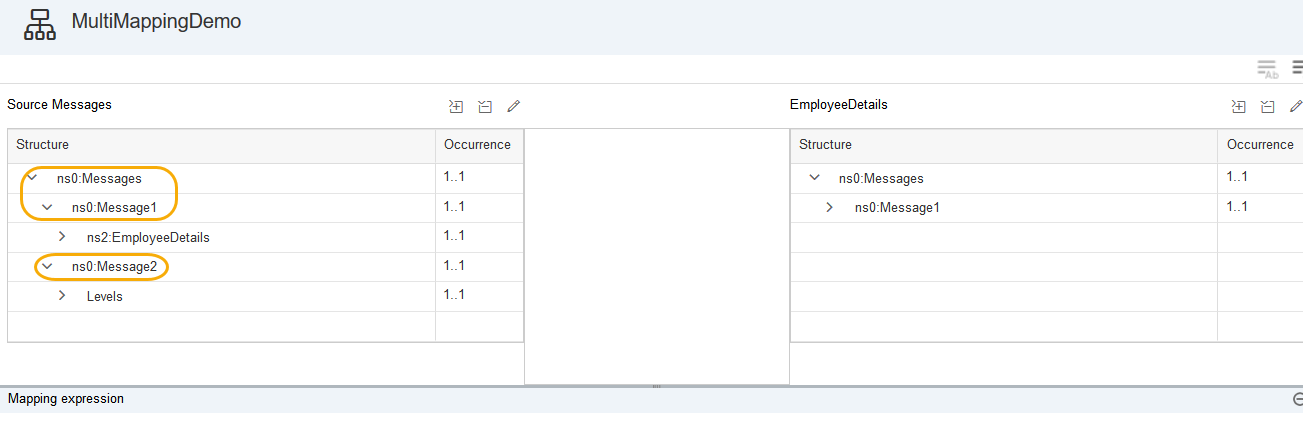
You can observe that elements for multi mapping has been populated in the source message with ns0:Messages root element and ns0:Message1 for existing EmployeeDetails element along with ns0:Message2 for newly added schema's Levels element
Now, you can perform the required mapping definition for the multi mapping elements as per your scenario.
Note: Multi mapping support for EDMX is not enabled.
Labels
10 Comments
You must be a registered user to add a comment. If you've already registered, sign in. Otherwise, register and sign in.
 Bluesky
Related Content
- Powering AI-Ready Enterprises with SAP Integration Suite - SAP Sapphire Madrid 2026 in Technology Blog Posts by SAP
- SAP MDG + Azure AD - Part 2: Connecting SAP to Azure Active Directory – The Technical Setup in Technology Blog Posts by Members
- Fullstack CAP Application with HANA Cloud (Decoupled Architecture) [Part-2] in Technology Blog Posts by Members
- Moving Legacy On-Premise Console Apps Scheduling & Monitoring to SAP CPI ? in Technology Q&A
- SAP Integration Suite Event Mesh - Events can be published in testing but can't be consumed in Technology Q&A
Top liked authors
| User | Count |
|---|---|
| 36 | |
| 28 | |
| 27 | |
| 26 | |
| 26 | |
| 26 | |
| 25 | |
| 24 | |
| 23 | |
| 23 |


