
-
Products and Technology
By Category
-
Groups
Activity Groups
Industry Groups
Influence and Feedback Groups
Interest Groups
Location Groups
Customer Only Groups
- Developers
- Partners
- Events
- Help Center
- Topic Pages
-
Explore SAP
Products
- Autonomous Enterprise
- Artificial intelligence
- Data and analytics
- Autonomous Suite
- AI platform
- Transformation management
- Midsize business solutions
- Financial management
- Spend management
- Supply chain management
- Human capital management
- Customer experience
- Enterprise resource planning
- Business network
- Sustainability management
- SAP Store
- Try SAP
- View all industries
- Partners
- Services
Learning and Support
-
- Products and Technology
- Groups
- Developers
- Partners
- Events
- Help Center
- Topic Pages
-
Explore SAP
- Explore SAP
-
Products
- Products
- Autonomous Enterprise
- Artificial intelligence
- Data and analytics
- Autonomous Suite
- AI platform
- Transformation management
- Midsize business solutions
- Financial management
- Spend management
- Supply chain management
- Human capital management
- Customer experience
- Enterprise resource planning
- Business network
- Sustainability management
- SAP Store
- Try SAP
- View all industries
- Partners
- Services
- Learning and Support
- About
- SAP Community
- Groups
- Interest Groups
- Application Development and Automation
- Discussions
- Table Footer multiple rows problem in Multiple Pag...
- Subscribe to RSS Feed
- Mark Topic as New
- Mark Topic as Read
- Float this Topic for Current User
- Bookmark
- Subscribe
- Mute
- Printer Friendly Page
Table Footer multiple rows problem in Multiple Pages Smart Form

- Mark as New
- Bookmark
- Subscribe
- Mute
- Subscribe to RSS Feed
- Permalink
- Report Inappropriate Content
2018 May 15 11:57 AM
- SAP Managed Tags
- ABAP Development
Dear All
I made a Multiple pages Smart Form having Page Break . It prints different pages on monthly basis , e.g March Data is displayed in 1 page and April on the other page . My problem is that table footer is having three Rows , First Two Rows of the Table Footer are printing on every page but last row of table footer is printing on last page only , although i have not given any such condition in any node . Please help me rectify this problem . Thanks


- Mark as New
- Bookmark
- Subscribe
- Mute
- Subscribe to RSS Feed
- Permalink
- Report Inappropriate Content
2018 May 15 2:29 PM
- SAP Managed Tags
- ABAP Development
Hi Mohammed,
Could you please check that you set the appropriate height value for the footer? The footer of the table has the reserved height = 1 cm. (default).I suppose it is definitely not enough - only 2 lines are fit to the page 1., 2..
To resolve the issue you need set appropriate height value. See please my attachment. footer-height.png
Best regards,
Hedvig
Dear All
I made a Multiple pages Smart Form having Page Break . It prints different pages on monthly basis , e.g March Data is displayed in 1 page and April on the other page . My problem is that table footer is having three Rows , First Two Rows of the Table Footer are printing on every page but last row of table footer is printing on last page only , although i have not given any such condition in any node . Please help me rectify this problem . Thanks
 Bluesky
- Mark as New
- Bookmark
- Subscribe
- Mute
- Subscribe to RSS Feed
- Permalink
- Report Inappropriate Content
2018 May 15 12:28 PM
- SAP Managed Tags
- ABAP Development
Hi Mohammed,
"First Two Rows of the Table Footer are printing on every page but last row of table footer is printing on last page only If there is no condition for the last row, then place breakpoint inside the last row by creating program lines as shown below, which helps to troubleshoot the issue.
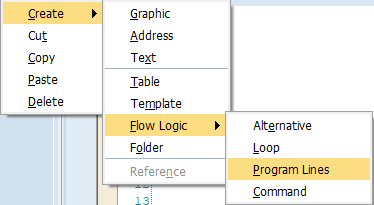
Also check whether any command is created between Row2 and Row3 that also help to skip Row3.

Or any Event is created for Row3.

Regards
Rajkumar Narasimman
- Mark as New
- Bookmark
- Subscribe
- Mute
- Subscribe to RSS Feed
- Permalink
- Report Inappropriate Content
2018 May 15 12:39 PM
- SAP Managed Tags
- ABAP Development
Hi Rajkumar
Yes I have already checked all of the above points
And I have also checked by placing break-points in programming lines ( code section of Last Row and other rows of Footer ) .
There is no such thing

- Mark as New
- Bookmark
- Subscribe
- Mute
- Subscribe to RSS Feed
- Permalink
- Report Inappropriate Content
2018 May 15 12:46 PM
- SAP Managed Tags
- ABAP Development
When you are sharing screenshot which contains the nodes, always do expand the nodes(Footer) and share the screenshot. also share the output screenshot.
- Mark as New
- Bookmark
- Subscribe
- Mute
- Subscribe to RSS Feed
- Permalink
- Report Inappropriate Content
2018 May 15 1:00 PM
- SAP Managed Tags
- ABAP Development
ok Sorry for that . Even when i copy pasted second row and created third row , it is printing 3rd row ( copy pasted from second one ) on last page only .
- Mark as New
- Bookmark
- Subscribe
- Mute
- Subscribe to RSS Feed
- Permalink
- Report Inappropriate Content
2018 May 15 1:13 PM
- SAP Managed Tags
- ABAP Development
"It prints different pages on monthly basis , e.g March Data is displayed in 1 page and April on the other page .How are you trying to print the footer in all the pages without help of secondary window? Mainwindow footer window will be called only if the table is fully printed.
- If Footer is placed inside mainwindow and to be printed all pages means, as per the your design only maximum two pages are possible? like March and April.
- If same footer is created in Secondary window, split up will work for more number of month.
- Mark as New
- Bookmark
- Subscribe
- Mute
- Subscribe to RSS Feed
- Permalink
- Report Inappropriate Content
2018 May 15 2:29 PM
- SAP Managed Tags
- ABAP Development
Hi Mohammed,
Could you please check that you set the appropriate height value for the footer? The footer of the table has the reserved height = 1 cm. (default).I suppose it is definitely not enough - only 2 lines are fit to the page 1., 2..
To resolve the issue you need set appropriate height value. See please my attachment. footer-height.png
Best regards,
Hedvig
- Mark as New
- Bookmark
- Subscribe
- Mute
- Subscribe to RSS Feed
- Permalink
- Report Inappropriate Content
2018 May 15 7:07 PM

| User | Count |
|---|---|
| 4 | |
| 2 | |
| 1 | |
| 1 | |
| 1 | |
| 1 | |
| 1 | |
| 1 | |
| 1 | |
| 1 |


