
-
Products and Technology
By Category
-
Groups
Activity Groups
Industry Groups
Influence and Feedback Groups
Interest Groups
Location Groups
Customer Only Groups
- Developers
- Partners
- Events
- Help Center
- Topic Pages
-
Explore SAP
Products
- Autonomous Enterprise
- Artificial intelligence
- Data and analytics
- Autonomous Suite
- AI platform
- Transformation management
- Midsize business solutions
- Financial management
- Spend management
- Supply chain management
- Human capital management
- Customer experience
- Enterprise resource planning
- Business network
- Sustainability management
- SAP Store
- Try SAP
- View all industries
- Partners
- Services
Learning and Support
-
- Products and Technology
- Groups
- Developers
- Partners
- Events
- Help Center
- Topic Pages
-
Explore SAP
- Explore SAP
-
Products
- Products
- Autonomous Enterprise
- Artificial intelligence
- Data and analytics
- Autonomous Suite
- AI platform
- Transformation management
- Midsize business solutions
- Financial management
- Spend management
- Supply chain management
- Human capital management
- Customer experience
- Enterprise resource planning
- Business network
- Sustainability management
- SAP Store
- Try SAP
- View all industries
- Partners
- Services
- Learning and Support
- About
- SAP Community
- Groups
- Interest Groups
- Application Development and Automation
- Discussions
- Please make sure you provide a valid path to the J...
- Subscribe to RSS Feed
- Mark Topic as New
- Mark Topic as Read
- Float this Topic for Current User
- Bookmark
- Subscribe
- Mute
- Printer Friendly Page
Please make sure you provide a valid path to the Java FX modules during gui installation.

- Mark as New
- Bookmark
- Subscribe
- Mute
- Subscribe to RSS Feed
- Permalink
- Report Inappropriate Content
2019 Sep 22 4:16 PM
- SAP Managed Tags
- ABAP Development
Hi All,
trying to run GUI from Eclipse, having this error.
Could you plasce show me where i have to provide path to JavaFX during installation ?


- Mark as New
- Bookmark
- Subscribe
- Mute
- Subscribe to RSS Feed
- Permalink
- Report Inappropriate Content
2019 Sep 22 10:47 PM
- SAP Managed Tags
- ABAP Development
Hello there,
For this answer I'm assuming that you also have problem using it standalone, outside Eclipse (because I had this pop-up yesterday when upgrading a Dockerfile for SAPGui Linux).
It appears on SAPGui installation, in step Define Options (print below is from 7.50r7 for Linux, I don't use Mac but should be the same option).
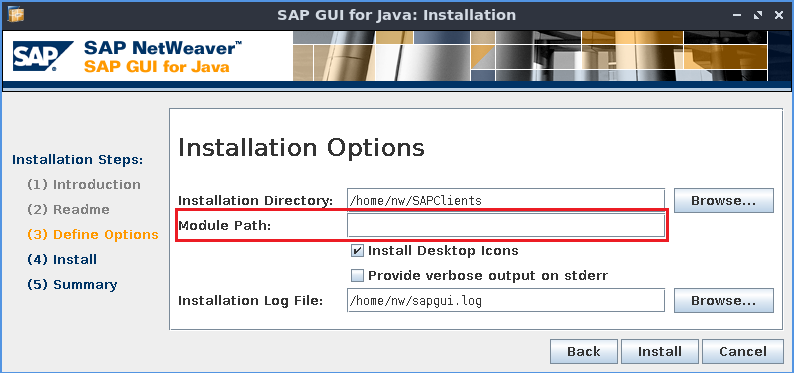
The module path for it on Mac (if installed on default path) is
/Library/Java/JavaVirtualMachines/javafx-sdk-11/libYou need to put /lib suffix or it won't work.
Best Regards
 Bluesky
- Mark as New
- Bookmark
- Subscribe
- Mute
- Subscribe to RSS Feed
- Permalink
- Report Inappropriate Content
2019 Sep 22 10:47 PM
- SAP Managed Tags
- ABAP Development
Hello there,
For this answer I'm assuming that you also have problem using it standalone, outside Eclipse (because I had this pop-up yesterday when upgrading a Dockerfile for SAPGui Linux).
It appears on SAPGui installation, in step Define Options (print below is from 7.50r7 for Linux, I don't use Mac but should be the same option).
The module path for it on Mac (if installed on default path) is
/Library/Java/JavaVirtualMachines/javafx-sdk-11/libYou need to put /lib suffix or it won't work.
Best Regards
- Mark as New
- Bookmark
- Subscribe
- Mute
- Subscribe to RSS Feed
- Permalink
- Report Inappropriate Content
2019 Sep 23 8:54 PM
- SAP Managed Tags
- ABAP Development
Thank you Thales Batista,
also in ▸ Applications ▸ Eclipse.app ▸ Contents ▸ Eclipse ▸ Eclipse.ini
in Eclipse.ini file after -vmargs following lines needed to be added.
-vmargs
--module-path=/Library/Java/JavaVirtualMachines/javafx-sdk-11.0.2/lib
--add-modules=ALL-MODULE-PATH
I was expecting to have an option to update module path in SAP GUI options, but somehow based on "best run" logic it is only available in installation screen.
- Mark as New
- Bookmark
- Subscribe
- Mute
- Subscribe to RSS Feed
- Permalink
- Report Inappropriate Content
2019 Sep 25 9:43 PM
- SAP Managed Tags
- ABAP Development
Yes, I forgot about that step, sorry. It's been almost a year that I installed it on my machine.
We have to wait and see. They could at least improve this label prepending it with "JFX" or "Java FX", "Module Path" doesn't give a clue to what is required to put on it...

| User | Count |
|---|---|
| 8 | |
| 4 | |
| 2 | |
| 1 | |
| 1 | |
| 1 | |
| 1 | |
| 1 | |
| 1 | |
| 1 |


