
-
Products and Technology
By Category
-
Groups
Activity Groups
Industry Groups
Influence and Feedback Groups
Interest Groups
Location Groups
Customer Only Groups
- Developers
- Partners
- Events
- Help Center
- Topic Pages
-
Explore SAP
Products
- Autonomous Enterprise
- Artificial intelligence
- Data and analytics
- Autonomous Suite
- AI platform
- Transformation management
- Midsize business solutions
- Financial management
- Spend management
- Supply chain management
- Human capital management
- Customer experience
- Enterprise resource planning
- Business network
- Sustainability management
- SAP Store
- Try SAP
- View all industries
- Partners
- Services
Learning and Support
-
- Products and Technology
- Groups
- Developers
- Partners
- Events
- Help Center
- Topic Pages
-
Explore SAP
- Explore SAP
-
Products
- Products
- Autonomous Enterprise
- Artificial intelligence
- Data and analytics
- Autonomous Suite
- AI platform
- Transformation management
- Midsize business solutions
- Financial management
- Spend management
- Supply chain management
- Human capital management
- Customer experience
- Enterprise resource planning
- Business network
- Sustainability management
- SAP Store
- Try SAP
- View all industries
- Partners
- Services
- Learning and Support
- About
- SAP Community
- Groups
- Interest Groups
- Application Development and Automation
- Discussions
- Gridlines missing in table control
- Subscribe to RSS Feed
- Mark Topic as New
- Mark Topic as Read
- Float this Topic for Current User
- Bookmark
- Subscribe
- Mute
- Printer Friendly Page
Gridlines missing in table control

- Mark as New
- Bookmark
- Subscribe
- Mute
- Subscribe to RSS Feed
- Permalink
- Report Inappropriate Content
2017 Jan 19 3:10 PM
- SAP Managed Tags
- ABAP Development
Experts,
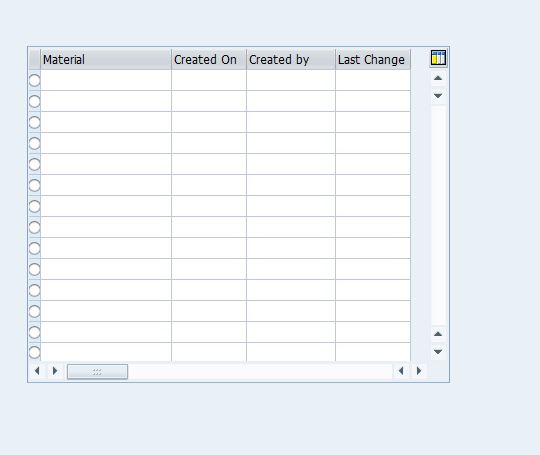
I have a table control with row selection as 'X'. So i see a lead selection button for row. As per my requirement, i had to add radiobutton as first column in place of lead selection. After making this change, I see that:
Grid lines for rows & columns which were displayed earlier are missing now
Output looks as below after adding radio button:

Before adding radiobutton as first column, output looks as below with gridlines,

Please let me know what i am missing.
Best,
Aspire

- Mark as New
- Bookmark
- Subscribe
- Mute
- Subscribe to RSS Feed
- Permalink
- Report Inappropriate Content
2017 Jan 20 5:47 AM
- SAP Managed Tags
- ABAP Development
Hi Bharath,
First you add radio button at first column in table control by just clicking radio button option in layout and then you go to properties of table control and there is a option named 'Separator', you just check both check boxes e.i, vertical and horizontal separator.
Regards
Ajeet
Experts,
I have a table control with row selection as 'X'. So i see a lead selection button for row. As per my requirement, i had to add radiobutton as first column in place of lead selection. After making this change, I see that:
Grid lines for rows & columns which were displayed earlier are missing now
Output looks as below after adding radio button:
Before adding radiobutton as first column, output looks as below with gridlines,
Please let me know what i am missing.
Best,
Aspire
 Bluesky
- Mark as New
- Bookmark
- Subscribe
- Mute
- Subscribe to RSS Feed
- Permalink
- Report Inappropriate Content
2017 Jan 19 11:43 PM
- SAP Managed Tags
- ABAP Development
Experts,
Can you please share your valuable inputs.
Best
Aspire

- Mark as New
- Bookmark
- Subscribe
- Mute
- Subscribe to RSS Feed
- Permalink
- Report Inappropriate Content
2017 Jan 20 5:00 AM
- Mark as New
- Bookmark
- Subscribe
- Mute
- Subscribe to RSS Feed
- Permalink
- Report Inappropriate Content
2017 Jan 20 5:47 AM
- SAP Managed Tags
- ABAP Development
Hi Bharath,
First you add radio button at first column in table control by just clicking radio button option in layout and then you go to properties of table control and there is a option named 'Separator', you just check both check boxes e.i, vertical and horizontal separator.
Regards
Ajeet

- Mark as New
- Bookmark
- Subscribe
- Mute
- Subscribe to RSS Feed
- Permalink
- Report Inappropriate Content
2017 Jan 20 8:13 AM
- SAP Managed Tags
- ABAP Development
Or programmatically via the components V_GRID and H_GRID of the CONTROLS data object.
- Mark as New
- Bookmark
- Subscribe
- Mute
- Subscribe to RSS Feed
- Permalink
- Report Inappropriate Content
2017 May 16 3:42 AM
- Mark as New
- Bookmark
- Subscribe
- Mute
- Subscribe to RSS Feed
- Permalink
- Report Inappropriate Content
2017 Jan 20 8:07 AM
- SAP Managed Tags
- ABAP Development
I think that using a radiobutton to select a line is not a good idea: how would you deselect it once it's selected? (the radiobutton group is not vertical, it's horizontal, probably several consecutive buttons)
- Mark as New
- Bookmark
- Subscribe
- Mute
- Subscribe to RSS Feed
- Permalink
- Report Inappropriate Content
2017 May 16 3:42 AM
- SAP Managed Tags
- ABAP Development
Hi Ajeet,
Sorry for the huge delay in reply. I got dragged into a different project & could not get my hands on this issue. You nailed the solution.

As seen above, table control has a table icon to the top right that has been highlighted. Upon clicking it, we can access the properties of table control like setting the order of fields to be displayed, show/hide fields etc.. As mentioned my Ajeet, I see option to add horizontal & vertical separators in this popup.
Cheers,
Aspire

| User | Count |
|---|---|
| 4 | |
| 2 | |
| 1 | |
| 1 | |
| 1 | |
| 1 | |
| 1 | |
| 1 | |
| 1 | |
| 1 |


