
-
Products and Technology
By Category
-
Groups
Activity Groups
Industry Groups
Influence and Feedback Groups
Interest Groups
Location Groups
Customer Only Groups
- Developers
- Partners
- Events
- Help Center
- Topic Pages
-
Explore SAP
Products
- Autonomous Enterprise
- Artificial intelligence
- Data and analytics
- Autonomous Suite
- AI platform
- Transformation management
- Midsize business solutions
- Financial management
- Spend management
- Supply chain management
- Human capital management
- Customer experience
- Enterprise resource planning
- Business network
- Sustainability management
- SAP Store
- Try SAP
- View all industries
- Partners
- Services
Learning and Support
-
- Products and Technology
- Groups
- Developers
- Partners
- Events
- Help Center
- Topic Pages
-
Explore SAP
- Explore SAP
-
Products
- Products
- Autonomous Enterprise
- Artificial intelligence
- Data and analytics
- Autonomous Suite
- AI platform
- Transformation management
- Midsize business solutions
- Financial management
- Spend management
- Supply chain management
- Human capital management
- Customer experience
- Enterprise resource planning
- Business network
- Sustainability management
- SAP Store
- Try SAP
- View all industries
- Partners
- Services
- Learning and Support
- About
- SAP Community
- Groups
- Interest Groups
- Application Development and Automation
- Discussions
- Re: Error uploading SAP Note - System setting does...
- Subscribe to RSS Feed
- Mark Topic as New
- Mark Topic as Read
- Float this Topic for Current User
- Bookmark
- Subscribe
- Mute
- Printer Friendly Page
Error uploading SAP Note - System setting does not allow changes... on Production Server

- Mark as New
- Bookmark
- Subscribe
- Mute
- Subscribe to RSS Feed
- Permalink
- Report Inappropriate Content
2020 Jan 23 6:25 AM
- SAP Managed Tags
- ABAP Development
System setting does not allow changes to be made to object NOTE 0001247722
Message no. TO128
Diagnosis
The system and namespace change option set for this SAP System does not allow any changes to be made to object NOTE 0001247722.
System Response
Editing is terminated, the object can only be displayed.
Procedure
If you want to edit the object NOTE 0001247722 in this SAP System, have your system administator set the SAP System to "modifiable" for this object.
This can affect the modifiability of the namespace /0SAP/ or the namespaces that correspond to the pattern /0SAP/, as well as the global setting of the system change option.
The system change option is set using the Transport Organizer tools (Transaction SE03). Expand the Administration node and execute the program Set system change option. The options are described there.
Any idea which prefix is used for this SAP Note:0001247722 ?

- Mark as New
- Bookmark
- Subscribe
- Mute
- Subscribe to RSS Feed
- Permalink
- Report Inappropriate Content
2020 Jan 23 6:31 AM
- SAP Managed Tags
- ABAP Development
You never apply OSS note on production system. You have to install it on development system & transport it through the Transport Route and it will goes to the Production Server (with the transport request)
 Bluesky
- Mark as New
- Bookmark
- Subscribe
- Mute
- Subscribe to RSS Feed
- Permalink
- Report Inappropriate Content
2020 Jan 23 6:31 AM
- SAP Managed Tags
- ABAP Development
You never apply OSS note on production system. You have to install it on development system & transport it through the Transport Route and it will goes to the Production Server (with the transport request)
- Mark as New
- Bookmark
- Subscribe
- Mute
- Subscribe to RSS Feed
- Permalink
- Report Inappropriate Content
2020 Jan 23 6:33 AM
- SAP Managed Tags
- ABAP Development
Sir, Can you please help us How do this OSS not through the Transport Route... any document link... can you please shared...
- Mark as New
- Bookmark
- Subscribe
- Mute
- Subscribe to RSS Feed
- Permalink
- Report Inappropriate Content
2020 Jan 23 6:37 AM
- SAP Managed Tags
- ABAP Development
Simply with transaction SNOTE in the development system
When you apply the note you will prompted by SAP for a transport request.
- Mark as New
- Bookmark
- Subscribe
- Mute
- Subscribe to RSS Feed
- Permalink
- Report Inappropriate Content
2020 Jan 23 6:52 AM
- SAP Managed Tags
- ABAP Development
Sir, Thank you we understand this.
But here is a twist.... We try to upload "0001247722.txt" file after extract "0001247722.SAR" file. Hence when we upload into DEV system, it has not prompted by SAP for transport......
This is done due to some SNOTE functionality has been changed by SAP, which has for Download/Upload for SNOTE new implementation is not done on my end. Hence we used this .SAR extract file optional.
See refer this SAP Note:
https://launchpad.support.sap.com/#/notes/1816647
Kindly let me know can we create transport request for this for .txt file upload?
- Mark as New
- Bookmark
- Subscribe
- Mute
- Subscribe to RSS Feed
- Permalink
- Report Inappropriate Content
2020 Jan 23 7:18 AM
- SAP Managed Tags
- ABAP Development
If you would like to upload manually a sap note, check this doc
https://www.itsfullofstars.de/2016/05/how-to-manually-upload-an-sap-note-in-snote/
- Mark as New
- Bookmark
- Subscribe
- Mute
- Subscribe to RSS Feed
- Permalink
- Report Inappropriate Content
2020 Feb 03 8:44 AM
- SAP Managed Tags
- ABAP Development
Hello Frederic Girod,
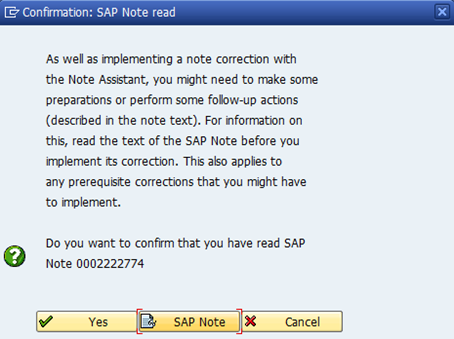
I have follow the Manually steps but after upload the SNOTE as .txt file below snpshot which is given by your link don't appear.
This Popup message not appear after click on it showing "Load the following SAP Notes into your system:" and here my SNOTE which want to upload that not listed out
- Mark as New
- Bookmark
- Subscribe
- Mute
- Subscribe to RSS Feed
- Permalink
- Report Inappropriate Content
2020 Feb 03 9:13 AM
- SAP Managed Tags
- ABAP Development
This is just a warning message gived by the SNOTE transaction.
As it cannot check you have made the manual task, it asks you to be sure you have done it.
It is not impacting your implementation, your system or anything. (you could continue)
- Mark as New
- Bookmark
- Subscribe
- Mute
- Subscribe to RSS Feed
- Permalink
- Report Inappropriate Content
2020 Feb 03 10:48 AM
- SAP Managed Tags
- ABAP Development
There has not any error on SNOTE transaction....
I think we have issue in DEV system ... RFC connection has not established SAPOSS RFC.....
We will check ...at our end....
thank you

- Mark as New
- Bookmark
- Subscribe
- Mute
- Subscribe to RSS Feed
- Permalink
- Report Inappropriate Content
2020 Feb 03 8:36 AM
- SAP Managed Tags
- ABAP Development
Please use the COMMENT button for comments, questions, adding details, etc., ANSWER is only to propose a solution, dixit SAP text at the right of the answer area. At the same time, the person will be informed of your comment (currently not).
- Mark as New
- Bookmark
- Subscribe
- Mute
- Subscribe to RSS Feed
- Permalink
- Report Inappropriate Content
2020 Feb 03 8:43 AM
- SAP Managed Tags
- ABAP Development
Moreover, I think it's a different question, so, create a new question, please.
- Mark as New
- Bookmark
- Subscribe
- Mute
- Subscribe to RSS Feed
- Permalink
- Report Inappropriate Content
2020 Feb 03 8:44 AM
- SAP Managed Tags
- ABAP Development
Hello Sandra Rossi,
I am new in SAP Community so not able to understand during the post... By mistaken, I have entered into ANSWER .... Really Apologize for that.

| User | Count |
|---|---|
| 8 | |
| 1 | |
| 1 | |
| 1 | |
| 1 | |
| 1 | |
| 1 | |
| 1 | |
| 1 | |
| 1 |


