
-
Products and Technology
By Category
-
Groups
Activity Groups
Industry Groups
Influence and Feedback Groups
Interest Groups
Location Groups
Customer Only Groups
- Developers
- Partners
- Events
- Help Center
- Topic Pages
-
Explore SAP
Products
- Autonomous Enterprise
- Artificial intelligence
- Data and analytics
- Autonomous Suite
- AI platform
- Transformation management
- Midsize business solutions
- Financial management
- Spend management
- Supply chain management
- Human capital management
- Customer experience
- Enterprise resource planning
- Business network
- Sustainability management
- SAP Store
- Try SAP
- View all industries
- Partners
- Services
Learning and Support
-
- Products and Technology
- Groups
- Developers
- Partners
- Events
- Help Center
- Topic Pages
-
Explore SAP
- Explore SAP
-
Products
- Products
- Autonomous Enterprise
- Artificial intelligence
- Data and analytics
- Autonomous Suite
- AI platform
- Transformation management
- Midsize business solutions
- Financial management
- Spend management
- Supply chain management
- Human capital management
- Customer experience
- Enterprise resource planning
- Business network
- Sustainability management
- SAP Store
- Try SAP
- View all industries
- Partners
- Services
- Learning and Support
- About
- SAP Community
- Groups
- Interest Groups
- Application Development and Automation
- Discussions
- CDS view issue (cannot get correct value from data...
- Subscribe to RSS Feed
- Mark Topic as New
- Mark Topic as Read
- Float this Topic for Current User
- Bookmark
- Subscribe
- Mute
- Printer Friendly Page
CDS view issue (cannot get correct value from database)

- Mark as New
- Bookmark
- Subscribe
- Mute
- Subscribe to RSS Feed
- Permalink
- Report Inappropriate Content
2017 Aug 10 3:42 PM
- SAP Managed Tags
- ABAP Development
- SQL
Hi, experts
I define a CDS view to get records from table MCHB, but all of the clabs field equals 0 in the results. Actually, there are many records whose clabs > 0 in the database. The view is defined like this:
define view ZTEST001_11 as select from mchb
{
matnr,
charg,
lgort,
werks,
clabs
}
And if I add a where clause " where clabs > 0", the view will not be able to get any data. Is there any special restriction in CDS view whcih I am not aware of?


- Mark as New
- Bookmark
- Subscribe
- Mute
- Subscribe to RSS Feed
- Permalink
- Report Inappropriate Content
2017 Aug 11 10:07 AM
- SAP Managed Tags
- ABAP Development
- SQL
Seem that's I had the right idea in the comments -> ST05.
The result was not influenced by CDS access control, but ST05 showed that there seems to be a redirect.
Hi, experts
I define a CDS view to get records from table MCHB, but all of the clabs field equals 0 in the results. Actually, there are many records whose clabs > 0 in the database. The view is defined like this:
define view ZTEST001_11 as select from mchb
{
matnr,
charg,
lgort,
werks,
clabs
}
And if I add a where clause " where clabs > 0", the view will not be able to get any data. Is there any special restriction in CDS view whcih I am not aware of?
 Bluesky
- Mark as New
- Bookmark
- Subscribe
- Mute
- Subscribe to RSS Feed
- Permalink
- Report Inappropriate Content
2017 Aug 10 5:43 PM
- SAP Managed Tags
- ABAP Development
- SQL
Is it ABAP CDS? How do you read the data? Did you try the same query in Open SQL? Did you consider client dependency? Are there non zero values for the current client?
- Mark as New
- Bookmark
- Subscribe
- Mute
- Subscribe to RSS Feed
- Permalink
- Report Inappropriate Content
2017 Aug 11 8:20 AM
- SAP Managed Tags
- ABAP Development
- SQL
I am glad to receive your comment, Keller. It is your article that leads me to start studying ABAP CDS.
Yes, it is ABAP CDS. I have tried the same query in Open SQL( SELECT matnr, charg, lgort, werks, clabs FROM mchb INTO TABLE @DATA(gt_mchb) ), and it returned correct records. The results is shown in below picture.
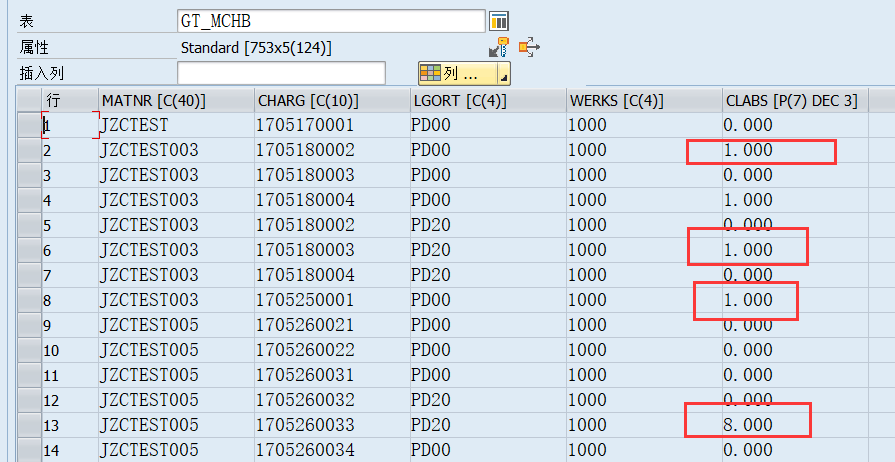
But if the Open SQL is: SELECT matnr, charg, lgort, werks, clabs FROM zci_test INTO TABLE @DATA(gt_mchb)

"zci_test" is the CDS view, and the two query were executed in the same client. You can see the clabs column is zero in the results...
- Mark as New
- Bookmark
- Subscribe
- Mute
- Subscribe to RSS Feed
- Permalink
- Report Inappropriate Content
2017 Aug 11 8:27 AM
- SAP Managed Tags
- ABAP Development
- SQL
Hmm, this shouldn't happen. Can you provide the full DDL source code of the CDS view?
- Mark as New
- Bookmark
- Subscribe
- Mute
- Subscribe to RSS Feed
- Permalink
- Report Inappropriate Content
2017 Aug 11 8:34 AM
- SAP Managed Tags
- ABAP Development
- SQL
Do you mean these statements?
@AbapCatalog.sqlViewName: 'ZCI_TEST'
@AbapCatalog.compiler.compareFilter: true
@AccessControl.authorizationCheck: #NOT_REQUIRED
@EndUserText.label: 'QAQ'
define view ZTEST001_11 as select from mchb
{
matnr,
charg,
lgort,
werks,
clabs
}
or these?
CREATE VIEW "ZCI_TEST" AS SELECT
"MCHB"."MANDT" AS "MANDT",
"MCHB"."MATNR",
"MCHB"."CHARG",
"MCHB"."LGORT",
"MCHB"."WERKS",
"MCHB"."CLABS"
FROM "MCHB" "MCHB"
- Mark as New
- Bookmark
- Subscribe
- Mute
- Subscribe to RSS Feed
- Permalink
- Report Inappropriate Content
2017 Aug 11 8:45 AM
- SAP Managed Tags
- ABAP Development
- SQL
This looks OK.
Just a hunch:
Replace
@AccessControl.authorizationCheck: #NOT_REQUIRED
with
@AccessControl.authorizationCheck: #NOT_ALLOWED
Can you check the ST05 trace of your acces to the view?
What is the result if you access the DB-view 'ZCI_TEST' directly instead of the CDS entity ZTEST001_11.?
- Mark as New
- Bookmark
- Subscribe
- Mute
- Subscribe to RSS Feed
- Permalink
- Report Inappropriate Content
2017 Aug 11 8:55 AM
- SAP Managed Tags
- ABAP Development
- SQL
I did the following simple things:
CDS view:
@AbapCatalog.sqlViewName: 'KELLER1_CDS_V0'
define view kellerh_cds_view0
   as select from
    demo_expressions
     {
      id,
      dec3
    };
ABAP program:
DELETE FROM demo_expressions.
INSERT demo_expressions
  FROM TABLE @( VALUE #( ( id = 'X' dec3 = '1234.567' )
                         ( id = 'Y' dec3 = '1234' ) ) ).

SELECT *
       from kellerh_cds_view0
       INTO TABLE @data(result).

cl_demo_output=>display( result ).
No problem.
RESULT
ID DEC3
X 1234.567
Y 1234.0
Can you do the same?
- Mark as New
- Bookmark
- Subscribe
- Mute
- Subscribe to RSS Feed
- Permalink
- Report Inappropriate Content
2017 Aug 11 10:08 AM
- SAP Managed Tags
- ABAP Development
- SQL
According your comment, I found the reason by ST05 trace.
It seems when accessing table MCHB,system will direct it to NSDM_V_MCHB,and the data is in NSDM_V_MCHB...
So should I Accept this answer? 🙂
- Mark as New
- Bookmark
- Subscribe
- Mute
- Subscribe to RSS Feed
- Permalink
- Report Inappropriate Content
2017 Aug 11 10:27 AM
- Mark as New
- Bookmark
- Subscribe
- Mute
- Subscribe to RSS Feed
- Permalink
- Report Inappropriate Content
2017 Aug 11 9:56 AM
- SAP Managed Tags
- ABAP Development
- SQL
The 'ZCI_TEST' has the same query results with 'ZTEST001_11' .
I checked 'ZCI_TEST' in se16, the clabs is zero, too.
After replacing '@AccessControl...' the results seems not change.
This is the ST05 trace record of CDS view:

This is the record of selecting from table MCHB
Oh, it seems the real source is NSDM_V_MCHB...I replaced MCHB with it in the DDL, and it works fine now!
Thank you very much.
But now I think I should be careful to define a ABAP CDS view. Do you know how to avoid to write incorrect DDL statement in such case? If we must check whether there is a redirection, it will cost some time...
- Mark as New
- Bookmark
- Subscribe
- Mute
- Subscribe to RSS Feed
- Permalink
- Report Inappropriate Content
2017 Aug 11 10:07 AM
- SAP Managed Tags
- ABAP Development
- SQL
Seem that's I had the right idea in the comments -> ST05.
The result was not influenced by CDS access control, but ST05 showed that there seems to be a redirect.
- Mark as New
- Bookmark
- Subscribe
- Mute
- Subscribe to RSS Feed
- Permalink
- Report Inappropriate Content
2017 Aug 11 10:10 AM
- Mark as New
- Bookmark
- Subscribe
- Mute
- Subscribe to RSS Feed
- Permalink
- Report Inappropriate Content
2017 Aug 11 10:24 AM
- SAP Managed Tags
- ABAP Development
- SQL
But I do not think it is an authorization issue. Because the authorizationCheck of NSDM_DDL_MCHB is #NOT_ALLOWED, too.
- Mark as New
- Bookmark
- Subscribe
- Mute
- Subscribe to RSS Feed
- Permalink
- Report Inappropriate Content
2017 Aug 11 10:28 AM

- Mark as New
- Bookmark
- Subscribe
- Mute
- Subscribe to RSS Feed
- Permalink
- Report Inappropriate Content
2021 Dec 29 11:24 AM
- SAP Managed Tags
- ABAP Development
- SQL
Rather than using MCHB please use its proxy object NSDM_V_MCHB while applying the JOIN condition and issue and issue will get resolved.

- Mark as New
- Bookmark
- Subscribe
- Mute
- Subscribe to RSS Feed
- Permalink
- Report Inappropriate Content
2022 Dec 28 8:54 PM
- SAP Managed Tags
- ABAP Development
- SQL
I came across the same scenario. Some of the DB tables values are not read directly from the DB ,and instead it's read from the compatibility views . So SAP has used compatibility views to overcome such problems. Try using NSDM_E_MCHB/NSDM_V_MCHB .

| User | Count |
|---|---|
| 4 | |
| 2 | |
| 1 | |
| 1 | |
| 1 | |
| 1 | |
| 1 | |
| 1 | |
| 1 | |
| 1 |


