


Applies to:
SAP NetWeaver 2004s, mySAP ERP 2005
Created on:
22-01-2013
Author:
Gaurang Gujar, Capgemini , Consultant , Appsone.
Summary:
Many of the MNC’s require SAP implementation all over the globe involving a lot of custom objects and custom text. It is a tedious task to translate this text manually where lot of hours are burnt for the same and moreover the translation may still have some human related translation typo errors, which will require more efforts to be put in to correct it .
Purpose:
The tool developed increases the efficiency of language translation objects as it helps in avoiding human errors. This tool also does the translation for Reports, Function groups, Includes in seconds. This tool not only saves time for translation but also helps in reviewing the translation done with an additional Excel tool.
Traditional method of LT
In most of the cases the Language translation for various Custom Texts is made available in Excel worksheet.
Below is sample screen shot of the same.

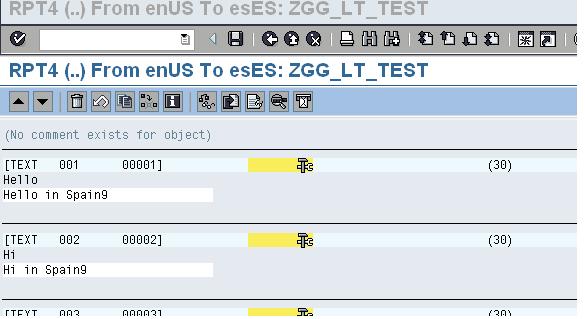
Now Here the Translation in SAP is done by using SE63 T-code or SE38 GoTo->Translation

Enter the Source and Target Language
Find the Text in source language and enter the corresponding translation from Excel Worksheet in as shown below.
LT by using this tool
The tool is made considering the most common input and output medium used for translation to be Excel worksheet. The Text Types and Translation are Read from Excel using an ABAP Program and Insert this translation into the Text Pool of the Program Specified in the Selection Screen of the Tool. This tool can be used for Uploading and Reviewing the Translation.
Section 1
Uploading the Translation
- Execute the ABAP Program (Tool). Selection screen is shown below

- Choose the Radio Button “TRANS” for translation.
- Enter the Program Name for which the Translation is to be done in “PROG”
- Specify the Source Excel File Path which has translation in “FILENAME”.
- Specify the source language and target languages in “S1” “T1” “T2” “T3” where ‘’T2” and “T3” are optional. A maximum of 3 target language’s can be translated at once using this sample tool.
- Execute the Code and translation will be completed.
Section 2
Reviewing the Translation
- Choose the Radio Button “REVIEW” for reviewing the translation.
- Enter the program name, Source and Target Language’s and Path of the blank destination Excel file.
- Execute The Code

This code will export the current language translation in Excel file mentioned in the above selection
screen.
Output will be as shown below

The 2 Excel file (Source and Review) can be compared using another Excel based tool
Whose opening screen is shown below.

- Open the Macro Enabled Excel Tool
- Click On LT utility for Reports

- Excel based Form Is to be provided with both(Source and review) Excel file details:
1) Excel File Path
2) Sheet Name
3) Source and Target Index of Translation Text in the Worksheet
- Output of this tool execution is shown below

- The 2 files are compared for source and target language and in case of any error, this is displayed as highlighted in red in the source column and the non-highlighted cells in the target column indicates the mismatch else they are highlighted in yellow. If no entries exist in any one of the file for a record, then the cells in the target columns are not highlighted. This is shown in the above screenshot.
- This incorrect Translation can then be corrected and uploaded.
Future Scope
This methodology is currently capable of doing automatic language translation for Reports, Includes,
Programs and Function Groups. This Tool with additional changes can be used for language translation of almost all SAP objects like Smart forms , Adobe Forms, Workflow etc
Related content
Complete documentation on language translation of SAP objects using SE63 Tcode
http://help.sap.com/saphelp_nw04/helpdata/en/77/5719d2492011d1894a0000e829fbbd/frameset.htm
 Bluesky