Application Development and Automation Blog Posts
Learn and share on deeper, cross technology development topics such as integration and connectivity, automation, cloud extensibility, developing at scale, and security.
cancel
Showing results for 
Search instead for 
Did you mean: 
Former Member
225,537

Business Requirement

Many a times there is a business requirement of linking documents, entering notes, sending notes or linking an internet address to various SAP objects. These external attachments can be reference documents, pictures, Email attachments, designs, diagrams or related spreadsheets. To meet this requirement SAP has provided a tool bar called ‘Generic Object services toolbar’ or ‘GOS toolbar’.

What is GOS

The GOS is a toolbar that provides different functions such as adding an attachment, creating a document link, displaying all the attachments etc. The attachments are not generic for that transaction but are specific for a particular SAP object. The GOS toolbar can be activated using a class CL_GOS_MANAGER.

Currently in the system the GOS toolbar is available by default only for certain SAP objects.

For Ex. ME21N. See screen shot below. The GOS toolbar is highlighted.

As shown above, the attachments created in ME21N screen will be linked to a particular purchase order and cannot be seen for any other purchase order in ME22N or ME23N screens.


Services that the GOS toolbar provides

The following list shows all possible object services. Not all object services are available - it depends on objects that are already active. Individual object services can also only be accessed using a sub-menu, so that the symbol is not displayed in the toolbox.

Activating Generic Object Services toolbar

The Class CL_GOS_MANAGER is used for activating the GOS toolbar. We have to create an instance of the class. The instance of the class can be created by calling the constructor method. Also, a variable of type BORIDENT needs to be created for the application business object. The object type and object key is assigned to this variable which is then passed to the instance of the class CL_GOS_MANAGER as shown below. This entire code has to be written either inside a suitable user-exit, enhancement point. If both user-exit and enhancement point are not applicable, implicit enhancement can be created inside the standard of that transaction where GOS has to be activated.

The syntax is:

DATA: LR_GOS_MANAGER TYPE REF TO CL_GOS_MANAGER,

      LS_BORIDENT TYPE BORIDENT.

LS_BORIDENT-OBJTYPE = 'BUS2081'.

LS_BORIDENT-OBJKEY = '12345678902011'.

CREATE OBJECT LR_GOS_MANAGER

EXPORTING

IS_OBJECT = LS_BORIDENT

IP_NO_COMMIT = ' '

EXCEPTIONS

OBJECT_INVALID = 1.

Here the object key is the combination of the SAP fields that are mandatorily required to execute those transactions. This will publish the GOS with the supplied BO instance if it is used in an executable program.

Earlier the Function Module SWU_OBJECT_PUBLISH was used for activating the GOS toolbar which now has become obsolete. The object type and the object key were passed as the import parameters to the function module.

Example

For the material BOM transactions (CS01, CS02, CS03), the GOS tool bar is not provided by standard SAP. See screen shot below.

We will see below how we can activate the GOS toolbar using above class for transactions CS01 / CS02 / CS03.

To activate it we need to do an enhancement in include ‘LCSDIFCD’ inside form OKCODE_BEARBEITEN. For transaction ‘CS03’ material number, plant, BOM usage are the required fields. See screen shot below:


  1. So the object key for above example is combination of values of material number, plant and BOM usage.

        How to get the object key

  The object key can be found out from the object type. Enter the object type in transaction ‘SWO1’

   Click on display.

E.g. If material number is 100000000000000099,

        plant is – 1234 and

        BOM usage – 5, the object key will be

        Object-key = ‘10000000000000009912345’

   2. The object type can be found in table TOBJ and also from transaction SWO1.The object type for Material BOM (CS01/02/03) - BUS1082.

   3. Leave the IP_NO_COMMIT parameter as blank.
       If the parameter IP_NO_COMMIT is set, it means that your application should start ‘COMMIT WORK’ command. That is also the default value.

       If the parameter is empty, the object services will call the ‘COMMIT WORK’. In this case, the data passed should be consistent.

       When called because the database changes cannot be reversed using ‘ROLLBACK’.

   4. The GOS toolbar / Button will now be visible and activated in t-codes CS01, CS02 and CS03 after the enhancement is activated.


   5. For Sales order, the service can be activated by setting user parameter.Set parameter SD_SWU_ACTIVE = ‘X’ in the user profile. This will activate the

      generic object services for VA01, VA02 and VA03.


Steps to create attachments for a Material BOM

1] Click on the GOS toolbar. Different options will be displayed.

2.  Click on ‘Create-> Create attachment’ option.

3. A pop-up window will be opened to find a file or attachment as shown below.

  Select the file and click on open.

4. A success message will be displayed in the task bar.

5. Now let us create an external document link. Follow the screen shot below:
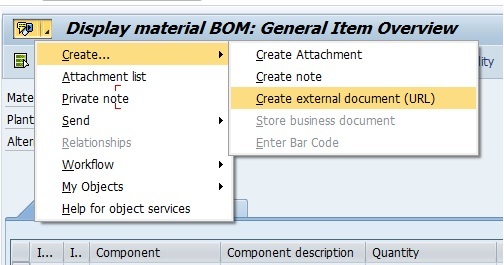

6. Click on Enter.

A success message will be displayed at the status bar ‘The attachment was successfully created’.

Viewing the attachments

1] To view the list of attachments, go to attachment list as shown below.

2] The list will be displayed as shown below.

Some transactions where GOS is activated using this class.

94 Comments
Former Member
0 Likes

Hi Abhijeet Kapgate,


    Thanks for your valuable info :smile: Then i tried out this by inserting those coding into implict enhancement. It can be activated the GOS toolbar. Attachments can be inserted. But there is a new problem that the attachment list is not refreshing properly.

   For instance, i have attached one file into one material reservation number say '10001'. Then when i go to mb21 for creating another reservation that old attachment contains for this newly created reservation as well(Instead the attachment list should be empty as its a new creation right?). That is attachment list is not refreshing. It is containing old material number attachment as well. Pls advise whether we need to do code for refresh attachment list if go to Mb21. If yes then how it can be applicable for MB22./MB23. Once again many thanks for your great support :smile:

Former Member
0 Likes

Hi KAVI,

I suppose the attachments are being stored for the transaction and not for particular material reservation. May be you can try to use different include to create implicit enhancement and write the code there.

Regards,

Abhijeet

0 Likes

Hi Abhijeet,

How do we control the events associated with this toolbar from our own custom program?

For example, I have an alv grid display & as validation, I need to achieve the following:

If I select more than one record in alv & click on this GO toolbar, it should give an error.

To achieve this validation, I need to get the control of this GOS in my program. How can we do it? Please reply.

Thanks in advance,

Ajai

Former Member
0 Likes

Hi Abhijeet,

Found the reason for the old attachment repetition in MB21 and MB22. As SAP standard process, we are not supposed to add attachments in creation documents such as VA01, ME21N and MB21 etc. Because all attachments will be stored as binary format in table SRGBTBREL according to object type.

    So in my case, even i add attachment in MB21, it will get stored with ID '0000000000' since document number will be created only after it get saved. So that's the reason whenever i go into MB21 freshly i could see the old attachments. Now i have removed it using below selection coding. It's working fine. Thanks for your support.

    Select count(*) into lv_count

           from SRGBTBREL

           where INSTID_A = '0000000000' AND TYPEID_A = 'BUS2093'.

    DO lv_count TIMES.

    Delete FROM SRGBTBREL where INSTID_A = '0000000000' AND TYPEID_A = 'BUS2093'.

    IF sy-subrc <> 0.

    EXIT.

    ENDIF.

   ENDDO.


With Regards,

Kavi

Former Member
0 Likes

Hi Ajai,

Sorry for the late response. I have not tried this in a custom program, so not sure about this. If you find out, please let us know.

Thanks.

Former Member
0 Likes

Thanks Kavi for sharing this useful information.

0 Likes

No problem. Its achieved by using  BADI ‘GOS_SRV_REQUEST’ .

Former Member
0 Likes

Hi Abhijeet,

Can you please confirm if we have to implement the BADI -- "CL_PLM_AUDIT_GOS" to enable GOS in PLMD_AUDIT transaction?

OR GOS will be enabled by implementing the code mentioned in the blog above in one of the includes of PBO? Also what if there is no business object related to the transaction?

Thanks

0 Likes

Hi akapgate please it's posible VK11, VK12 VK13?

Thanks

Former Member
0 Likes

Hello Luis,

You can use the business object BUS3005 for condition type. The key field is ConditionRecordNo. Please try the above approach and see .

You might need to add required attributes and methods to this object.

Regards,

Abhijeet Kapgate

Former Member
0 Likes

Hi Manohar,

I could find business object for 'Audit' - BUS20350.

Try using it and see. It should work.

Regards,

Abhijeet Kapgate

Former Member
0 Likes

Hi Abhijeet n Everyone,

Just wanted to know that in my system i dont get sub option "Create Attachment" in VA02/VA03.

I get only 4 option on clicking create button:

"Create Note"

Create External Document(URL)

Store Business Document

Enter Barcode

but i am not getting the "Create Attachment" option which should allow me upload an excel or word document to Sales order.

Thanks for your help in advance

Regards:

Pranav

holger_hartung
Contributor
0 Likes

Hello,

i would like use GOS for BUS1191 inspection plan but it dosn't work as expeceted in QP01 - 03.

Former Member
0 Likes

Hi Holger,

Sorry for the delayed response. I have used the same business object for inspection plan and the key would comprise of MATNR, WERKS and PLNNR. Hope this helps.

Regards,

Abhijeet Kapgate

holger_hartung
Contributor
0 Likes

Hi Abhijeet,

no probleme.

Could you please give more details how to run BUS1191 via QP01-QP03?

With CWBQM it already works fine but I would like to run with QP01 to QP03.

Former Member
0 Likes

Hi Abhijeet,

Its really a very useful document. I am facing a problem in attaching the invoice document to the attachment list in VF02 transaction. I am trying to attach the invoice using an output type(External Send) the document is not getting attached.

Could you please suggest how to attach the invoice document output generated via external send?

Former Member
0 Likes

Hi Hemanth,

For Sales order, the service can be activated by setting user parameter.Set parameter SD_SWU_ACTIVE = ‘X’ in the user profile. This will activate the generic object services for VA01, VA02 and VA03 T-codes.


Thanks,

Mahendra Reddy.P

SAP OpenText Consultant.

Former Member
0 Likes

Hello abhijeet,

Thanku very much for this valueable document. is it possible to insert GOS in transaction like POP1, POP2 and POP3 via enhancement??

Best regards

Arshad

Former Member
0 Likes

Hi Arshad,

Sorry for the delayed response. Yes, it is possible in transaction POP1, POP2 and POP3.

Regards,

Abhijeet

0 Likes

Hi Abhijit,

I would like to activate GOS toolbar for ZBUS2075 and i want to use store business document.

Former Member
0 Likes

Hi Atul,

GOS toolbar is for the transaction. Which transaction are you referring to?

Regards,

Abhijeet

Former Member
0 Likes

Hi Abhijit,

I have the same requirement as mentioned above by Atul, I am trying to activate GOS toolbar for EHS&M modules transaction EHSAMBTAET where it does not have any standard Business Object. Here we have created a custom business object and trying to create a document link from SAP to Open text.

Let me know your thoughts.


Thanks,


Wali.

Former Member
0 Likes

Hi Wali,

So, have you tried the code by passing the business object type and the object key in the class-CL_GOS_MANAGER.

Regards,

Abhijeet

0 Likes

I am referring to T code KO02. we have created BO ZBUS2075 for a workflow development. so i want to know how can we attach documents against this Z business object. 

uma_surapaneni
Explorer
0 Likes

Hi Abhijeet,

how can we activate this for FV60.

I enhanced the code, but i do not have Object Key while creating Invoice.

Thanks.

Uma

SubhadipBose
Explorer
0 Likes

Hi Abhijeet,

I am having a similar requirement for IW41 (PM Order Confirmation) transaction. Could you please let me know what would be the business objtect type for the same in order to active the GOS functionality. The F4 help of SWO1 provides a big hit list. Not sure which one to take.

Thanks,

Subhadip

Former Member
0 Likes

Hi Shubhadip,

Sorry for the delayed response. Please try with the following as I am also not sure about the exact one:

BPR_MOCONF

BUS2128

BUS2007

Regards,

Abhijeet

nitish_chawla2
Participant
0 Likes
Hello Abhijeet,

Thanks a lot for such a descriptive document. It helps a lot.


I am working on a custom class based workflow where i need to proide GOS tool bar functionality. Could you please tell me how to utilize custom class instead of Business Object for creating GOS toolbar ?

Regards,

Nitish
jagannath_parija
Explorer
0 Likes
IS it possible for transaction code PPAMO_CRM  ?
Former Member
0 Likes
I've implemented GOS in outline agreement and I'm using BOR BUS2014. Insert code into badi name ME_PROCESS_PO_CUST.

The reason why I insert this GOS in ME35K because the approver normally will check the attachments in contract before

approve it. Here the method I used.

Method: IF_EX_ME_PROCESS_PO_CUST~INITIALIZE


DATA: lr_gos_manager TYPE REF TO cl_gos_manager,
ls_borident TYPE borident,
lv_ekko(15) type c,
it_ekko type ekko.

FIELD-SYMBOLS <ekko> TYPE ekko.

IF sy-tcode EQ 'ME33K'.

lv_ekko = '(SAPMM06E)EKKO'.
ASSIGN (lv_ekko) TO <ekko>.
it_ekko-ebeln = <ekko>-ebeln.

ls_borident-objtype = 'BUS2014'.

ls_borident-objkey = it_ekko-ebeln.

CREATE OBJECT lr_gos_manager
EXPORTING
is_object = ls_borident
ip_no_commit = ' '
EXCEPTIONS
object_invalid = 1.

ENDIF.
Former Member
0 Likes
 

akapgate

in ME21N the GOS toolbar is activated but the store business document id not enable.


do i have to make an Implicit enhancement  some where ?

thanks in advance.

 
0 Likes

Hi Abhijeet,

I tried the same with ME31L t-code and while creating Schedule Agreement I am attaching one Excel file but when I saw that schedule agreement in ME33L I couldn’t find the attachment.   This is my below code.


IF sytcode EQ ‘ME31L’.
DATAlr_gos_manager TYPE REF TO cl_gos_manager,
ls_borident TYPE borident,
lv_ebeln TYPE ekkoebeln.

ls_boridentobjtype ‘BUS2013’.

ls_boridentobjkey lv_ebeln.

CREATE OBJECT lr_gos_manager
EXPORTING
is_object      ls_borident
ip_no_commit   
EXCEPTIONS
object_invalid 1.

ENDIF.

Former Member
0 Likes
Hi you can put the enhancement in Include MV130F0F    : FORM FCODE_BEARBEITEN

if sy-tcode 'VK12' and xvake-knumh is not INITIAL .

DATALR_GOS_MANAGER TYPE REF TO CL_GOS_MANAGER,

IS_BORIDENT TYPE BORIDENT.

IS_BORIDENT-OBJTYPE 'BUS3005'.

IS_BORIDENT-OBJKEY  =  xvake-knumh .

CREATE OBJECT LR_GOS_MANAGER
EXPORTING
IS_OBJECT IS_BORIDENT
IP_NO_COMMIT ' '
EXCEPTIONS
OBJECT_INVALID 1.

endif.
0 Likes
Hi Abhijeet,

Thanks for the post.

I have a requirement to activate GOS for FB11 transaction. I added the piece of code you have provided in an implicit enhancement. The GOS tool bar appears.

The user wants the workflow overview option. But in my case, GOS is activated and works for only few documents.

For rest of them it throws a message : There are no workflows that have already worked with this object.


Could you please help me with this. Is there a way I can debug GOS and see why no workflow data is being pulled out.


Note: I can see workflow items for this particular document in SWI1.

Thanks.

Mamatha

 
grishinda
Explorer
0 Likes
Hello!

We activated GOS for CJ30, but the menu 'Store business document' isn't active.

Although it's active in CJ20N, where I can assign documents to Project Definition (2001) and view.

Any ideas why it's disabled in CJ30?
peter_atkin
Active Contributor
0 Likes

For CS02/CS03 I did the following:

  1. Added an implicit enhancement in include LCSDIF2B (FORM CUA_SETZEN_U0 )
  2. Added the code below


* Activate GOS for CS02/CS03

data: lr_gos_manager type ref to cl_gos_manager,
ls_borident type borident.

if sy-tcode = 'CS02' or sy-tcode = 'CS03'.

ls_borident-objtype = 'BUS1080'.
concatenate tsd-matnr tsd-werks tsd-stlan into ls_borident-objkey.

create object lr_gos_manager
exporting
is_object = ls_borident
ip_no_commit = ' '
exceptions
object_invalid = 1.

endif.
pramodrepaka
Participant
0 Likes

For transaction MSC3N, add implicit enhancement in include LCHRGF02 (End of Form init_screen_data )

  DATA: lr_gos_manager TYPE REF TO CL_GOS_MANAGER,
is_borident TYPE BORIDENT.

CONCATENATE dfbatch-matnr dfbatch-charg dfbatch-werks INTO is_borident-OBJKEY.

IS_BORIDENT-OBJTYPE = 'BUS1001002'.

CREATE OBJECT lr_gos_manager
EXPORTING
IS_OBJECT = is_borident
IP_NO_COMMIT = ' '
EXCEPTIONS
OBJECT_INVALID = 1.


0 Likes
Hello, I would like to ask if you can resubmit for approval after uploading the attachment, such as ME32K, thank you.
0 Likes
Dear colleagues,

We have installed SERVICE FOR OBJECTS regarding the transaction Sales Order ... VA02 and VA03
The first item of the pop-up regarding the options "CREATE ATTACHMENTS" is visible but not available... not highlighted!

Nevertheless the option STORE BUSINESS DOCUMENTS - which requires more time to attach documents is available.

Is it possible to have both options operational?

If it is not, How can I activate "CREATE ATTACHMENTS instead of STORE BUSINESS DOCUMENTS?

In advance I would like to thank you for your help!
former_member615455
Discoverer
0 Likes
Hi all. Is there a functionality to to a mass load of attachments eg: diferent delivery notes


Thanks
supriyanaskar
Newcomer
0 Likes

How to actvate GOS toolbar in MM01/MMO2,Pls help for ativation in material master

Dominik_Tylczynski
SAP Champion
SAP Champion

Hello @supriyanaskar 

GOS is active in material master in standard:

DominikTylczyn_0-1722590021792.png

Best regards

Dominik Tylczynski

Sandra_Rossi
Active Contributor

What a mess here, with possibly hundreds or thousands of comments asking how to enhance each SAP transaction code... Better ask in the Q&A...

RakeshKumar0558
Newcomer
0 Likes


Hello Experts,

it is possible to FBCJ Transaction?? how is it ??

Thanks in advance.

Rakesh.