
-
Products and Technology
By Category
-
Groups
Activity Groups
Industry Groups
Influence and Feedback Groups
Interest Groups
Location Groups
Customer Only Groups
- Developers
- Partners
- Events
- Help Center
- Topic Pages
-
Explore SAP
Products
Learning and Support
-
- Products and Technology
- Groups
- Developers
- Partners
- Events
- Help Center
- Topic Pages
-
Explore SAP
- Explore SAP
-
Products
- Products
- SAP Business Suite
- Artificial Intelligence
- Business applications
- Data and analytics
- Technology Platform
- Financial Management
- Spend Management
- Supply Chain Management
- Human Capital Management
- Customer Experience
- SAP Business Network
- View products A-Z
- View industries
- Try SAP
- Partners
- Services
- Learning and Support
- About

- SAP Community
- Groups
- Interest Groups
- Application Development and Automation
- Blog Posts
- QR Code in Base64 encoding for KSA E-Invoicing
Application Development and Automation Blog Posts
Learn and share on deeper, cross technology development topics such as integration and connectivity, automation, cloud extensibility, developing at scale, and security.
Turn on suggestions
Auto-suggest helps you quickly narrow down your search results by suggesting possible matches as you type.
Showing results for
Success! Subscription added.
We have launched new Developer forums/groups in the SAP Community. If you are here to publish developer- or SAP-technology related blog posts, please check out our new groups instead. You can find more information about the developer forums in this What's New post.

Firoz_Ashraf
Contributor
Options
- Subscribe to RSS Feed
- Mark as New
- Mark as Read
- Bookmark
- Subscribe
- Printer Friendly Page
- Report Inappropriate Content
2021 Nov 18
7:28 PM
66,102
- SAP Managed Tags
- ABAP Development
As per Zakat, Tax and Customs Authority (ZATCA) of Saudi Arabia, one of the main requirements is the implementation of QR codes on tax invoices in the e-invoicing project (Fatoora), which will be mandatory starting December 4, 2021
As per the ZATCA instructions(Page No. 23), the minimum requirements that must be shown after scanning a QR code are the following fields, which should be represented in form of based64 encoding:
In this blog, I will show how to encode the QR data in base64 format using ABAP and then using it in SAPScript/SmartForms to print QR code on Invoice layouts.
1st Step is to prepare each of the five values in TLV (Tag-Length-Value) structure
Tag is fixed (1 for Seller's name, 2 for VAT No......5 for VAT Total)
Length is the size of the value field in bytes (it’s not the count of characters but how many bytes the value represents)
Value is the data against each of the five fields.
Let's take an example to clarify TLV
2nd Step is to convert 'Tag' and 'Length' to Hexadecimal and then to string. Then concatenate these two strings with 'Value' (stored as string)
concatenate all the five TLVs into one string
'##Firoz Ashraf##1234567891##2021-11-17 08:30:00##115.00##15.00'
3rd Step is to convert the concatenated string to Base64 format
From the above example we get the following Base64 encoded value
AQxGaXJveiBBc2hyYWYCCjEyMzQ1Njc4OTEDEzIwMjEtMTEtMTcgMDg6MzA6MDAEBjExNS4wMAUFMTUuMDA=
Now let's see how we can do this in ABAP
To get the 'Length' in the TLV structure, we will use the Function Module SCMS_STRING_TO_XSTRING to convert the text to xString and then we will use xstrlen to get the length.
To convert the string to Base64 we have two ways in ABAP:
The first one is using Class CL_HTTP_UTILITY method ENCODE_BASE64
The second one is using Function Module SCMS_STRING_TO_XSTRING to Convert String to Xstring and the using another Function Module SCMS_BASE64_ENCODE_STR to Convert the Xstring to Base64.
You can choose either of the ways (either Class or FM)
I have used the Class method to convert string to Base64.
To start with, I created a custom FM which takes invoice number as input and gives QR code values in text as well as in Base64.
I use this FM in SAPScript/SmartForms to print the QR Code.
PERFORM convert_hex_to_str
Setting up the QR Code font
Using SE73, create a new 'System Bar Code'
Once this is done, create a Character format say QR in your SAPScript using the Bar Code (QR Code) created above.
You can then use this in your Window
Here I am calling the subroutine ZEDOC_KSA_QRBASE64 in ABAP program ZSDLINCLUDE which actually has our custom FM Z_EINVOICE_BASE64_QRCODE_VALUE
Note that a single text variable in SAPScript has a capacity to hold 80 characters and our QR code value is more than 80 hence I had to spilt the values in two variables V_QRCODE1 & V_QRCODE2.
After doing this when you call the layout you will get the QR Code
If you scan this QR code then you will get the the following Base64 coded text
AQxGaXJveiBBc2hyYWYCCjEyMzQ1Njc4OTEDEzIwMjEtMTEtMTcgMDg6MzA6MDAEBjExNS4wMAUFMTUuMDA=
When decoded this will give the following text value (as shown below )
You may go through the following blogs and links which were quite helpful in getting the pieces together.
Note: if you have set up EDOC_COCKPIT then you can directly get the QR code data in base64 encoding without bothering about TLV conversion. You may follow my another blog where I have explained how you can use the data stored in field QR_CODE from table EDOSAINV.
Enjoy coding !!
Firoz Ashraf.
As per the ZATCA instructions(Page No. 23), the minimum requirements that must be shown after scanning a QR code are the following fields, which should be represented in form of based64 encoding:
- Seller’s name.
- VAT registration number of the seller.
- Time stamp of the invoice (date and time).
- Invoice total (with VAT).
- VAT total.
In this blog, I will show how to encode the QR data in base64 format using ABAP and then using it in SAPScript/SmartForms to print QR code on Invoice layouts.
1st Step is to prepare each of the five values in TLV (Tag-Length-Value) structure
Tag is fixed (1 for Seller's name, 2 for VAT No......5 for VAT Total)
Length is the size of the value field in bytes (it’s not the count of characters but how many bytes the value represents)
Value is the data against each of the five fields.
Let's take an example to clarify TLV
- Seller name; for example, “Firoz Ashraf”
- Tag = 1 (1 as a type represents the seller name)
- Length = 12 (The number of the bytes in “Firoz Ashraf” word)
- Value = Firoz Ashraf
- VAT Number; for example, 1234567891
- Tag = 2 (2 as a type represents the VAT number)
- Length = 10
- Value = 1234567891
- Time Stamp; for example, 2021-11-17 08:30:00
- Tag = 3 (3 as a type represents invoice time stamp)
- Length = 19
- Value = 2021-11-17 08:30:00
- Invoice Total; for example, 100.00
- Tag = 4 (4 as a type represents the invoice amount)
- Length = 6
- Value = 100.00
- VAT Total; for example, 15.00
- Tag = 5 (5 as a type represents the tax amount)
- Length = 5
- Value = 15.00
- Seller name; for example, “Firoz Ashraf”
2nd Step is to convert 'Tag' and 'Length' to Hexadecimal and then to string. Then concatenate these two strings with 'Value' (stored as string)
concatenate all the five TLVs into one string
'##Firoz Ashraf##1234567891##2021-11-17 08:30:00##115.00##15.00'
3rd Step is to convert the concatenated string to Base64 format
From the above example we get the following Base64 encoded value
AQxGaXJveiBBc2hyYWYCCjEyMzQ1Njc4OTEDEzIwMjEtMTEtMTcgMDg6MzA6MDAEBjExNS4wMAUFMTUuMDA=
Now let's see how we can do this in ABAP
To get the 'Length' in the TLV structure, we will use the Function Module SCMS_STRING_TO_XSTRING to convert the text to xString and then we will use xstrlen to get the length.
FORM tag_length  USING    p_string

                 CHANGING p_length.

  DATA: v_xstr TYPE xstring.

*First Convert string to xString

  CALL FUNCTION 'SCMS_STRING_TO_XSTRING'

    EXPORTING

      text   = p_string

*     MIMETYPE       = ' '

*     ENCODING       =

    IMPORTING

      buffer = v_xstr

    EXCEPTIONS

      failed = 1

      OTHERS = 2.

  IF sy-subrc <> 0.

* Implement suitable error handling here

  ELSE.

    p_length = xstrlen( v_xstr ).

  ENDIF.


ENDFORM.
To convert the string to Base64 we have two ways in ABAP:
The first one is using Class CL_HTTP_UTILITY method ENCODE_BASE64
The second one is using Function Module SCMS_STRING_TO_XSTRING to Convert String to Xstring and the using another Function Module SCMS_BASE64_ENCODE_STR to Convert the Xstring to Base64.
You can choose either of the ways (either Class or FM)
I have used the Class method to convert string to Base64.
To start with, I created a custom FM which takes invoice number as input and gives QR code values in text as well as in Base64.
I use this FM in SAPScript/SmartForms to print the QR Code.
FUNCTION z_einvoice_base64_qrcode_value.

*"----------------------------------------------------------------------

*"*"Local Interface:

*"  IMPORTING

*"     REFERENCE(INVOICE_NO) TYPE  VBELN_VF

*"  EXPORTING

*"     REFERENCE(QRCODE_STRING) TYPE  STRING

*"     REFERENCE(QRCODE_BASE64) TYPE  STRING

*"  EXCEPTIONS

*"      NO_INVOICE

*"      XSTR_ERROR

*"----------------------------------------------------------------------

*-----------------------------------------------------------------------

*  The QR code fields shall be encoded in Tag-Length-Value (TLV) format

*  The TLV encoding shall be as follows:

*  Tag    : the tag value (1 to 5) stored in one byte

*  Length : the length of the byte array resulted from the UTF8 encoding of the field value.

*  Value  : the byte array resulting from the UTF8 encoding of the field value.

*----------------------------------------------------------------------

  DATA: wa_vbrk     TYPE vbrk,


        v_t1_cname  TYPE string,

        v_t2_vatno  TYPE string, v_date(10), v_time(8),

        v_t3_tstmp  TYPE string,

        v_t4_invamt TYPE vbrk-netwr, v_t4_invamx TYPE string,

        v_t5_vatamt TYPE vbrk-netwr, v_t5_vatamx TYPE string,


        v_t1_len    TYPE i,v_t2_len TYPE i,v_t3_len TYPE i,

        v_t4_len    TYPE i,v_t5_len TYPE i,


        v_t1_lenx   TYPE xstring,v_t2_lenx TYPE xstring,v_t3_lenx TYPE xstring,

        v_t4_lenx   TYPE xstring,v_t5_lenx TYPE xstring,


        v_t1_lent   TYPE string,v_t2_lent TYPE string,v_t3_lent TYPE string,

        v_t4_lent   TYPE string,v_t5_lent TYPE string,


        v_t1_tag    TYPE string, v_t2_tag TYPE string, v_t3_tag TYPE string,

        v_t4_tag    TYPE string, v_t5_tag TYPE string.


  SELECT SINGLE * FROM vbrk INTO wa_vbrk

     WHERE vbeln = invoice_no.

  IF sy-subrc = 0.

*   Company Name & VAT No.

    SELECT SINGLE butxt stceg FROM t001 INTO ( v_t1_cname, v_t2_vatno )

      WHERE bukrs = wa_vbrk-bukrs.

*   Invoice Time Stamp

    CONCATENATE wa_vbrk-fkdat(4) '-' wa_vbrk-fkdat+4(2) '-' wa_vbrk-fkdat+6(2)

    INTO v_date.

    CONCATENATE wa_vbrk-erzet(2) ':' wa_vbrk-erzet+2(2) ':' wa_vbrk-erzet+4(2)

    INTO v_time.

    CONCATENATE v_date v_time INTO v_t3_tstmp SEPARATED BY space.

*  Invoice Total (with VAT)

    v_t4_invamt = wa_vbrk-netwr + wa_vbrk-mwsbk.

    v_t4_invamx = v_t4_invamt. CONDENSE v_t4_invamx.

*  VAT Total

    v_t5_vatamt = wa_vbrk-mwsbk.

    v_t5_vatamx = v_t5_vatamt. CONDENSE v_t5_vatamx.


**********Tag & Length (T&L from TLV) should be first converted to

*         Hexadecimal format then it should be converted to string.

*         Finally these two strings should be concatenated with 'Value' (of TLV).

*         Since tags are 1 to 5. We take the hexa values as 01 to 05


    PERFORM convert_hex_to_str USING '01' CHANGING v_t1_tag.

    PERFORM convert_hex_to_str USING '02' CHANGING v_t2_tag.

    PERFORM convert_hex_to_str USING '03' CHANGING v_t3_tag.

    PERFORM convert_hex_to_str USING '04' CHANGING v_t4_tag.

    PERFORM convert_hex_to_str USING '05' CHANGING v_t5_tag.


    PERFORM tag_length USING v_t1_cname  CHANGING v_t1_len.

    v_t1_lenx = v_t1_len. " Convert to hexadecial value

    PERFORM convert_hex_to_str USING v_t1_lenx CHANGING v_t1_lent.


    PERFORM tag_length USING v_t2_vatno  CHANGING v_t2_len.

    v_t2_lenx = v_t2_len.

    PERFORM convert_hex_to_str USING v_t2_lenx CHANGING v_t2_lent.


    PERFORM tag_length USING v_t3_tstmp  CHANGING v_t3_len.

    v_t3_lenx = v_t3_len.

    PERFORM convert_hex_to_str USING v_t3_lenx CHANGING v_t3_lent.


    PERFORM tag_length USING v_t4_invamx CHANGING v_t4_len.

    v_t4_lenx = v_t4_len.

    PERFORM convert_hex_to_str USING v_t4_lenx CHANGING v_t4_lent.


    PERFORM tag_length USING v_t5_vatamx CHANGING v_t5_len.

    v_t5_lenx = v_t5_len.

    PERFORM convert_hex_to_str USING v_t5_lenx CHANGING v_t5_lent.


***************Concatenate all TLV data********************

    CONCATENATE v_t1_tag v_t1_lent v_t1_cname

                v_t2_tag v_t2_lent v_t2_vatno

                v_t3_tag v_t3_lent v_t3_tstmp

                v_t4_tag v_t4_lent v_t4_invamx

                v_t5_tag v_t5_lent v_t5_vatamx

    INTO qrcode_string.


***************Encode String to Base64*********************

    CALL METHOD cl_http_utility=>if_http_utility~encode_base64

      EXPORTING

        unencoded = qrcode_string

      RECEIVING

        encoded   = qrcode_base64.

  ELSE.

    RAISE no_invoice.

  ENDIF.


ENDFUNCTION.
PERFORM convert_hex_to_str
*&---------------------------------------------------------------------*

*&      Form  CONVERT_HEX_TO_STR

*&---------------------------------------------------------------------*

*       text

*----------------------------------------------------------------------*

*      -->P_HEX  text

*      <--P_STR  text

*----------------------------------------------------------------------*

FORM convert_hex_to_str  USING    p_hex

                         CHANGING p_str.

*  CALL FUNCTION 'HR_RU_CONVERT_HEX_TO_STRING'

*    EXPORTING

*      xstring = p_hex

*    IMPORTING

*      cstring = p_str.


**Note: Above FM was sometimes not giving correct   **

**      conversion. Hence we have changed it to     **

**      class based explicitly using UTF-8          **


  DATA: loc_conv TYPE REF TO cl_abap_conv_in_ce.


  CALL METHOD cl_abap_conv_in_ce=>create

    EXPORTING

      input       = p_hex

      encoding    = 'UTF-8'

      replacement = '?'

      ignore_cerr = abap_true

    RECEIVING

      conv        = loc_conv.


  TRY.

      CALL METHOD loc_conv->read

        IMPORTING

          data = p_str.

    CATCH cx_sy_conversion_codepage.

*-- Should ignore errors in code conversions

    CATCH cx_sy_codepage_converter_init.

*-- Should ignore errors in code conversions

    CATCH cx_parameter_invalid_type.

    CATCH cx_parameter_invalid_range.

  ENDTRY.ENDFORM.
Setting up the QR Code font
Using SE73, create a new 'System Bar Code'

Once this is done, create a Character format say QR in your SAPScript using the Bar Code (QR Code) created above.

You can then use this in your Window
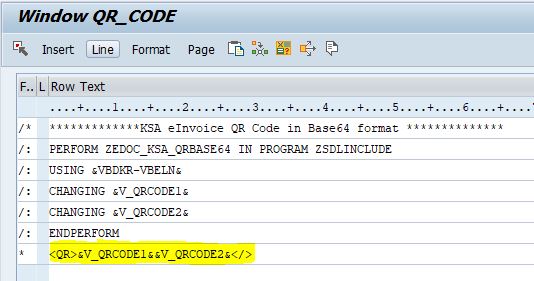
Here I am calling the subroutine ZEDOC_KSA_QRBASE64 in ABAP program ZSDLINCLUDE which actually has our custom FM Z_EINVOICE_BASE64_QRCODE_VALUE
Note that a single text variable in SAPScript has a capacity to hold 80 characters and our QR code value is more than 80 hence I had to spilt the values in two variables V_QRCODE1 & V_QRCODE2.
FORM zedoc_ksa_qrbase64 TABLES in_tab STRUCTURE itcsy

                               out_tab STRUCTURE itcsy.

  DATA: v_vbeln TYPE vbeln,

        v_qrb64 TYPE string,

        v_len   TYPE i,

        v_rem   TYPE i.


  READ TABLE in_tab INDEX 1.

  IF sy-subrc = 0.

    v_vbeln = in_tab-value.

    CALL FUNCTION 'Z_EINVOICE_BASE64_QRCODE_VALUE'

      EXPORTING

        invoice_no    = v_vbeln

      IMPORTING

*       QRCODE_STRING =

        qrcode_base64 = v_qrb64

      EXCEPTIONS

        no_invoice    = 1

        xstr_error    = 2

        OTHERS        = 3.

    IF sy-subrc <> 0.

* Implement suitable error handling here

    ELSE.

      v_len = strlen( v_qrb64 ).


      READ TABLE out_tab INDEX 1.

      IF sy-subrc = 0.

        IF v_len GT 80. "Split into two variables

          out_tab-value = v_qrb64(80).

          v_rem = v_len - 80.

          MODIFY out_tab INDEX 1.CLEAR out_tab.

          READ TABLE out_tab INDEX 2.

          IF sy-subrc = 0.

            out_tab-value = v_qrb64+80(v_rem).

            MODIFY out_tab INDEX 2.CLEAR out_tab.

          ENDIF.

        ELSE.

          out_tab-value = v_qrb64.

          MODIFY out_tab INDEX 1.CLEAR out_tab.

        ENDIF.

      ENDIF.

    ENDIF.

  ENDIF.

ENDFORM.
After doing this when you call the layout you will get the QR Code

If you scan this QR code then you will get the the following Base64 coded text
AQxGaXJveiBBc2hyYWYCCjEyMzQ1Njc4OTEDEzIwMjEtMTEtMTcgMDg6MzA6MDAEBjExNS4wMAUFMTUuMDA=
When decoded this will give the following text value (as shown below )

You may go through the following blogs and links which were quite helpful in getting the pieces together.
- https://blogs.sap.com/2019/03/29/base64-function-modules-in-sap-abap/
- https://sapintegrationhub.com/abap/base64/base64-encoding-and-decoding-in-sap-abap/
- https://blogs.sap.com/2020/10/12/display-qr-code-for-gst-india-e-invoicing-on-script-and-smartform/
- https://salla.dev/blog/qr-code-fatoora-e-invoicing-zatca/
- https://www.textencode.com/decoder/decodeBase64
Note: if you have set up EDOC_COCKPIT then you can directly get the QR code data in base64 encoding without bothering about TLV conversion. You may follow my another blog where I have explained how you can use the data stored in field QR_CODE from table EDOSAINV.
Enjoy coding !!
Firoz Ashraf.
112 Comments
 Bluesky