
-
Products and Technology
By Category
-
Groups
Activity Groups
Industry Groups
Influence and Feedback Groups
Interest Groups
Location Groups
Customer Only Groups
- Developers
- Partners
- Events
- Help Center
- Topic Pages
-
Explore SAP
Products
- Autonomous Enterprise
- Artificial intelligence
- Data and analytics
- Autonomous Suite
- AI platform
- Transformation management
- Midsize business solutions
- Financial management
- Spend management
- Supply chain management
- Human capital management
- Customer experience
- Enterprise resource planning
- Business network
- Sustainability management
- SAP Store
- Try SAP
- View all industries
- Partners
- Services
Learning and Support
-
- Products and Technology
- Groups
- Developers
- Partners
- Events
- Help Center
- Topic Pages
-
Explore SAP
- Explore SAP
-
Products
- Products
- Autonomous Enterprise
- Artificial intelligence
- Data and analytics
- Autonomous Suite
- AI platform
- Transformation management
- Midsize business solutions
- Financial management
- Spend management
- Supply chain management
- Human capital management
- Customer experience
- Enterprise resource planning
- Business network
- Sustainability management
- SAP Store
- Try SAP
- View all industries
- Partners
- Services
- Learning and Support
- About
- SAP Community
- Groups
- Interest Groups
- Application Development and Automation
- Discussions
- Insert field display autotextlist
- Subscribe to RSS Feed
- Mark Topic as New
- Mark Topic as Read
- Float this Topic for Current User
- Bookmark
- Subscribe
- Mute
- Printer Friendly Page
Insert field display autotextlist

- Mark as New
- Bookmark
- Subscribe
- Mute
- Subscribe to RSS Feed
- Permalink
- Report Inappropriate Content
2021 Jun 28 9:21 AM
- SAP Managed Tags
- ABAP Development
Hi expert,
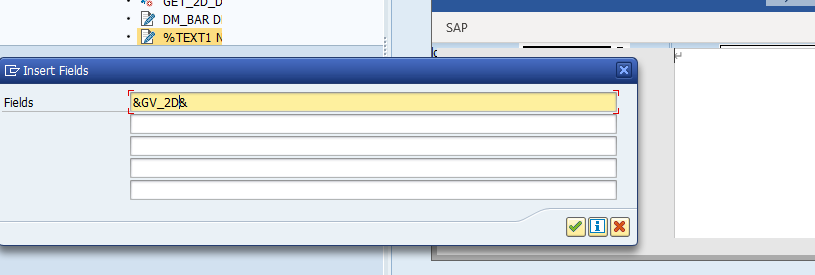
when i insert a field &gv_2d& in smartform, it display autotextlist, it should display as &gv_2d&
how to fix? thanks
Hi expert,
when i insert a field &gv_2d& in smartform, it display autotextlist, it should display as &gv_2d&
how to fix? thanks
 Bluesky
- Mark as New
- Bookmark
- Subscribe
- Mute
- Subscribe to RSS Feed
- Permalink
- Report Inappropriate Content
2021 Jun 28 9:26 AM


- Mark as New
- Bookmark
- Subscribe
- Mute
- Subscribe to RSS Feed
- Permalink
- Report Inappropriate Content
2021 Jun 28 10:46 AM
- SAP Managed Tags
- ABAP Development
I don't know what { ... }, what is AUTOTEXTLIST, and why you see this:
{ AUTOTEXTLIST &GV_2D& }you should see this:
&GV_2D&Maybe a Word macro issue for SMARTFORMS / incompatibility with your Microsoft Word version. Search "SAPSCRIPTWORDINTEGRATION2" in SAP notes. Open a ticket at SAP support if you don't find any relevant note.
Workaround: use the little button at bottom left of the "Insert field" button to enter the SAPScript text editor to fix the error manually.
NB: in my 7.52 system, if I use the button "Insert field" and I enter &GV_2D&, the line &GV_2D& is correctly inserted without that { AUTOTEXTLIST ... } stuff...

- Mark as New
- Bookmark
- Subscribe
- Mute
- Subscribe to RSS Feed
- Permalink
- Report Inappropriate Content
2021 Jun 28 2:15 PM
- SAP Managed Tags
- ABAP Development
Hi Victor,
This is an SAP setting issue. You should ask your IT-support team to re-install this SAP Smartform feature and you'll be good to go.
Also don't use Insert field, instead press CTRL + Shift +F4 key to enable the Field list on/off and drag your variable gv_2d in the required text area element maybe from import interface or global declarations among the various options in Field list on/off.

Regards,
Rohit
- Mark as New
- Bookmark
- Subscribe
- Mute
- Subscribe to RSS Feed
- Permalink
- Report Inappropriate Content
2021 Jul 09 1:53 AM
- SAP Managed Tags
- ABAP Development
Hi All experts,
I re-installed the word, the issue solved. thanks very much.
Regards
Victor
- Mark as New
- Bookmark
- Subscribe
- Mute
- Subscribe to RSS Feed
- Permalink
- Report Inappropriate Content
2021 Jul 09 9:32 AM
- SAP Managed Tags
- ABAP Development
vic90- Thank you for the feedback. To help other people with the same issue, you could post it as an answer and mark it as best answer/accepted. Thank you!

| User | Count |
|---|---|
| 8 | |
| 1 | |
| 1 | |
| 1 | |
| 1 | |
| 1 | |
| 1 | |
| 1 | |
| 1 | |
| 1 |


