
-
Products and Technology
By Category
-
Groups
Activity Groups
Industry Groups
Influence and Feedback Groups
Interest Groups
Location Groups
Customer Only Groups
- Developers
- Partners
- Events
- Help Center
- Topic Pages
-
Explore SAP
Products
- Autonomous Enterprise
- Artificial intelligence
- Data and analytics
- Autonomous Suite
- AI platform
- Transformation management
- Midsize business solutions
- Financial management
- Spend management
- Supply chain management
- Human capital management
- Customer experience
- Enterprise resource planning
- Business network
- Sustainability management
- SAP Store
- Try SAP
- View all industries
- Partners
- Services
Learning and Support
-
- Products and Technology
- Groups
- Developers
- Partners
- Events
- Help Center
- Topic Pages
-
Explore SAP
- Explore SAP
-
Products
- Products
- Autonomous Enterprise
- Artificial intelligence
- Data and analytics
- Autonomous Suite
- AI platform
- Transformation management
- Midsize business solutions
- Financial management
- Spend management
- Supply chain management
- Human capital management
- Customer experience
- Enterprise resource planning
- Business network
- Sustainability management
- SAP Store
- Try SAP
- View all industries
- Partners
- Services
- Learning and Support
- About
- SAP Community
- Groups
- Interest Groups
- Application Development and Automation
- Discussions
- Data was not getting saved to data base ?
- Subscribe to RSS Feed
- Mark Topic as New
- Mark Topic as Read
- Float this Topic for Current User
- Bookmark
- Subscribe
- Mute
- Printer Friendly Page
Data was not getting saved to data base ?

- Mark as New
- Bookmark
- Subscribe
- Mute
- Subscribe to RSS Feed
- Permalink
- Report Inappropriate Content
2017 Sep 12 8:32 AM
- SAP Managed Tags
- ABAP Connectivity
- ABAP Development
METHOD save_employee.
  DATA : gs_empl TYPE yempl_details.
   DATA : lv_success TYPE abap_bool.
 FIELD-SYMBOLS: <empl_attr_n> LIKE LINE OF gt_employee.
   lv_success = 'X'.
READ TABLE gt_employee ASSIGNING <empl_attr_n> WITH
  KEY guid = cs_key-guid
 employee_id = cs_key-employee_id.
   CHECK sy-subrc = 0.
   CASE<empl_attr_n>-new.
     WHEN 'C' OR 'M'.
     MOVE-CORRESPONDING <empl_attr_n> TO gs_empl.
       MODIFY yempl_details FROM gs_empl.
     WHEN OTHERS.
   ENDCASE.
CALL FUNCTION 'DEQUEUE_EYEMPL_DETAILS'
 EXPORTING
   mode_yempl_details       = 'E'
   client                   = sy-mandt
   guid                     =  cs_key-guid
   employee_id              = cs_key-employee_id.
   CLEAR cs_key.
ENDMETHOD.
Hello Experts,
I have requirement that in sap crm web ui, when user click on 'new' button it was navigating to create view. The mobile no field was showing initially zeros. This should not be shown so for that particular field in domain level i kept conversion exit as ALPHA and also in create method i written a statement of 'delete leading zeros'. In web ui after giving all values and clicking on save the Mobile No. field which has conversion exit and leading zero that was not getting saved into data base custom table. Insted it was saving all zeros to data base.
When i debugged the API Custom class i got to know that there was problem in save_method.
Above is method for save employee details into data base.
Here data was successfully passing to <empl_attr_n>,but only one field i,e. mobile number field which was char format is not passing not to gs_empl.
So it was not saving to data base.
Please any suggestions.
METHOD save_employee.
  DATA : gs_empl TYPE yempl_details.
   DATA : lv_success TYPE abap_bool.
 FIELD-SYMBOLS: <empl_attr_n> LIKE LINE OF gt_employee.
   lv_success = 'X'.
READ TABLE gt_employee ASSIGNING <empl_attr_n> WITH
  KEY guid = cs_key-guid
 employee_id = cs_key-employee_id.
   CHECK sy-subrc = 0.
   CASE<empl_attr_n>-new.
     WHEN 'C' OR 'M'.
     MOVE-CORRESPONDING <empl_attr_n> TO gs_empl.
       MODIFY yempl_details FROM gs_empl.
     WHEN OTHERS.
   ENDCASE.
CALL FUNCTION 'DEQUEUE_EYEMPL_DETAILS'
 EXPORTING
   mode_yempl_details       = 'E'
   client                   = sy-mandt
   guid                     =  cs_key-guid
   employee_id              = cs_key-employee_id.
   CLEAR cs_key.
ENDMETHOD.
Hello Experts,
I have requirement that in sap crm web ui, when user click on 'new' button it was navigating to create view. The mobile no field was showing initially zeros. This should not be shown so for that particular field in domain level i kept conversion exit as ALPHA and also in create method i written a statement of 'delete leading zeros'. In web ui after giving all values and clicking on save the Mobile No. field which has conversion exit and leading zero that was not getting saved into data base custom table. Insted it was saving all zeros to data base.
When i debugged the API Custom class i got to know that there was problem in save_method.
Above is method for save employee details into data base.
Here data was successfully passing to <empl_attr_n>,but only one field i,e. mobile number field which was char format is not passing not to gs_empl.
So it was not saving to data base.
Please any suggestions.
 Bluesky
- Mark as New
- Bookmark
- Subscribe
- Mute
- Subscribe to RSS Feed
- Permalink
- Report Inappropriate Content
2017 Sep 12 9:11 AM
- SAP Managed Tags
- ABAP Connectivity
- ABAP Development
Hi Harish,
Are you creating a new record or updating a row which already exist in table.
~Vky Veera
- Mark as New
- Bookmark
- Subscribe
- Mute
- Subscribe to RSS Feed
- Permalink
- Report Inappropriate Content
2017 Sep 12 9:17 AM
- SAP Managed Tags
- ABAP Connectivity
- ABAP Development
Hello Vignesh
I am Creating new record and Even it's not working for update also.

- Mark as New
- Bookmark
- Subscribe
- Mute
- Subscribe to RSS Feed
- Permalink
- Report Inappropriate Content
2017 Sep 12 9:36 AM
- SAP Managed Tags
- ABAP Connectivity
- ABAP Development
Hi Harish,
You need to convert into internal formats for particular field using FM,
CONVERSION_EXIT_ALPHA_INPUT
.
- Mark as New
- Bookmark
- Subscribe
- Mute
- Subscribe to RSS Feed
- Permalink
- Report Inappropriate Content
2017 Sep 12 9:40 AM
- SAP Managed Tags
- ABAP Connectivity
- ABAP Development
Hello Shiva,
Yes i used it in domain, but still not working.
And in another method i,e. create_employee i placed a statement
SHIFT lv_data-employee_pcode LEFT DELETING LEADING '0'.
because in web crm ui no zeros should be displayed initially wlile click on create button.
Even if I delete the above statement, the data was not storing to data base.
- Mark as New
- Bookmark
- Subscribe
- Mute
- Subscribe to RSS Feed
- Permalink
- Report Inappropriate Content
2017 Sep 12 11:28 AM
- SAP Managed Tags
- ABAP Connectivity
- ABAP Development
MODIFY yempl_details FROM gs_empl.
if sy-subrc = 0.
commit work.
endif.

Try above. Note: By using Modify you can not insert Duplicate records. If same data exist with key ,it will not insert any new data. Check that also.- Mark as New
- Bookmark
- Subscribe
- Mute
- Subscribe to RSS Feed
- Permalink
- Report Inappropriate Content
2017 Sep 12 12:37 PM
- SAP Managed Tags
- ABAP Connectivity
- ABAP Development
Hello Shiva,
No i didn't gave it as key.
I used two fields in web ui, one is for pin code with data type NUMC and another one is mobile no. with data type NUMC.
Here data given in pin code field is getting saved but not the mobile no.
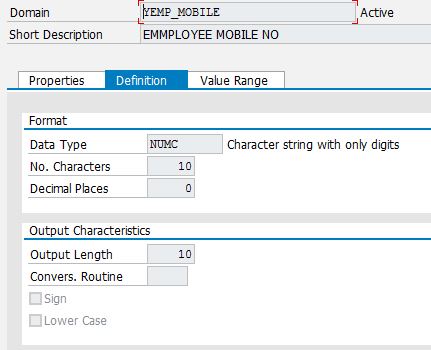
Data base table.
Because of using NUMC in web ui we will get initially zeros.
So i used a statements in create employee as shown below.
SHIFT lv_data-employee_moblie LEFT DELETING LEADING '0'.
SHIFT lv_data-employee_pcode LEFT DELETING LEADING '0'.
- Mark as New
- Bookmark
- Subscribe
- Mute
- Subscribe to RSS Feed
- Permalink
- Report Inappropriate Content
2017 Sep 12 12:48 PM
- SAP Managed Tags
- ABAP Connectivity
- ABAP Development
Hi,
I think you are passing data from some external source.
So, Please use keyword condense <fieldname> no-gaps inside the abap program.
- Mark as New
- Bookmark
- Subscribe
- Mute
- Subscribe to RSS Feed
- Permalink
- Report Inappropriate Content
2017 Sep 12 2:26 PM
- SAP Managed Tags
- ABAP Connectivity
- ABAP Development
Hello Siva,
Thanks for reply can you explain still clearly where to add above keyword.
- Mark as New
- Bookmark
- Subscribe
- Mute
- Subscribe to RSS Feed
- Permalink
- Report Inappropriate Content
2017 Sep 13 12:01 PM
- SAP Managed Tags
- ABAP Connectivity
- ABAP Development
Hi Harish,
SHIFT lv_data-employee_moblie LEFT DELETING LEADING '0'.
condense lv_data-employee_moblie.
SHIFT lv_data-employee_pcode LEFT DELETING LEADING '0'.
condense lv_data-employee_moblie.
or
You can do in final work area field .

- Mark as New
- Bookmark
- Subscribe
- Mute
- Subscribe to RSS Feed
- Permalink
- Report Inappropriate Content
2017 Sep 12 9:44 AM
- SAP Managed Tags
- ABAP Connectivity
- ABAP Development
Please reformat your question (take your comments and question out of the ABAP code)
- Mark as New
- Bookmark
- Subscribe
- Mute
- Subscribe to RSS Feed
- Permalink
- Report Inappropriate Content
2017 Sep 12 9:53 AM
- SAP Managed Tags
- ABAP Connectivity
- ABAP Development
Hello Sandra Ross,
Thanks for suggestion and i done what you said.

| User | Count |
|---|---|
| 8 | |
| 1 | |
| 1 | |
| 1 | |
| 1 | |
| 1 | |
| 1 | |
| 1 | |
| 1 | |
| 1 |


