- SAP Community
- Products and Technology
- Technology
- Technology Q&A
- Authentication incorrect to connect to SAP system ...
- Subscribe to RSS Feed
- Mark Question as New
- Mark Question as Read
- Bookmark
- Subscribe
- Printer Friendly Page
- Report Inappropriate Content
Authentication incorrect to connect to SAP system via business application studio

- Subscribe to RSS Feed
- Mark Question as New
- Mark Question as Read
- Bookmark
- Subscribe
- Printer Friendly Page
- Report Inappropriate Content
on 04-05-2021 6:35 PM
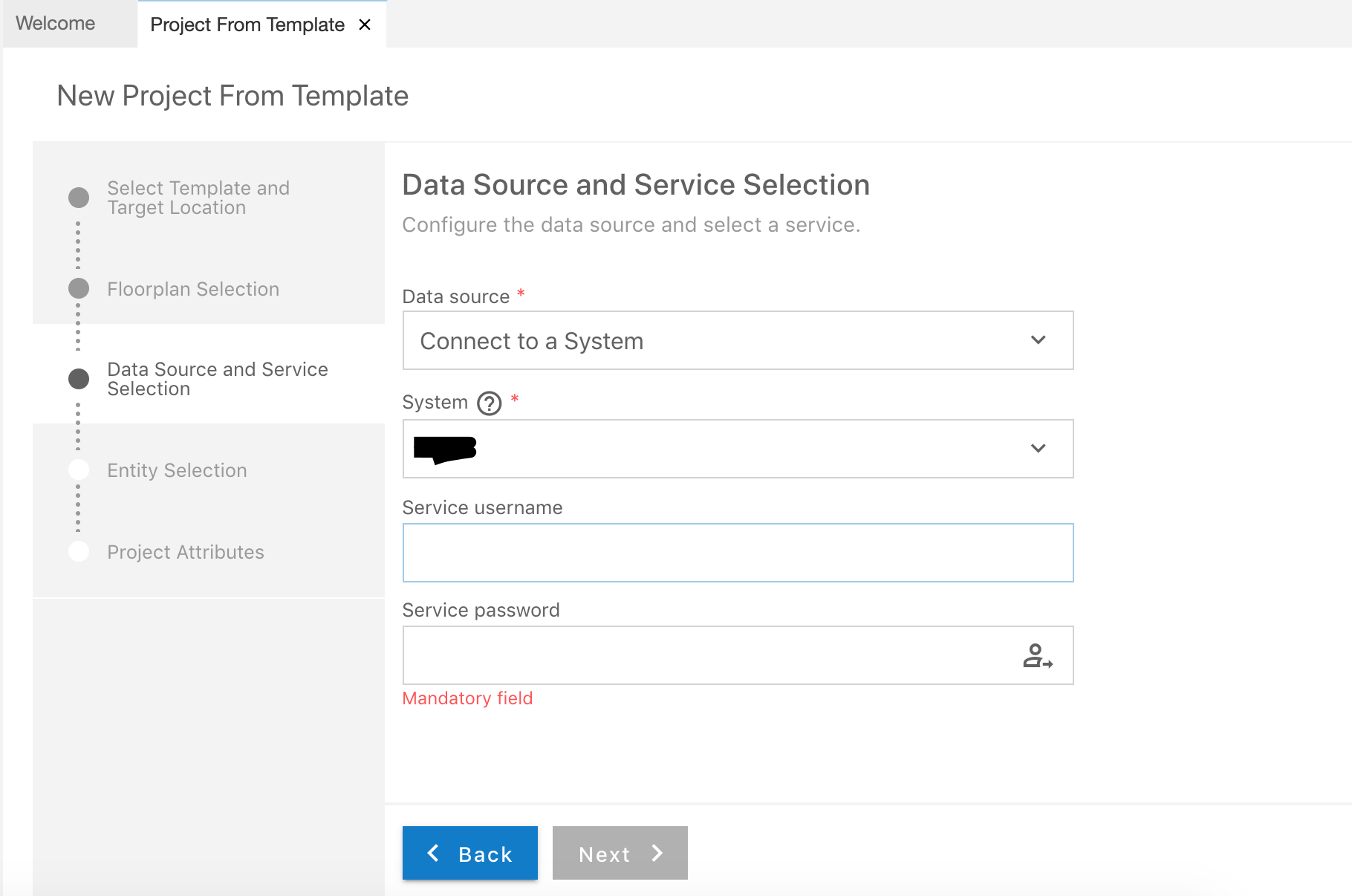
Hello, I am trying to connect to backend SAP system via business application studio(BAS) to build fiori apps. However, when I select the data source as SAP system and enter my SAP GUI credentials for service username and password, it says authentication incorrect! as shown in the picture.
The destination is configured in cloud connector to connect to on premise SAP system and the SAP system shows up in BAS.
What could be wrong here?
Thanks Vinod


- SAP Managed Tags:
- SAP Business Application Studio
Accepted Solutions (1)
Accepted Solutions (1)

 RazK
RazK
- Mark as New
- Bookmark
- Subscribe
- Subscribe to RSS Feed
- Report Inappropriate Content
Hi vvinod ,
The "HTML5.Timeout" property is defined in milliseconds. You should probably change its value to 60000.
BTW - In many cases there's no need to add this additional property to the destination configuration.
Regards - Raz
You must be a registered user to add a comment. If you've already registered, sign in. Otherwise, register and sign in.
- Mark as New
- Bookmark
- Subscribe
- Subscribe to RSS Feed
- Report Inappropriate Content
RazK
- Mark as New
- Bookmark
- Subscribe
- Subscribe to RSS Feed
- Report Inappropriate Content
When configuring the destination to use basic authentication the credentials (user/pass) should be those for accessing the SAP system. If configured correctly then during the app creation wizard, in the Data Source selection step, you will not need to provide credentials. It might be that the user you're using is locked. If you change its password, do not forget to update the new password in the destination configuration.
As gregorw mentioned above you can configure the destination to use NoAuthentication and then whenever accessing the SAP system one will need to provide the credentials.
Additional resources that can help:
- https://blogs.sap.com/2020/10/13/how-to-check-the-connectivity-to-your-backend-system-in-business-ap...
- SAP Tech Bytes: Testing SAP BTP destinations
Regards - Raz
Answers (5)
Answers (5)
- Mark as New
- Bookmark
- Subscribe
- Subscribe to RSS Feed
- Report Inappropriate Content
Hello Raz Korn,
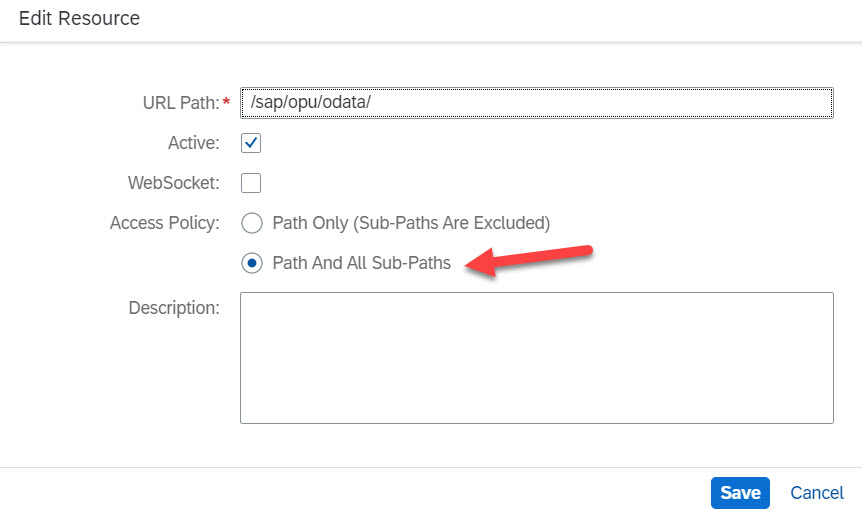
Thank you for pointing me in the right direction. The error message "Authentication Incorrect" was misleading here even though the credentials were correct. The issue was with access policy that was set up in the cloud connector. Once all sub paths are allowed, I could get past this error message and retrieve my oData services.
The issue is resolved now.
Thank you
Vinod
You must be a registered user to add a comment. If you've already registered, sign in. Otherwise, register and sign in.

- Mark as New
- Bookmark
- Subscribe
- Subscribe to RSS Feed
- Report Inappropriate Content
For the development connection exposing all path is OK. But for production expose only the needed services.

- Mark as New
- Bookmark
- Subscribe
- Subscribe to RSS Feed
- Report Inappropriate Content

- Mark as New
- Bookmark
- Subscribe
- Subscribe to RSS Feed
- Report Inappropriate Content
For a Developer Extension in S4Hana Cloud, Public Edition I have on a similar situation.
According to the example, Create Your Own Gadget Shopping App Using Developer Extensibility, it can't login to the customised oData v2
Has anyone a great Idea to resolve that situation?
- Data source: OData Service
- in Eclipse ADT created Service URL
- Username from S4Hana Cloud, Public Edition (the same, what I enter into the Browser, when I'm open the preview into the Browser)
- The Password from 3.
- Klick on Login
- Notice (Authentication incorrect)
Best regards and Thank you for your Attention
You must be a registered user to add a comment. If you've already registered, sign in. Otherwise, register and sign in.

- Mark as New
- Bookmark
- Subscribe
- Subscribe to RSS Feed
- Report Inappropriate Content
Hello all,
I was reading your answers since I'm having a similar Authentication issue, the service password as a Mandatory field:
This are the destination properties and the additional ones:

I would really appreciate any advice, since I'm not being able to figure it out.
Thanks you in advance for your time!
Florencia.
You must be a registered user to add a comment. If you've already registered, sign in. Otherwise, register and sign in.

- Mark as New
- Bookmark
- Subscribe
- Subscribe to RSS Feed
- Report Inappropriate Content

You must be a registered user to add a comment. If you've already registered, sign in. Otherwise, register and sign in.
- Mark as New
- Bookmark
- Subscribe
- Subscribe to RSS Feed
- Report Inappropriate Content
Have you tried without providing username and password? You've configured the username and password already in the destination. Otherwise try setting the destination to "NoAuthentication".
You must be a registered user to add a comment. If you've already registered, sign in. Otherwise, register and sign in.
- Mark as New
- Bookmark
- Subscribe
- Subscribe to RSS Feed
- Report Inappropriate Content
Hello Gregor,
When I tried without providing username and password, it doesn't do anything and the 'Next' button is disabled. I tried setting the destination to NoAuthentication and tried again but no luck.
Thanks
Vinod
- Configuration as code (CaC) with destinations. in Technology Blogs by SAP
- SAP CAP - Could not work with on-premise remote odata service via destination - 401 authentication in Technology Q&A
- Connect to Data Source & Services in SAP FIORI APPLICATION (BAS) in Technology Q&A
- Error "Missing JWT Token for forwardAuthToken" When Using worker_threads/spawn in SAP CAP in Technology Q&A
- Identity Access Management (IAM) Reference Architectures 2024 in Technology Blogs by SAP
| User | Count |
|---|---|
| 74 | |
| 9 | |
| 7 | |
| 7 | |
| 6 | |
| 6 | |
| 6 | |
| 6 | |
| 5 | |
| 4 |


You must be a registered user to add a comment. If you've already registered, sign in. Otherwise, register and sign in.